Parent/Student course request screen showing incorrect information





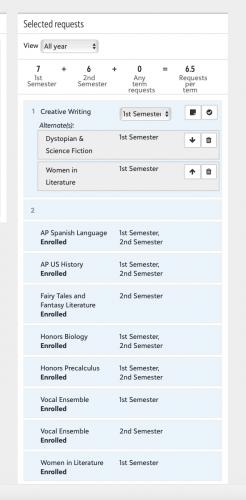
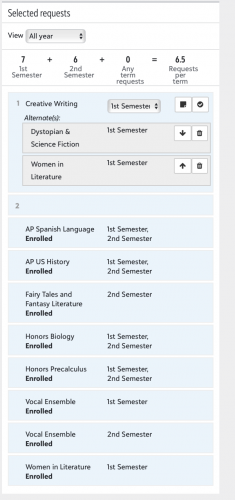
We have used the Course Requests page to release course enrollments every July. This year it is redesigned and our unenrolled approved alternates are showing as Enrolled, and our Enrolled courses are being suppressed for parents and students. Everything looks normal in the back end. The first screenshot below shows a student/parent view that shows them enrolled in Creative Writing, but not in Women in Literature. In reality, the student is NOT enrolled in Creative Writing, but IS enrolled in Women in Literature as is shown in the second screenshot below, one of the views we have in Academics. The second screenshot is also what has shown in previous years to parents/students. Clearly the redesigned screen has a bug and is causing our parents to purchase books for the wrong courses. I've created a case, but wondering if others are experiencing the same issue. @Jacqueline Koca @Michael Morrissette

Comments
-
Hi @Nancy Kierstead!
I'm going to discuss this with my team to see what options we have to make it clearer to parents and students as it is the dreaded "working as designed/coded".
The simple explanation is that an enrollment in an alternate request marks the overall request as fulfilled/enrolled, so Enrolled displays with the main request.
However, your example is a perfect use case for why we need a better way to display that! If it is okay with you, once I discuss with the team, if we have a few potential options, I will reach out to you directly to get your thoughts on the potential changes.
Thanks so much!
Jacqueline0 -
@Jacqueline Koca Happy to talk more about this. n.kierstead@severnschool.com. I'm still confused, however, as to why a course they are truly enrolled in is not showing at all. How would they know they are enrolled in that course? It sounds like we can no longer release course requests in this manner going forward, as we have in the past. Right now, we literally have parents buying books for the wrong classes. It was not an issue on the screen visible to parents/students in previous years. This screen is still visible to us (but unfortunately not to parents) in Academics. It's very obvious what says “Enrolled” and what does not say “Enrolled”. In this case, if they had the old screen, they would see they need to buy the books for Women in Lit and not for Creative Writing.
 0
0 -
@Nancy Kierstead @Jacqueline Koca Following - we don't use course requests yet but I want to introduce them for 2025-26 and so I'm trying to absorb as much knowledge as I can now!
Nancy, as someone who's never used this before but is familiar with the Group Page Access controls for releasing schedules at a specific date/time, is that option a potential workaround? In our case, we don't have to worry about book purchases, so we only release schedules a week or so ahead of the start of the new year. As long as I remember to set Group Page Access at the appropriate time (no small feat), it works great to allow us to tweak schedules up to the last minute without parents or students snooping around beforehand.
Is there some other reason that they would absolutely have to see that they have been enrolled in a course prior to seeing it on a schedule? In other words, once the window is closed for parents/students to actually request courses, could we just prevent anything from displaying there whatsoever and direct them to the Groups page at the appropriate time?
1 -
@Brian LeBlanc @Jacqueline Koca @Nancy Kierstead We have seen this exact same problem, and the way we work around it is using the Group Page Access way that Brian mentioned. We turn off the registration view and rely on Group Page Access for students to see what classes they are in. We actually just did it a couple of days ago - July 15 - and now students who have holes in their schedule call the registrar to fix them, the remainder can do the book ordering process.
Where we ran into the situation that Nancy showed is our J-term. We open up registration for seniors at 7pm on a Monday, next day is Juniors, and so forth, and they choose their main class and alternates. They choose 1 class for the morning session, and 1 class for the afternoon session, each with an alternate. We try and do a first-come first-serve basis with enrolling, so every couple of minutes, we run the “generate student schedules” and as the classes fill up, it then kicks to the alternates. However, we have seen that a lot of people think they got their primary request to then find out later they actually got into an alternate request because this view shows “enrolled” and only the primary request shows up.
0 -
@Brian LeBlanc
Hi Brian, Great questions!In addition to buying books, our students need to know their courses early in the summer because they have required summer reading and work for the upcoming school year.
Unfortunately, Group Page Access shows the teacher and the period. We turn that on 1 week prior to the start of school. If there was some way to use Group Page Access without teacher names and periods, and to restrict group page access for Academic/Financial holds, it would be ideal. Unfortunately, there is not a way to do either of those things that I am aware of.
1 -
@Brian LeBlanc
If there was some way to use Group Page Access without teacher names and periods, and to restrict group page access for Academic/Financial holds, it would be ideal. Unfortunately, there is not a way to do either of those things that I am aware of.I wish this same thing was possible! Periods I am not too concerned about, but the teacher and room is more our concern - if the room is listed they can typically figure out the teacher.
This is very cumbersome, but what we do right after graduation is we do a mail merge of the student schedules - this allows for us to not include teacher name and room number and remove those with financial holds. Then, as I mentioned in my other message, July 15 we open up the Group Page Access for families, and at that point they can see the teachers and rooms.
2 -
@Chris Felinski @Nancy Kierstead This is fantastic information - thank you both! I might be reaching out in January or so to pick your brains some more as we start the real heavy lifting on this.
Holds are a bugaboo for us as well; I hadn't even considered those in the context of course requests. Bleh.
0 -
@Brian LeBlanc
Happy to talk through things anytime.Holds are a pain if you release it via Group Page Access. The only way to hold visibility of Group Page Access is to delete the enrollments altogether. This is one of the many reasons we have been releasing course enrollments via the Course Requests page instead of Group Page Access.
0 -
@Nancy Kierstead @Jacqueline Koca We are experiencing the same issue. We've used this method of sharing course enrollments since 2020-21 and this is the first time we've had this issue pop up. Thankfully, there is a way to find which students are impacted (add Fulfilled by Alternate to Course Requests and Recommendations List and sort on Yes) so we can communicate the error to them. Unfortunately, some of them may have already purchased textbooks.
Do we have any idea when this issue actually began? I posted Requests on June 10 but didn't hear any issues from parents. I did not realize there was an issue until I heard from Nancy.
0 -
@Tom Mach @Jacqueline Koca We found over 200 enrollments showing incorrectly in our Upper School. That is 200 instances where students/parents thought they got their first choice for a course because it said “enrolled”, but were actually enrolled in an alternate. We had to send out an apology letter today, shut off the Course Requests page, and turn on group page access (which now shows teachers and periods, unfortunately). My thanks to Tom for pointing me in the right direction to the list that displayed alternates so I could understand the magnitude of the problem.
I've also had to delete the schedules for all students on hold since you cannot “hold” group page access visibility for individual families.
I have no idea how long it's been going on. We realized it Monday when we turned on our sync to a 3rd party product that pulls course enrollments. Parents were emailing us - confused as to why the course enrollments incorrectly displayed in Education Management showed something different from the actual course enrollments they could see in the 3rd party bookseller product.
0 -
@Nancy Kierstead
We use this view in early August as well to communicate enrolled courses to students and parents (we also, do not want to show teachers, blocks, etc.)Is this issue only occurring with the use of Alternate courses during the request period? We do not use the Alternate option so I am hoping when we open the Course Request view to students/families next week they will see the correctly enrolled courses.
Thank you, feeling a bit of panic if this is an overreaching issue, this is how we communicate enrollments.
0 -
Jacqueline, I neglected to include you on my reply to Nancy regarding the issue in Course Request viewing….
We use this view in early August as well to communicate enrolled courses to students and parents (we also, do not want to show teachers, blocks, etc.)Is this issue only occurring with the use of Alternate courses during the request period? We do not use the Alternate option so I am hoping when we open the Course Request view to students/families next week they will see the correctly enrolled courses.
Thank you, feeling a bit of panic if this is an overreaching issue, this is how we communicate enrollments.
0 -
@Jean Sudduth The incorrect enrollments showing were related to a request that was filled by an alternate. I didn't check every student, but the ones we spot checked were showing the first request as “enrolled”, and not the alternate used to fulfill the request.
0











Categories
- All Categories
- 6 Blackbaud Community Help
- 213 bbcon®
- 1.4K Blackbaud Altru®
- 403 Blackbaud Award Management™ and Blackbaud Stewardship Management™
- 1.1K Blackbaud CRM™ and Blackbaud Internet Solutions™
- 15 donorCentrics®
- 360 Blackbaud eTapestry®
- 2.6K Blackbaud Financial Edge NXT®
- 656 Blackbaud Grantmaking™
- 577 Blackbaud Education Management Solutions for Higher Education
- 3.2K Blackbaud Education Management Solutions for K-12 Schools
- 939 Blackbaud Luminate Online® and Blackbaud TeamRaiser®
- 84 JustGiving® from Blackbaud®
- 6.6K Blackbaud Raiser's Edge NXT®
- 3.7K SKY Developer
- 248 ResearchPoint™
- 119 Blackbaud Tuition Management™
- 165 Organizational Best Practices
- 241 Member Lounge (Just for Fun)
- 34 Blackbaud Community Challenges
- 37 PowerUp Challenges
- 3 (Open) PowerUp Challenge: Grid View Batch
- 3 (Closed) PowerUp Challenge: Chat for Blackbaud AI
- 3 (Closed) PowerUp Challenge: Data Health
- 3 (Closed) Raiser's Edge NXT PowerUp Challenge: Product Update Briefing
- 3 (Closed) Raiser's Edge NXT PowerUp Challenge: Standard Reports+
- 3 (Closed) Raiser's Edge NXT PowerUp Challenge: Email Marketing
- 3 (Closed) Raiser's Edge NXT PowerUp Challenge: Gift Management
- 4 (Closed) Raiser's Edge NXT PowerUp Challenge: Event Management
- 3 (Closed) Raiser's Edge NXT PowerUp Challenge: Home Page
- 4 (Closed) Raiser's Edge NXT PowerUp Challenge: Standard Reports
- 4 (Closed) Raiser's Edge NXT PowerUp Challenge: Query
- 794 Community News
- 3K Jobs Board
- 54 Blackbaud SKY® Reporting Announcements
- 47 Blackbaud CRM Higher Ed Product Advisory Group (HE PAG)
- 19 Blackbaud CRM Product Advisory Group (BBCRM PAG)