Raiser's Edge NXT Need to do a global import





I ran into an issue as I was importing transactions from NetSuite to RE. We transitioned about two years ago and have some residual transactions that we import each month. In order to make sure each Fundraiser receives the proper credit, I have been attaching the Fundraiser to the NetSuite transactions and all Soft Credits in RE. So, I have two imports. Unfortunately I pulled fundraisers for a donor, and it applied the first fundraiser for the donor, not necessarily the current one. Therefore there are transactions and donors with a fundraiser assigned that should not have a fundraiser. Therefore I need to correct my mistake. Here is the process I think I need to go through. If there is someone who could review this process and give me feedback, that would be awesome!
Query the actual list of today’s donor/fundraiser relationships
Query all NetSuite transactions that were imported (also soft credits?)
Delete all fundraisers from all NetSuite imports/transactions/gifts
Delete DonorCare as a fundraiser Query the list of fundraisers and their constituent ID.
Match/Vlookup the “today” donor/fundraiser list to the NetSuite transactions list.
Filter and delete all transactions/gifts that do not have a corresponding fundraiser
Import the GIFT import ID and the Fundraiser’s constituent Import ID into NXT.
I hope someone can help! Thanks!
Comments
-
@Mike Bowles - This is how I would approach this, it is relatively the same as what you've laid out.
- Query the list of donors/fundraiser relationships, export.
- Query the imported NetSuite transactions, export. Make sure to include the current gift credit and the Gift Import ID.
- Compare results of Steps 1 & 2. Make note of the gifts that have the wrong fundraiser credited.
- Utilize a Global Change, to remove the wrong gift solicitors. Proceed with caution for this step - it's very easy to mess up a Global Change/Delete and have the output be not what you were intending. https://kb.blackbaud.com/knowledgebase/Article/52867
- Utilize an Import, to add in the correct gift solicitors. Check out the RE Import Guide > “Gift Solicitor Fields” section for the requirements of this import. https://help.blackbaud.com/docs/0/assets/guides/re/import.pdf
1 -
@Austen Brown Thanks! I will work through it and reconnect if I run into any snags.
0 -
@Austen Brown Hi again! I have run a gift query to identify the Assigned Solicitor Name with the gift that was imported from NetSuite. It is showing me the current solicitor with gifts from the past that should not be tied to the current solicitor. My guess is the ASN is the same associated with a fundraisers Work Center, where they can see the gifts from their solicitors, but when running reports it only shows gifts since the fundraiser was assigned.
Do you know what I am missing?
When doing a donor/fundraiser relationship export, how do I query for just the current fundraiser? This is what it looks like the above query reference is doing, but applying it to all previous gifts.
In step 2, you mention to include the current gift credit. Is this separate from Assigned Solicitor Name?
Sorry for so many questions. I am struggling to work through this issue. Thanks!
0 -
@Mike Bowles - Happy to help! To locate the current fundraiser, you'll need to query the specific fields that your system uses to indicate 'current' status, such as solicitor type, end date, etc. Without knowing your exact tracking process, I can't provide more specific guidance.
I suggest using a query to group records together and saving the complexity of listing solicitor names for the export. For example, in Step 2, group the transactions in a gift query; in the export, include the necessary gift details, the solicitors directly associated with the gift, and a common ID (constituent ID) to facilitate comparison in Excel.
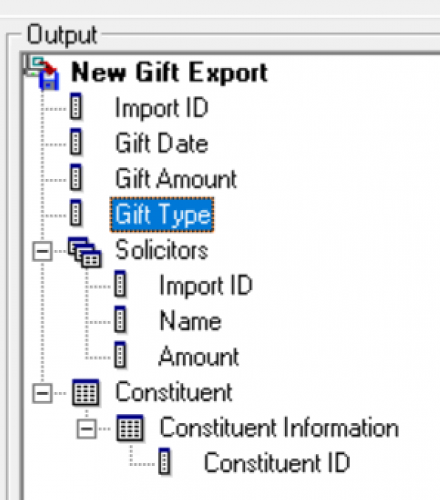
Let me know if you have any other questions.0





Categories
- All Categories
- 6 Blackbaud Community Help
- 211 bbcon®
- 1.4K Blackbaud Altru®
- 402 Blackbaud Award Management™ and Blackbaud Stewardship Management™
- 1.1K Blackbaud CRM™ and Blackbaud Internet Solutions™
- 15 donorCentrics®
- 360 Blackbaud eTapestry®
- 2.6K Blackbaud Financial Edge NXT®
- 655 Blackbaud Grantmaking™
- 576 Blackbaud Education Management Solutions for Higher Education
- 3.2K Blackbaud Education Management Solutions for K-12 Schools
- 940 Blackbaud Luminate Online® and Blackbaud TeamRaiser®
- 84 JustGiving® from Blackbaud®
- 6.7K Blackbaud Raiser's Edge NXT®
- 3.7K SKY Developer
- 248 ResearchPoint™
- 120 Blackbaud Tuition Management™
- 165 Organizational Best Practices
- 240 Member Lounge (Just for Fun)
- 34 Blackbaud Community Challenges
- 37 PowerUp Challenges
- 3 (Open) PowerUp Challenge: Grid View Batch
- 3 (Closed) PowerUp Challenge: Chat for Blackbaud AI
- 3 (Closed) PowerUp Challenge: Data Health
- 3 (Closed) Raiser's Edge NXT PowerUp Challenge: Product Update Briefing
- 3 (Closed) Raiser's Edge NXT PowerUp Challenge: Standard Reports+
- 3 (Closed) Raiser's Edge NXT PowerUp Challenge: Email Marketing
- 3 (Closed) Raiser's Edge NXT PowerUp Challenge: Gift Management
- 4 (Closed) Raiser's Edge NXT PowerUp Challenge: Event Management
- 3 (Closed) Raiser's Edge NXT PowerUp Challenge: Home Page
- 4 (Closed) Raiser's Edge NXT PowerUp Challenge: Standard Reports
- 4 (Closed) Raiser's Edge NXT PowerUp Challenge: Query
- 796 Community News
- 3K Jobs Board
- 54 Blackbaud SKY® Reporting Announcements
- 47 Blackbaud CRM Higher Ed Product Advisory Group (HE PAG)
- 19 Blackbaud CRM Product Advisory Group (BBCRM PAG)