Faculty Test Board





I'm looking for a solution where faculty can post tests and see the dates of tests so they don't overbook students with test/exams on a particular day. Is there an appropriate place to do that. I tried using the calendars but editing seems to be restricted to platform managers.
Best, Rich
Comments
-
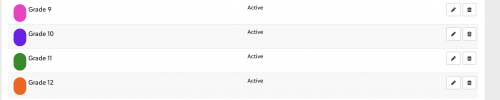
@Richard Pan I was able to do this using calendars and permissions. First, as a platform manager, I created grade level calendars for our upper school (colour-coded to make things easy):
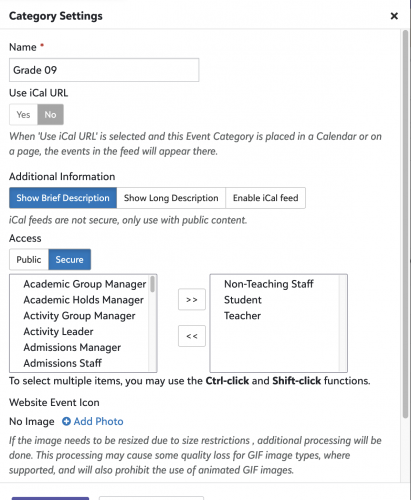
I then restricted view access to these calendars so that only faculty, staff and students could view the information that was posted: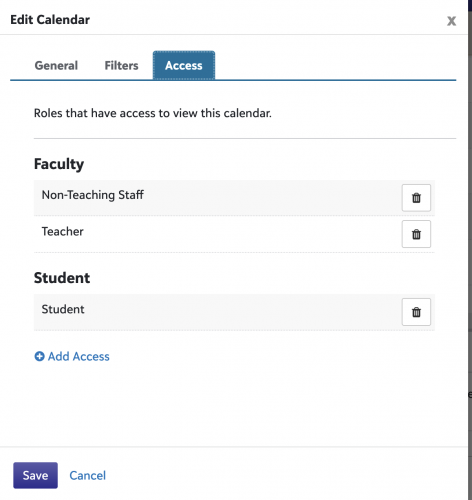
Once that was done I went into Core > Security > Content Editor Access > Content and created a new Content Editor Access Group called Grades Calendars:
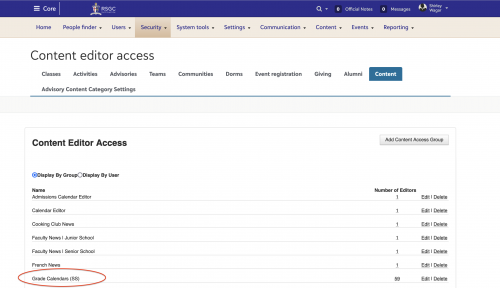
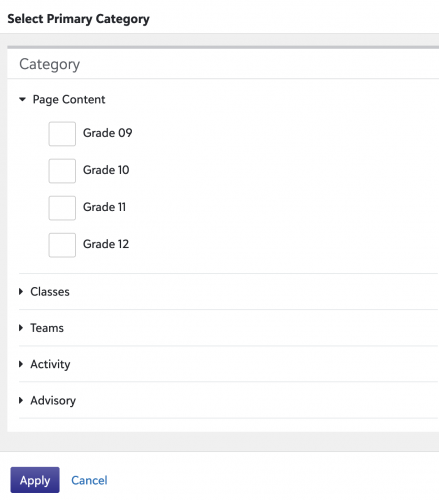
I then assigned faculty access to the various calendars they would need to post content on.
Once that was done, faculty simply navigate to the Calendar tab, select +Event and add the event to the correct calendar:
We use a standardized way of entering assessments/tests/assignments onto the calendar to ensure that no grade level has more than two major evaluations per day. When viewing the calendar, it looks like this:
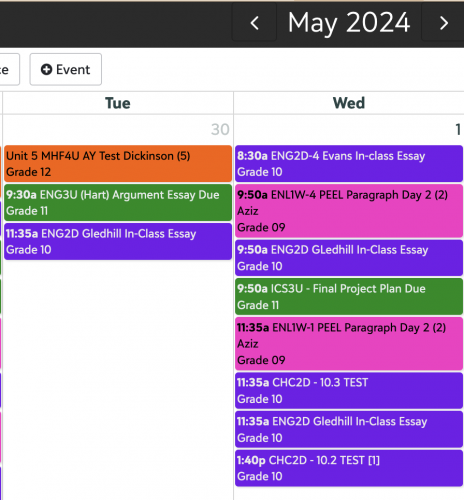
Teachers can toggle the various calendars on or off, but it allows everyone to view what's coming up in the weeks ahead and manage their assessment deadlines and due dates accordingly. We've been using this system for years and it's worked very well for us.
If you have any questions, please let me know.
1 -
Hello! I've been working towards this end and have tried to remove double entry from teachers. Currently teachers have to double-enter tests on a Google calendar in addition to their BB course assignment. We are testing a central grade level class in our MIddle School. All Teachers will be enrolled in the class and will just add their tests to the master class and it would be visible to all the teachers.
I'll let you know how it goes. Worked great in my head!
Annemarie0 -
@Shirley Wagar Thanks, I'm a little lost though. How do you connect the permissions to the calendar. I followed your instructions but I can't figure out how it connects to the calendar??
0 -
1
-
@Shirley Wagar: Are you able to restrict a calendar to just a specific grade, or can it only be restricted to “student”?
0 -
@Shirley Wagar Is there a way to track which calendar entry was made first, if say, three teachers put an assessment on the same day?
0 -
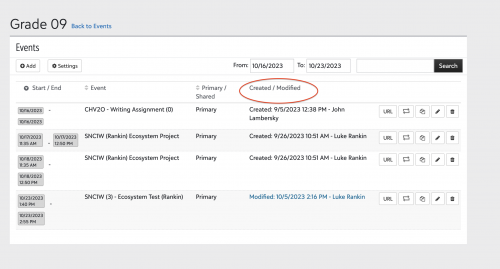
@Zoe MontoneyYes. If you go to Core > Events > Calendar events and look up the specific calendar, you can see the event as well as the day it was created or modified.
 0
0 -
@Melissa Battis The calendar is secured with access granted by role only.
That said, we simply tell our students to turn off any calendars that aren't relevant to them. It's easy and it keeps their calendar neat and easy to navigate.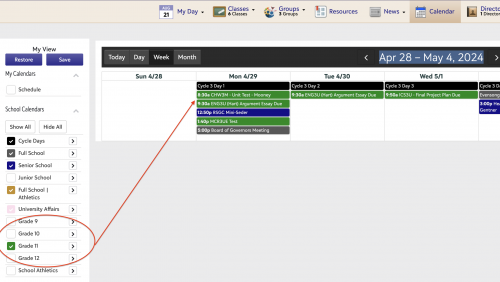 1
1 -
@Richard Pan I'm glad you figured it out. I was on vacation or would have responded sooner!
0






Categories
- All Categories
- 6 Blackbaud Community Help
- 211 bbcon®
- 1.4K Blackbaud Altru®
- 402 Blackbaud Award Management™ and Blackbaud Stewardship Management™
- 1.1K Blackbaud CRM™ and Blackbaud Internet Solutions™
- 15 donorCentrics®
- 360 Blackbaud eTapestry®
- 2.6K Blackbaud Financial Edge NXT®
- 657 Blackbaud Grantmaking™
- 577 Blackbaud Education Management Solutions for Higher Education
- 3.2K Blackbaud Education Management Solutions for K-12 Schools
- 941 Blackbaud Luminate Online® and Blackbaud TeamRaiser®
- 84 JustGiving® from Blackbaud®
- 6.7K Blackbaud Raiser's Edge NXT®
- 3.7K SKY Developer
- 248 ResearchPoint™
- 120 Blackbaud Tuition Management™
- 165 Organizational Best Practices
- 240 Member Lounge (Just for Fun)
- 34 Blackbaud Community Challenges
- 37 PowerUp Challenges
- 3 (Open) PowerUp Challenge: Grid View Batch
- 3 (Closed) PowerUp Challenge: Chat for Blackbaud AI
- 3 (Closed) PowerUp Challenge: Data Health
- 3 (Closed) Raiser's Edge NXT PowerUp Challenge: Product Update Briefing
- 3 (Closed) Raiser's Edge NXT PowerUp Challenge: Standard Reports+
- 3 (Closed) Raiser's Edge NXT PowerUp Challenge: Email Marketing
- 3 (Closed) Raiser's Edge NXT PowerUp Challenge: Gift Management
- 4 (Closed) Raiser's Edge NXT PowerUp Challenge: Event Management
- 3 (Closed) Raiser's Edge NXT PowerUp Challenge: Home Page
- 4 (Closed) Raiser's Edge NXT PowerUp Challenge: Standard Reports
- 4 (Closed) Raiser's Edge NXT PowerUp Challenge: Query
- 796 Community News
- 3K Jobs Board
- 54 Blackbaud SKY® Reporting Announcements
- 47 Blackbaud CRM Higher Ed Product Advisory Group (HE PAG)
- 19 Blackbaud CRM Product Advisory Group (BBCRM PAG)