Weekly Action Added Template





Is there an existing Action template (through Power Automate) to create a weekly email that displays a list of actions that were added in a given week?
Comments
-
@Spencer Smith
search for action here and you should see one that you can modify to start with:Daily action report with constituent solicitor & prospect status
1 -
@Alex Wong Got it. It was hard to tell if this template is based on a list or the end points within an interaction. My struggle on building my own flow is the action list does not allow you to base it off a Date Added but instead the Action Date. I will try the template and modify it.
0 -
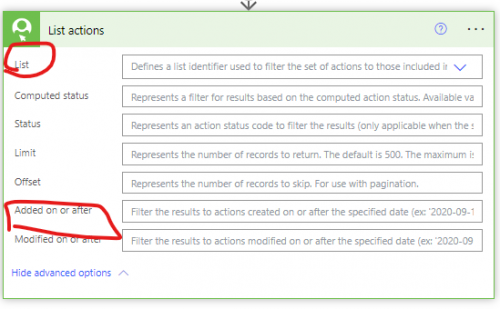
list actions does have filter for action added on or after.
However, keep in mind that List and all other fields are mutually exclusive, meaning, if you specified a List that you saved in RE NXT to use, you cannot filter on any other field (including added on or after)
0 -
@Alex Wong With Added on or after, is it possible to only reference the previous week without specifying an exact date. So, every Monday, I run this flow and it finds all actions from the previous week.
0 -
@Spencer Smith
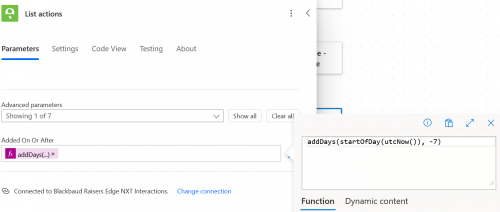
the added on or after field intakes a static date/time. However, since you are using power automate, it is easy to dynamically create a date that is X day in the past. You can check out these expression:addDays(startOfDay(utcNow()), -7) means use the date/time based on UTC (utcNow()), then use startOfDay() to set the time to midnight and then use addDays() to go back 7 days (using negative 7).
If you want to be more specific to your timezone, you can use convertFromUtc() expression.
1 -
@Spencer Smith I manually run a query and send out to our team every Monday. If this is something you put together and are willing to share I'd LOVE to see it! I am just starting to try to get into the Power Platform.
1 -
@Kacie Wise I'm working through Alex's suggestions which have been super helpful. Still a work in progress.
2 -
@Alex Wong I'm using the template and am getting a Null value error. I thought it could be the fundraiser name. Some actions won't have a fundraiser. I added a Nullify Fundraiser variable within the fundraiser condition but the error persists. Flow Run Failure: One or more fields provided is of type ‘Null’……a different type is expected.
0 -
@Spencer Smith
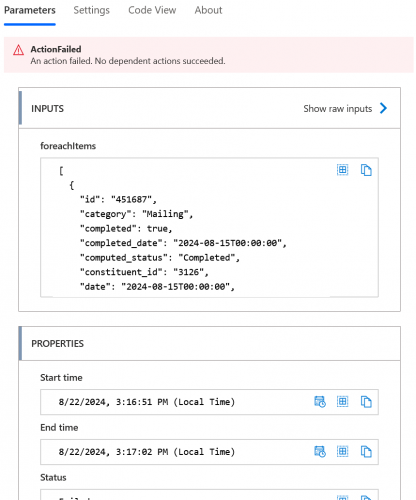
you will need to provide more info, esp the screenshot of the action when having run error and when in edit mode.1 -
0
-
@Spencer Smith
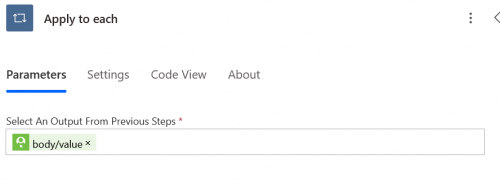
you did not provide the screenshot where the error happen.Your screnshot is just showing that there is error in your apply to each step, it doesn't show which iteration of apply to each failed and on which action did it failed on.
you need to click on the “>” button in the apply to each and find the specific action that has the red exclaimation and screenshot that action as well as the edit mode of that action.
0 -
0
-
@Spencer Smith
You are misunderstand what I am asking.For example, in a sample flow:
- get list of gifts
- apply to each gift
- action 1
- action 2
- action 3
If your flow run and show you there is error at “apply to each gift”, that is NOT where your error truly is. the error is going action 1, action 2, or action 3. It “MAY” not show for the first gift in the apply to each gift, you will have to use the >
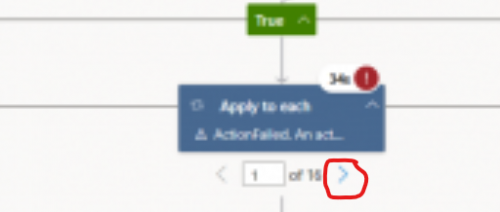
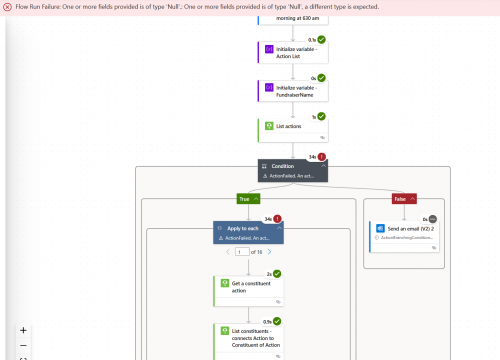
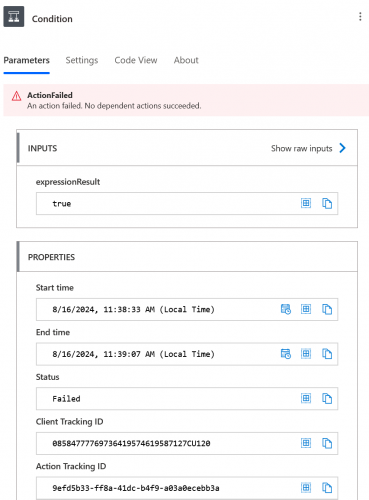
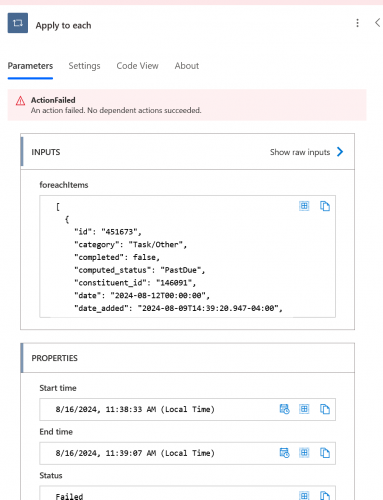
to go through each gift that is “looped” and find the one that has a red exclaimation on the actions INSIDE the apply to each. It will be one of the actions you have: Get a constituent action, List constituents - connects Action to Constituent of Action, etc (can't see more from your screenshot). Find that action that failed, and screenshot that action's run history and edit mode.
0 -
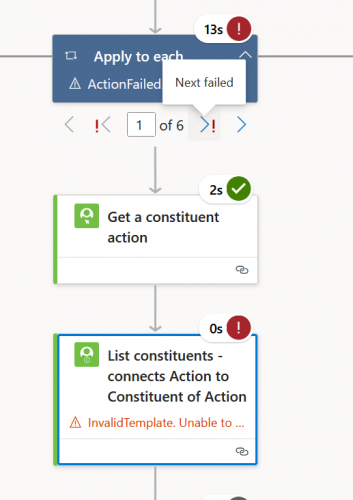
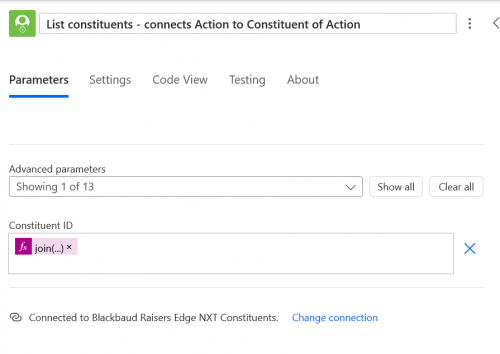
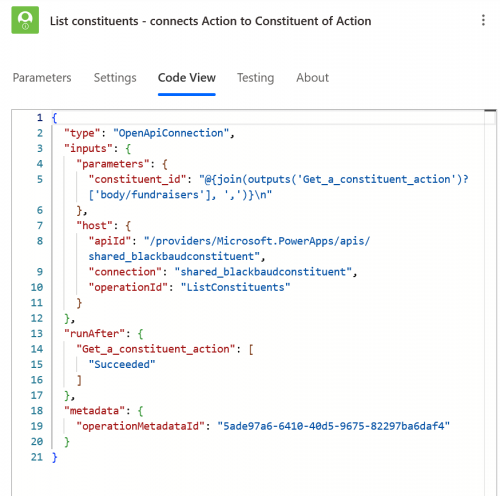
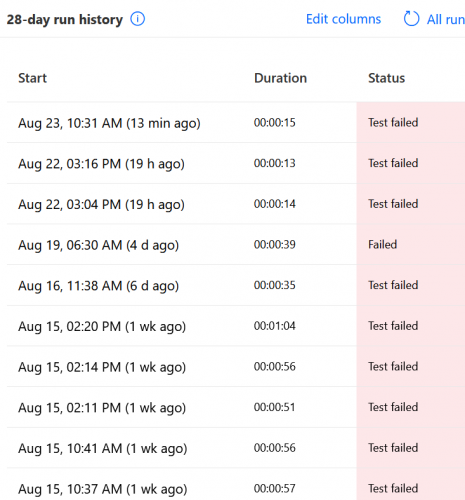
@Alex Wong Clicking the “>” indicates that all 6 actions in the list failed. The flow has never run successfully. I can't find the action history. I have the overall history for the flow but I don't think that's what you were requesting.
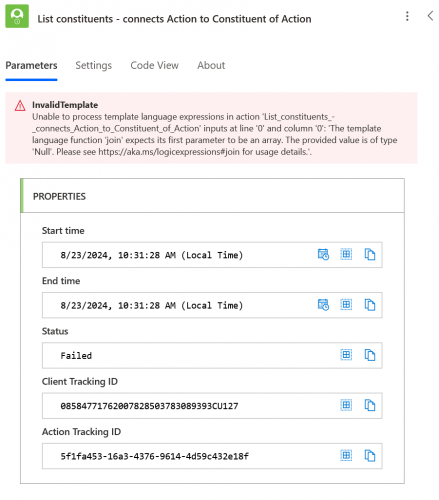
 0
0 -
@Spencer Smith
what you provided is good now. So we now know the real action that error out is List constituents - connects Action to Constituent of Actionyou are using the join() expression to create a comma separated constituent system record ids to get constituent list on. But the problem is your join() is incorrect. Like the error message tell you, the first parameter of a join needs to be an array, but instead you provided null.
Your join expression is: join(outputs('Get_a_constituent_action')?['body/fundraisers'], ‘,’)
this means either (1) the Get a constituent action did not return an action that has any fundraisers (action does not have to have fundraiser) or (2) You did not call the Get a constituent action using the action system record id.
Your flow also does not “sound” right, so your originally post was to get a list of action that was added in a given week, is that still what you are trying to do? if so, then your flow should just be:
- get action list (all constituents) parameter filter by date_added greater than -7 days ago
- for each action
- get the constituent (for info like name)
- append data you want to show in an email into an array
- create html table based on the array
- send email with the html table created in #3.
0 -
@Alex Wong I decided to start over and import the flow from the template. Worked great using a list. When I removed the list (in List Actions) and added the function (addDays(startOfDay(utcNow()), -7)) the flow resulted in the same Null error message.
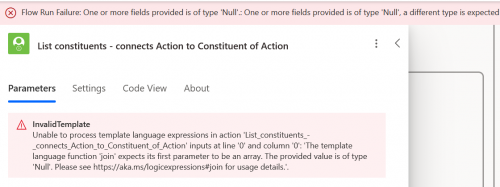 0
0 -
@Spencer Smith
what template did you use, maybe i'll import it so better see what it is.However, the error you receive has nothing to do with using list or using date_added. I don't konw what critiera you had on the RE NXT list, probably filter on fundraiser being some one or some people. Therefore your list of actions all had the fundraiser array. However, when you get action by date_added, you will get all actions that meet that criteria, including actions that does not have any fundraiser, which cause the “null” error.
If you are only looking for action that HAS fundraiser, then after the list action step, you can use filter array to filter only on actions that have fundraiser.
or if your flow INTENT to process actions that doesn't have fundraiser, then you need to use condition to determine if fundraiser dynamic content is null, if yes do not do the list constituent step, if no, do the list constituent step.
Flow should be created such that it does what you want it to do, so the question is what exactly are you trying to accomplish? what should happen for action that have fundraiser(s), what should happen for action that does not have fundraiser?
0






Categories
- All Categories
- 6 Blackbaud Community Help
- 211 bbcon®
- 1.4K Blackbaud Altru®
- 402 Blackbaud Award Management™ and Blackbaud Stewardship Management™
- 1.1K Blackbaud CRM™ and Blackbaud Internet Solutions™
- 15 donorCentrics®
- 360 Blackbaud eTapestry®
- 2.6K Blackbaud Financial Edge NXT®
- 655 Blackbaud Grantmaking™
- 576 Blackbaud Education Management Solutions for Higher Education
- 3.2K Blackbaud Education Management Solutions for K-12 Schools
- 941 Blackbaud Luminate Online® and Blackbaud TeamRaiser®
- 84 JustGiving® from Blackbaud®
- 6.7K Blackbaud Raiser's Edge NXT®
- 3.7K SKY Developer
- 248 ResearchPoint™
- 120 Blackbaud Tuition Management™
- 165 Organizational Best Practices
- 240 Member Lounge (Just for Fun)
- 34 Blackbaud Community Challenges
- 37 PowerUp Challenges
- 3 (Open) PowerUp Challenge: Grid View Batch
- 3 (Closed) PowerUp Challenge: Chat for Blackbaud AI
- 3 (Closed) PowerUp Challenge: Data Health
- 3 (Closed) Raiser's Edge NXT PowerUp Challenge: Product Update Briefing
- 3 (Closed) Raiser's Edge NXT PowerUp Challenge: Standard Reports+
- 3 (Closed) Raiser's Edge NXT PowerUp Challenge: Email Marketing
- 3 (Closed) Raiser's Edge NXT PowerUp Challenge: Gift Management
- 4 (Closed) Raiser's Edge NXT PowerUp Challenge: Event Management
- 3 (Closed) Raiser's Edge NXT PowerUp Challenge: Home Page
- 4 (Closed) Raiser's Edge NXT PowerUp Challenge: Standard Reports
- 4 (Closed) Raiser's Edge NXT PowerUp Challenge: Query
- 796 Community News
- 3K Jobs Board
- 54 Blackbaud SKY® Reporting Announcements
- 47 Blackbaud CRM Higher Ed Product Advisory Group (HE PAG)
- 19 Blackbaud CRM Product Advisory Group (BBCRM PAG)