Creating "Physical" Attachments for Records (Constituent attachment (Create))




Both via the SKY API Console and trying to code it myself in Python leveraging RESTful commands, I am struggling to get a programmatic answer to attaching attachments to records, specifically constituents.
Here is the doc I am trying to reference:
The main issue is that when I do this, I need a poorly defined “file_id” parameter. I do not understand how this id would be gathered or generated. “The identifier of the file. Character limit: 36. For physical attachments only,” identifier of the file how? I need to pass in an image file so why would I need an ID and where would I get it?
I had tried to remedy this by uploading a file via the constituent “Document (Create)” call. Here I was able to get a status code of 200 and a returned file_id. When I would pass this newfound file_id from the document through the Constituent attachment (Create) file_id, I would enter a scan limbo with no attachments being attached.
I need help trying to navigate this issue that I assume is being generated from this mysterious - yet required - field.
Comments
-
@Wyatt Mosteller
This is what I do.Create a Doc Location

just file name and if thumbnail will be uploaded, i generally don't do thumbail Upload the content of the file
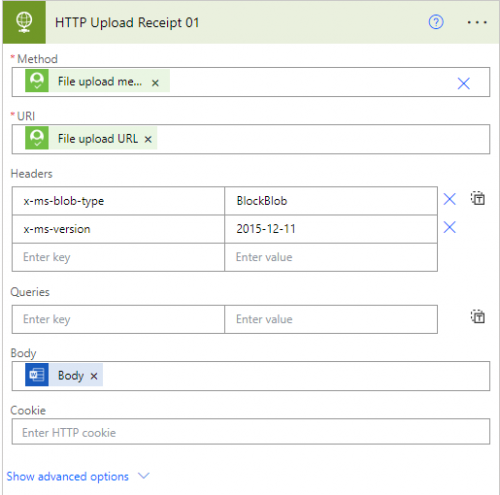
Method and URI comes from the Create Doc Location's response body: file_upload_request > method and file_upload_request > url then create the attachment
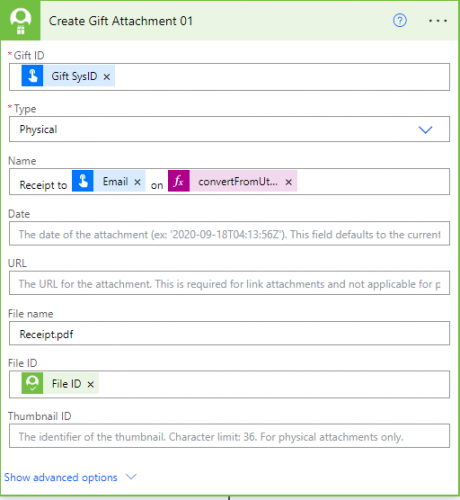
Name here is the name shown on the webview attachment tile. File ID comes from the Create Doc Location response body's file_id property 2 -
In image 2, is the body just the file? or is it a structured JSON object?
Again, I am trying to do this in Python, so I am just trying to understand a way to translate it into a pythonic structure. my current body structure:
data = {
"file_content": base64.b64encode(file.read())
}
`file.read()` is a binary representation of the file I am trying to upload and attach. Without the base64 encoding, it returns the same result, but a lot of documentation says that it should be encoded like this in order to try and convert it to a blob structure.
0 -
@Wyatt Mosteller
Body is a JSON representation of the content-type and actual content in base64{
"$content-type": "application/pdf",
"$content": “JVBERi0xLjcNCiW1tbW1DQoxIDAgb2JqD…………………………………………”
}
0 -
For future readers:
Follow Alex Wong's response except when you are running in Python, you need to pass the data differently than expected. Just pass the raw binary ‘rb’ file through with no encoding or passing MIME types.
with open(target_file_name, 'rb') as file:
file_content = file.read()
# Send the PUT request to upload the raw file
upload = requests.put(
json_response_from_document['file_upload_request']['url'],
data=file_content,
headers=upload_headers # Send headers generated by Document (create)
)
0 -
@Wyatt Mosteller I had a similar but with power automate syntax. I converted my file to base64 using the compose action base64(body('Get_file_content'))
I got that information from this post
Then, I used this syntax in the HTTP action to upload with the following syntax in the body
{
"$content-type": "application/pdf",
"$content": " outputs(<compose action name>)"
}and thanks to @Alex Wong for the syntax above in the HTTP body; I got a successful PDF loaded. Thanks for this post it really helped.
1 -
@Sarah Jordan
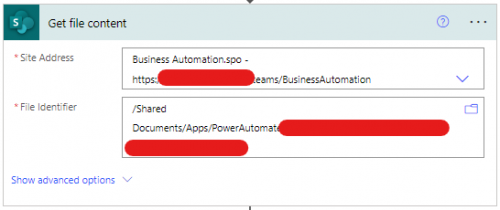
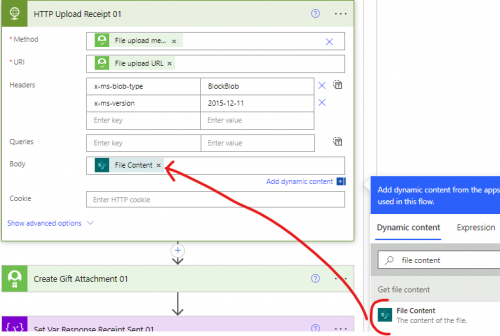
The info I show for Wyatt is so to show what is being uploaded in the body of a HTTP call so he can attempt to do the same in other platform/coding language.However, if you are using power automate already, when you get content of file, all you need is to put the content of the file in the HTTP upload body, you don't need additional steps to “define” a JSON that further do a base64 encoding.
 1
1 -
@Alex Wong Hi Alex, I tried that. The flow was successful; it created a file and attached it, but when I tried accessing the constituent file in RENXT, it would not open successfully.
0 -
@Sarah Jordan
if whatever you were doing was working fine for you, you can continue to do so.I am just pointing out you didn't need to do the extra step of compose action.
That said, what do you mean by it does not open successfully. Is there an error message? screenshot?
0 -
@Alex Wong It was opening and said 100%, but it was just a white screen. The file was not zero bytes, either. Yes, it is good to know it should work how you say it should. I will set up another flow to test and get it working. I don't want to add overhead if not needed. I will let you know if I get it working. Thanks
0 -
@Sarah Jordan
How do you fix the opening 100% but it really never show the PDF information?0






Categories
- All Categories
- 6 Blackbaud Community Help
- 213 bbcon®
- 1.4K Blackbaud Altru®
- 401 Blackbaud Award Management™ and Blackbaud Stewardship Management™
- 1.1K Blackbaud CRM™ and Blackbaud Internet Solutions™
- 15 donorCentrics®
- 360 Blackbaud eTapestry®
- 2.6K Blackbaud Financial Edge NXT®
- 655 Blackbaud Grantmaking™
- 576 Blackbaud Education Management Solutions for Higher Education
- 3.2K Blackbaud Education Management Solutions for K-12 Schools
- 939 Blackbaud Luminate Online® and Blackbaud TeamRaiser®
- 84 JustGiving® from Blackbaud®
- 6.6K Blackbaud Raiser's Edge NXT®
- 3.7K SKY Developer
- 248 ResearchPoint™
- 119 Blackbaud Tuition Management™
- 165 Organizational Best Practices
- 241 Member Lounge (Just for Fun)
- 34 Blackbaud Community Challenges
- 34 PowerUp Challenges
- 3 (Open) PowerUp Challenge: Chat for Blackbaud AI
- 3 (Closed) PowerUp Challenge: Data Health
- 3 (Closed) Raiser's Edge NXT PowerUp Challenge: Product Update Briefing
- 3 (Closed) Raiser's Edge NXT PowerUp Challenge: Standard Reports+
- 3 (Closed) Raiser's Edge NXT PowerUp Challenge: Email Marketing
- 3 (Closed) Raiser's Edge NXT PowerUp Challenge: Gift Management
- 4 (Closed) Raiser's Edge NXT PowerUp Challenge: Event Management
- 3 (Closed) Raiser's Edge NXT PowerUp Challenge: Home Page
- 4 (Closed) Raiser's Edge NXT PowerUp Challenge: Standard Reports
- 4 (Closed) Raiser's Edge NXT PowerUp Challenge: Query
- 791 Community News
- 2.9K Jobs Board
- 53 Blackbaud SKY® Reporting Announcements
- 47 Blackbaud CRM Higher Ed Product Advisory Group (HE PAG)
- 19 Blackbaud CRM Product Advisory Group (BBCRM PAG)