Gift lists: "last number of days" option in gift date filter dropdown




I would like to create and save a gift list that would always pull gifts dated within the past 15 days – i.e., 15 days prior to any day on which a user happens to pull it up.
I select GIFT DATE as a filter, go to its drop-down and select LAST NUMBER OF DAYS and click APPLY. There is nowhere to enter the number of days I actually want. Support case tells me all I can do is add this to the Idea Bank. But if so, why would this option be in the dropdown?
What am I missing?
Comments
-
@Rita Reilly this is interesting. I just checked this filter on our Gift Lists and it seems to be presenting OK for me. I have Admin rights, though, so that could be affecting things.
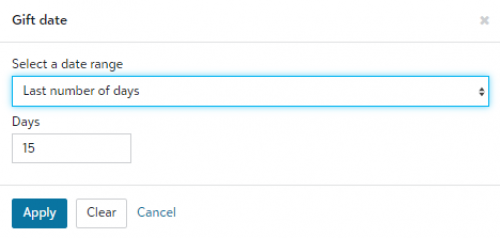
I would do a couple of things. First, I would completely log out of RE NXT, maybe even reboot the system just for giggles. Log in again and see if that fixes it. I would also check with whomever manages the security of web view to verify your settings. I think filters are an all-or-none kind of thing, though, so I am unsure about this one specifically. The only other thing I can consider is if you started from a saved list that was saved by a different user and that user did not want modifications made to the list. In that case I would start from scratch.
Sorry I cannot be of further help. Perhaps someone else would have another idea.
1 -
@Miki Martin
Thanks, Miki. This is really puzzling. The DAYS block that shows in your screenshot doesn't appear for me: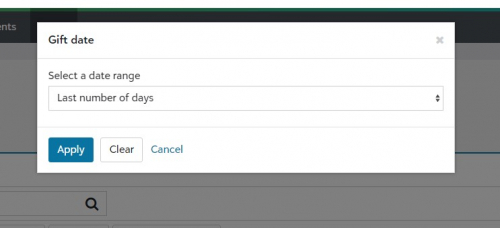
My user profile has organization admin rights, RE NXT admin, etc., as well as Supervisor rights in database view, so it doesn't look like security is the issue. Rebooting, logging out and in didn't help. I'll try again with support.
0 -
@Rita Reilly that is super strange for sure. Definitely a question for Support to handle. Hopefully they will have an easy answer - and not to put it in the Idea Bank. Obviously there is an issue somewhere since we basically have the same rights (albeit in different orgs). One other thing I would check is whether anyone else in your org can see the second part of the filter. I ended up having to have a new profile created in DB view because of some quirk I was experiencing with query lists and that fixed it. That isn't web view, though, so a whole different animal. Good luck!
1 -
@Miki Martin I see what you see when I open a previously created Gift list using this filter parameter as this will show it appear to be working however, when I attempt to create a new Gift list this is not working. I have already placed a ticket with the support yesterday, and they are calling this a defect/bug. Today they said it is fixed, it still is not fixed when opening a new gift list session. I have disconnected from my session in Citrix connection center, terminated the database session in web view, cleared cash and cookies and exited out of chrome. I have asked if there are specific steps to take to clear and reinstate the deployed 'bug fix’. Thanks!
1 -
@Darlene LeVielle OhMyGosh, I just started a new list and was able to see your issue now! That's weird, though, because I had initially used an unsaved list (but previously started) and was able to see the number of days but if I start a new list today I cannot see that. How incredibly bizarre. At least now you know it's not just you experiencing this issue!
1 -
Thanks, Danielle and Miki. I've tried everything you've suggested (except creating a new user profile), without success. Others in my org have the same issue. I added a note early this morning to the support case I opened yesterday, sent them Miki's screenshot, and asked for more info on why I don't see the same thing. No reply so far. It does seem like there's a bug somewhere. I'll go ahead with a new user profile if BB can't resolve the problem, but would rather just have it fixed….
0 -
@Rita Reilly
That is odd. I see the box to enter the number of days. And I was able to filter on it. Perhaps check your permissions and roles?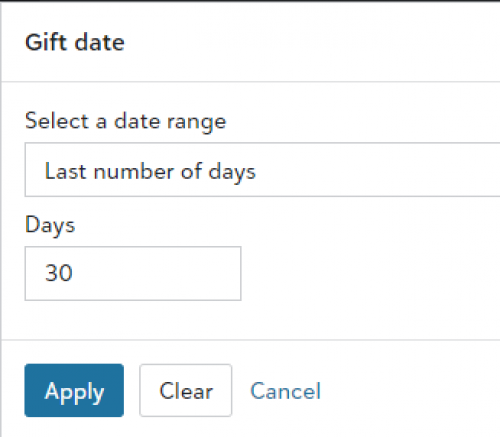 0
0 -
@Rita Reilly @Miki Martin @Madeleine Holdsworth Fascinating topic! So I went to create a new Gift List and was not able to enter the Number of Days at first. So I selected “This Calendar Year” and hit apply, and then went to Gift Date filter again (2nd time) and selected “Last Number of Days” and the box to enter the number of days came up! This may be the answer?
1 -
@Keith Wilson @Keith Wilson Yes, and still fascinating. I feel this is not how it was originally engineered, not to say it could change however, is there a KB indicating how this works now or was there a KB that indicated how it worked originally? Thank you for this information.
1 -
@Rita Reilly I just tried what @Keith Wilson suggested and was able to recreate it. That is just bizarre and I have no idea why it would be that way. A bug I would say, for sure.
@Darlene LeVielle I was not able to find a KB Article regarding this specifically, but I am not always great with searching for specific articles in there. Even searching through Google though didn't bring me anything besides this forum topic being at the top of the list. ?
@Madeleine Holdsworth I had originally gotten the same thing when I opened an existing list. It was creating a new list where the issue was for some reason. I'm glad Keith thought to try a different filter and then go back! Glad to find that works. Hopefully it will for anyone else having this issue.
1













Categories
- All Categories
- 6 Blackbaud Community Help
- 213 bbcon®
- 1.4K Blackbaud Altru®
- 403 Blackbaud Award Management™ and Blackbaud Stewardship Management™
- 1.1K Blackbaud CRM™ and Blackbaud Internet Solutions™
- 15 donorCentrics®
- 360 Blackbaud eTapestry®
- 2.6K Blackbaud Financial Edge NXT®
- 656 Blackbaud Grantmaking™
- 577 Blackbaud Education Management Solutions for Higher Education
- 3.2K Blackbaud Education Management Solutions for K-12 Schools
- 939 Blackbaud Luminate Online® and Blackbaud TeamRaiser®
- 84 JustGiving® from Blackbaud®
- 6.6K Blackbaud Raiser's Edge NXT®
- 3.7K SKY Developer
- 248 ResearchPoint™
- 119 Blackbaud Tuition Management™
- 165 Organizational Best Practices
- 241 Member Lounge (Just for Fun)
- 34 Blackbaud Community Challenges
- 37 PowerUp Challenges
- 3 (Open) PowerUp Challenge: Grid View Batch
- 3 (Closed) PowerUp Challenge: Chat for Blackbaud AI
- 3 (Closed) PowerUp Challenge: Data Health
- 3 (Closed) Raiser's Edge NXT PowerUp Challenge: Product Update Briefing
- 3 (Closed) Raiser's Edge NXT PowerUp Challenge: Standard Reports+
- 3 (Closed) Raiser's Edge NXT PowerUp Challenge: Email Marketing
- 3 (Closed) Raiser's Edge NXT PowerUp Challenge: Gift Management
- 4 (Closed) Raiser's Edge NXT PowerUp Challenge: Event Management
- 3 (Closed) Raiser's Edge NXT PowerUp Challenge: Home Page
- 4 (Closed) Raiser's Edge NXT PowerUp Challenge: Standard Reports
- 4 (Closed) Raiser's Edge NXT PowerUp Challenge: Query
- 794 Community News
- 2.9K Jobs Board
- 54 Blackbaud SKY® Reporting Announcements
- 47 Blackbaud CRM Higher Ed Product Advisory Group (HE PAG)
- 19 Blackbaud CRM Product Advisory Group (BBCRM PAG)