Recent changes in Organization contact email/phone records?





I've recently started to see some strange behavior from Organization contact email records.
Web view showing a contacts primary email only on the organization record (2 email shown when looking at the contact's own record).
Import validation is throwing exceptions that email records that I just exported and can plainly see in the record don't exist.
Has something changed recently about these records?
Comments
-
@Jordan Yarr Can you clarify which record the email addresses live on and which one you are trying to import them to? Organization Constituent, Individual Constituent, Individual Relationship (Contact), etc.
1 -
@Christine Robertson Everything I am doing currently pertains to Individual relationship records.
In the case of the import I'm working on updating old records that don't have an email marked as primary so that every record will have a primary email.1 -
@Jordan Yarr Are you moving email addresses from one record to another or trying to update the existing ones with the Primary check box?
To update the existing, you have to have all of the relevant Import IDs. One of the more annoying things in DB view is that you can't access Phone Import IDs in Query, so you have to use Export (which doesn't always format the file as you would want for this type of clean-up project).
0 -
@Christine Robertson
I am trying to update the primary checkbox.
What I've done is export a csv with Import ID and the primary checkbox change some of the “No”s to Yes based on various criteria then bring them back into RE with the import tool. Its working for about a third of the records.
the others have exceptions:
Some say that relationships phone/emails can't be primary (which I don't fully understand but I'm seeing this behavior when updating records manually)
The rest say this record does not exist which is simply incorrect and I just exported these records minutes before.0 -
@Jordan Yarr
when you say “import id” what import id are you talking about, based on what you said, you might be using the wrong import id.Constituent Import Id is used to change constituent data (one to one data, such as name, title, gender, etc)
relationship import id is used to change a relationship's data, as there can be more than one relationship with a constituent, so you need to specify which relationship to update
phone import id is used to change a phone (or email) data, as there can be more than one phone/email, you need to specify which phone/email to update.
So for an individual relationship's phone that you want to change using import, you will need the relationship import id AND the phone import id.
0 -
@Christine Robertson
export is harder here due to what you said, doesn't format right.You can use the Admin>Import module to export the various import id, which will come out formatted properly, one row per phone record.
0 -
@Alex Wong
Yes the import ID for the relationship record and the phone/email are both part of the import. I'd assumed I'd done that more or less correct as about a third of my changes were able to import0 -
I've been experimenting more with entering individual relationship emails in web view. Has web view always been limited to entering only one email on these records?
I'm used to Database view where entering multiple has been the norm (and is currently possible)
Edit: This was just the UI for adding a new individual relationships. Once they're created adding multiple emails works fine. My mistake0 -
@Jordan Yarr
i have no issue entering more than one email on webview for a non-constituent individual relationship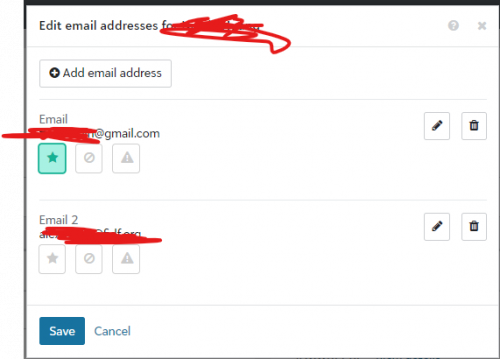 0
0 -
@Jordan Yarr
As for what is working vs not, check if what isn't working and what is common between them.I suspect the difference is between non-constituent individual relationship vs constituent individual relationship.
constituent individual relationsihp's email may not be changeable using the individual relationship phone import, you have to use the the constituent's phone import on the constituent record that is the relationship.
0







Categories
- All Categories
- 6 Blackbaud Community Help
- 211 bbcon®
- 1.4K Blackbaud Altru®
- 402 Blackbaud Award Management™ and Blackbaud Stewardship Management™
- 1.1K Blackbaud CRM™ and Blackbaud Internet Solutions™
- 15 donorCentrics®
- 360 Blackbaud eTapestry®
- 2.6K Blackbaud Financial Edge NXT®
- 655 Blackbaud Grantmaking™
- 577 Blackbaud Education Management Solutions for Higher Education
- 3.2K Blackbaud Education Management Solutions for K-12 Schools
- 940 Blackbaud Luminate Online® and Blackbaud TeamRaiser®
- 84 JustGiving® from Blackbaud®
- 6.7K Blackbaud Raiser's Edge NXT®
- 3.7K SKY Developer
- 248 ResearchPoint™
- 119 Blackbaud Tuition Management™
- 165 Organizational Best Practices
- 240 Member Lounge (Just for Fun)
- 34 Blackbaud Community Challenges
- 37 PowerUp Challenges
- 3 (Open) PowerUp Challenge: Grid View Batch
- 3 (Closed) PowerUp Challenge: Chat for Blackbaud AI
- 3 (Closed) PowerUp Challenge: Data Health
- 3 (Closed) Raiser's Edge NXT PowerUp Challenge: Product Update Briefing
- 3 (Closed) Raiser's Edge NXT PowerUp Challenge: Standard Reports+
- 3 (Closed) Raiser's Edge NXT PowerUp Challenge: Email Marketing
- 3 (Closed) Raiser's Edge NXT PowerUp Challenge: Gift Management
- 4 (Closed) Raiser's Edge NXT PowerUp Challenge: Event Management
- 3 (Closed) Raiser's Edge NXT PowerUp Challenge: Home Page
- 4 (Closed) Raiser's Edge NXT PowerUp Challenge: Standard Reports
- 4 (Closed) Raiser's Edge NXT PowerUp Challenge: Query
- 796 Community News
- 3K Jobs Board
- 54 Blackbaud SKY® Reporting Announcements
- 47 Blackbaud CRM Higher Ed Product Advisory Group (HE PAG)
- 19 Blackbaud CRM Product Advisory Group (BBCRM PAG)