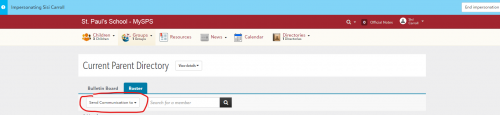
Community Groups: Send Communication to





Is there any way to hide access to the “Send Communication to” drop down to normal members of a Community Group? I like to hope I'm just missing something, but I don't see a way of hiding it.
Comments
-
So the answer is basically no unless you want to nuke it for ALL group types in the system.
From my case:
"Hello Jamie,
I'm writing in reference to case number 019888115, which we have open regarding how to hide the "Send Communication To" button from members of community groups.Thanks for reaching us about this. Turning this button off for the community groups is possible, but will have a much larger impact across the entire system. The option that controls this button will be within Core > Settings > Inbox settings: the Bulk Messaging option. Switching this option to Off will remove this button from all members of not only that community group, but all groups across the system (academic class rosters, advisory rosters, etc.).
At this time, there is not a more granular option in the system, based on role-access. I do suggest you visit the enhancement portal if you would like to see this added as a functionality. Our development team reviews the suggestions and feedback for future implementation. https://blackbaudk12.ideas.aha.io/ideas/"
My response
"So just want to get some clarifiaction. I impersonated a student in our system. When I visit multiple different types of groups that they belong to: Advisory, Athletics, Academics, Dorms - The student, as a member, doesn't have access to that dropdwon, but if they are in a Community group, they can see it.
Or put another way: For all group types in the system, except for community groups, only the group leaders have access to "Send Commonications to" dropdown. The lone exception is that everyone in a community group has that dropdown displayed."
Support Response
“Correct, it is as you mentioned in your last response.”
0 -
@Jamie Cross, several years ago, we had some students start to message large groups of students through a community group. When another student tipped us off about it, we added a teacher to the student community group, and the problem messages immediately stopped since students could now see that a teacher would be included on any messages sent to the group. Since then, we have never had a student message a group again. I do agree with you that it would be nice to hide that option altogether, but I wanted to share our trick of adding a teacher/administrator to the group to suppress any student horseplay with bulk communications. Seemed to work for us.
0 -
@Geoffrey Goodfellow - that's exactly what we did - any student group created must have a faculty/staff as a member.
0




Categories
- All Categories
- 6 Blackbaud Community Help
- 211 bbcon®
- 1.4K Blackbaud Altru®
- 402 Blackbaud Award Management™ and Blackbaud Stewardship Management™
- 1.1K Blackbaud CRM™ and Blackbaud Internet Solutions™
- 15 donorCentrics®
- 360 Blackbaud eTapestry®
- 2.6K Blackbaud Financial Edge NXT®
- 655 Blackbaud Grantmaking™
- 576 Blackbaud Education Management Solutions for Higher Education
- 3.2K Blackbaud Education Management Solutions for K-12 Schools
- 940 Blackbaud Luminate Online® and Blackbaud TeamRaiser®
- 84 JustGiving® from Blackbaud®
- 6.7K Blackbaud Raiser's Edge NXT®
- 3.7K SKY Developer
- 248 ResearchPoint™
- 120 Blackbaud Tuition Management™
- 165 Organizational Best Practices
- 240 Member Lounge (Just for Fun)
- 34 Blackbaud Community Challenges
- 37 PowerUp Challenges
- 3 (Open) PowerUp Challenge: Grid View Batch
- 3 (Closed) PowerUp Challenge: Chat for Blackbaud AI
- 3 (Closed) PowerUp Challenge: Data Health
- 3 (Closed) Raiser's Edge NXT PowerUp Challenge: Product Update Briefing
- 3 (Closed) Raiser's Edge NXT PowerUp Challenge: Standard Reports+
- 3 (Closed) Raiser's Edge NXT PowerUp Challenge: Email Marketing
- 3 (Closed) Raiser's Edge NXT PowerUp Challenge: Gift Management
- 4 (Closed) Raiser's Edge NXT PowerUp Challenge: Event Management
- 3 (Closed) Raiser's Edge NXT PowerUp Challenge: Home Page
- 4 (Closed) Raiser's Edge NXT PowerUp Challenge: Standard Reports
- 4 (Closed) Raiser's Edge NXT PowerUp Challenge: Query
- 796 Community News
- 3K Jobs Board
- 54 Blackbaud SKY® Reporting Announcements
- 47 Blackbaud CRM Higher Ed Product Advisory Group (HE PAG)
- 19 Blackbaud CRM Product Advisory Group (BBCRM PAG)