Phones and Emails marked Do Not and/or Inactive




When I am doing queries in database and I want to include only emails and phone numbers that are active, I consistently also get the inactive and/or the one marked with the do not sign. How can I make sure those are excluded in my query? Thanks in Advance!
Comments
-
@Kim Henry
Please screen shot the complete “filter” tab of your query. You are liking making a mistake with AND, OR, and paranthesis.A or B and D
is not the same as
(A or
 and D
and Dyou need to pay attention to logical operator: logic compare start inside paranthesis if any, then AND before OR
0 -
When I am doing queries in database and I want to include only emails and phone numbers that are active, I consistently also get the inactive and/or the one marked with the do not sign. How can I make sure those are excluded in my query? Thanks in Advance!
@Alex Wong is spot on, but also keep in mind that you are querying for constituents, and not necessarily their emails and phone numbers. After applying his logic, you WILL still see constituents in your results that have at least one inactive or DNC email or phone number appearing, if they also have one that is active or not DNC.
It is important to consider what you will ultimately be doing with your query, because going through the work to exclude the inactive and DNC information may not be necessary. If you are using this as an input query for an email using any Blackbaud tools, it should suppress the emails. If you want to see the information on a mailing list or report - basically any spreadsheet - you will want to run it through an Export anyway, which is where you can more easily refine the output. When that is the case, I rarely worry about all of those details in Query.
0 -
@Karen Diener
You are right about purpose, what is the “report used for” is important and determine how and where to run the report.for purpose such as getting list of active/emailable email addresses (all emilable email addresses of constituent, meaning potentially more than one per constituent) to use in a eblast list to import into a email tool (i.e. constant contact). Then Query trumps over Export as you want all emails in one column, not spread over multiple columns. An example that uses and OR condition: get list of all emailable email addresses of constituent haivng constsituent codes = Board Member or have constituent attribute Potential Board Candidate = Yes.
- Constituent Query Filter:
- Request no email = no
- AND Phone Type one of (select all email type)
- AND Phone Inactive = no
- AND Phone Do Not Contact? = no
- AND (Constituent Code = Board Member
- OR Constituent specific attribute Potential Board Candidate Description = Yes)
Yes, you WILL get duplicate rows due to the filter/output/sort (in this case filter) having multiple ONE-to-MANY relationship. Remove Duplicate can easily be done in Excel.
1 - Constituent Query Filter:
-
@Alex Wong all of this makes sense to me -and yes my use of this is typically for a mailing list where we want to also have emails and phone numbers. and I've used the remove duplicate function in my export but unfortunately sometimes the wrong one gets removed so I've just adapted to doing a very detailed scrub after I do the export. I will see if using the and/or and parenthesis functions help me a little more as well.
0 -
@Kim Henry You may also want to create a phone and email type of Former Phone and Former Email. This helps majorly with doing queries, where you can elimated “Former Types”.
1 -
@Kim Henry
just want to clarify a point, which from reading your reply, I feel you may have confused my response.in RE, Phone and Email (and fax and website) were originally all consider “phone”.
while the newer version of RE (database view version v7.95+) distinguish between phone and email into separate “tab” on the constituent Bio1 tab, in Query, it is all under “Phone” subsection.
What I posted:
- Constituent Query Filter:
- Request no email = no
- AND Phone Type one of (select all email type)
- AND Phone Inactive = no
- AND Phone Do Not Contact? = no
- AND (Constituent Code = Board Member
- OR Constituent specific attribute Potential Board Candidate Description = Yes)
has nothing to do with actual “phone” exporting or filtering. it is all email. Look carefully at where I have AND Phone Type one of (select all email type)
when you output the actual email (Phone Number)
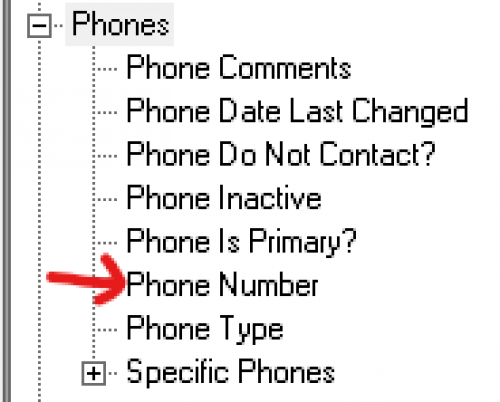
it will give you email addresses that is emailable (constituent not request no email, email is not inactive and not do not contact.
Again, if you are trying to get all emailable email addresses for use in eblast tool, Query exporting using the filtering I responsed will give you just that (and paying attention to your AND and OR and paranthesis).
0 - Constituent Query Filter:
-
I'm having a similar issue, when I include the following criteria in a query:
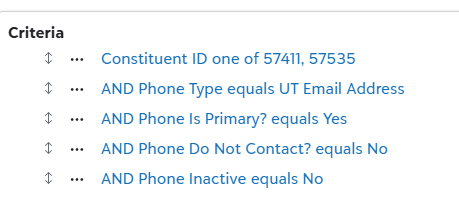
And the following output:
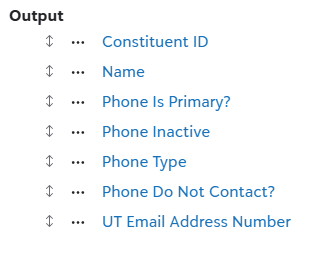
The system results include emails that are marked as "inactive" and "do not contact". As well as those that are primary and active. Additionally, the results report. Those highlighted in yellow are marked on the constituent's page as both inactive and "do not contact" and they are NOT listed as primary.
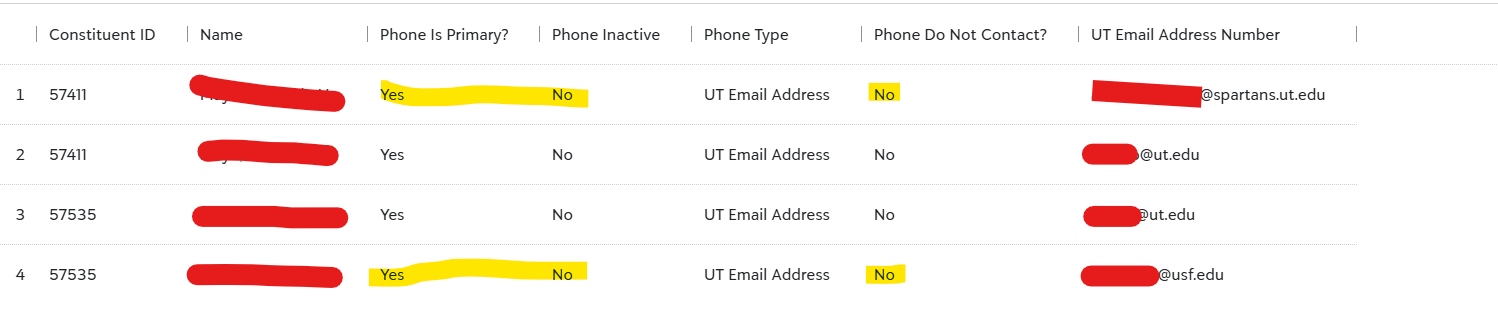
 0
0 -
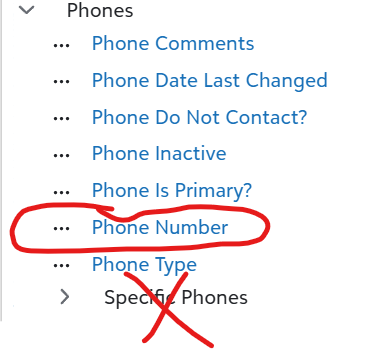
your output is the problem.
Don't output UT Email Address from under "Specific Phones", output Phone Number
 0
0











Categories
- All Categories
- 6 Blackbaud Community Help
- 211 bbcon®
- 1.4K Blackbaud Altru®
- 403 Blackbaud Award Management™ and Blackbaud Stewardship Management™
- 1.2K Blackbaud CRM™ and Blackbaud Internet Solutions™
- 15 donorCentrics®
- 360 Blackbaud eTapestry®
- 2.6K Blackbaud Financial Edge NXT®
- 659 Blackbaud Grantmaking™
- 579 Blackbaud Education Management Solutions for Higher Education
- 3.2K Blackbaud Education Management Solutions for K-12 Schools
- 943 Blackbaud Luminate Online® and Blackbaud TeamRaiser®
- 84 JustGiving® from Blackbaud®
- 6.7K Blackbaud Raiser's Edge NXT®
- 3.8K SKY Developer
- 250 ResearchPoint™
- 120 Blackbaud Tuition Management™
- 165 Organizational Best Practices
- 241 Member Lounge (Just for Fun)
- 36 Blackbaud Community Challenges
- 37 PowerUp Challenges
- 3 (Open) PowerUp Challenge: Grid View Batch
- 3 (Closed) PowerUp Challenge: Chat for Blackbaud AI
- 3 (Closed) PowerUp Challenge: Data Health
- 3 (Closed) Raiser's Edge NXT PowerUp Challenge: Product Update Briefing
- 3 (Closed) Raiser's Edge NXT PowerUp Challenge: Standard Reports+
- 3 (Closed) Raiser's Edge NXT PowerUp Challenge: Email Marketing
- 3 (Closed) Raiser's Edge NXT PowerUp Challenge: Gift Management
- 4 (Closed) Raiser's Edge NXT PowerUp Challenge: Event Management
- 3 (Closed) Raiser's Edge NXT PowerUp Challenge: Home Page
- 4 (Closed) Raiser's Edge NXT PowerUp Challenge: Standard Reports
- 4 (Closed) Raiser's Edge NXT PowerUp Challenge: Query
- 798 Community News
- 3K Jobs Board
- 56 Blackbaud SKY® Reporting Announcements
- 47 Blackbaud CRM Higher Ed Product Advisory Group (HE PAG)
- 19 Blackbaud CRM Product Advisory Group (BBCRM PAG)