Sharing How to Create Ad-hoc Query





This is a quick tutorial on how to use the new Query API to create Ad-hoc query.
Using Query API, you are able to run a database view saved query and obtain its result in csv. Refer to this post by @Ashley Moose to get a sample to try out: https://community.blackbaud.com/forums/viewtopic/586/66942
Ad-hoc query has an advantage as well as a disadvantage:
Pro = you don't need to have a query saved in database view, potentially modified/deleted by someone (or another admin) accidentally.
Con = you are not able to do ad-hoc querying (filter, output, or sort) on some fields (i.e. specific phone and email, specific attribute, etc).
You can refer to this post to get a sample to play with that use Ad-hoc querying for constituent no valid address and request no email field (that is currently not available from Constituent List API): https://community.blackbaud.com/forums/viewtopic/586/66943
To create your own Ad-hoc query JSON (action BB Send HTTP Post Execute Adhoc Query request body in the above post), there are 2 ways you can do this:
- Use the Query API: Get Query Type, Get Avaialble Fields (Root), and Get Available Fields (Node) and the documentation for the JSON of request body to construct from start to end
- https://developer.sky.blackbaud.com/api#api=query&operation=StartQueryExecutionJob&definition=ExecuteQueryDefinition
- while good for learning, this is more involve and complex
- Take advantage of the Get Query API call to use an existing database view saved query as your BASE JSON, and modify from there to get your JSON request body for Ad-hoc execution
- quick to get to the needed JSON body, not too much learning curve
So this post, is about using the 2nd method above to quickly get you started:
- Save a query in database view with what you want
- it is important to note that Query API is for query, NOT the export module, VERY different thing
- this does require you be aware of the difference between a database query vs export and have good knowledge of what field is ONE-to-MANY relationship that will create multiple rows for same “record”. Good knowledge here will equal to good data out of your Query API
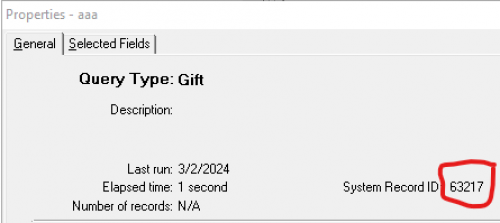
- Once the query is saved, click File > Properties on the query window to get the System Record ID of the query
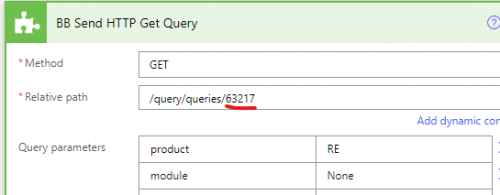
- Create a Power Automate Flow that uses the Blackbaud Add-in's Send HTTP Request action to issue a Get Query API call on this system record id.
- See @Ben Regier post on how to do BB's Send HTTP Request action here: https://community.blackbaud.com/forums/viewtopic/586/62295
- Running the flow will get you a starting point for the request body, copy it out to a text editor
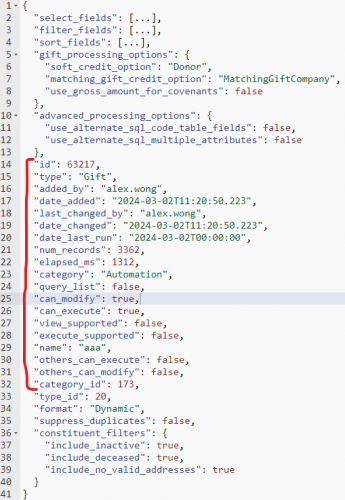
- You will want to first delete line 14 through 32 as seen with the red line above, those are JSON data specific to the saved query info, but not needed for Ad-hoc querying
- Then what you want to do is some editing in the select_fields, filter_fields, and sort_fields array JSON.
- For example, we want to go from this:
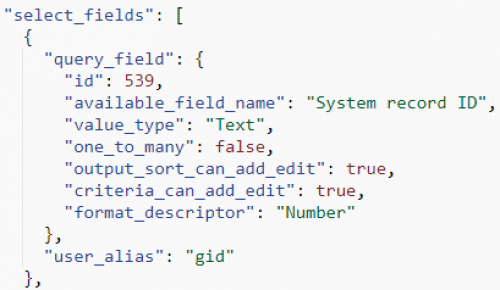
- to
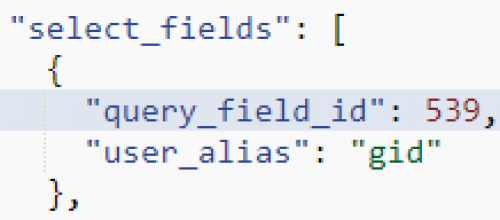
- so basically, delete the highlighted below and add an underscore between query_field and id
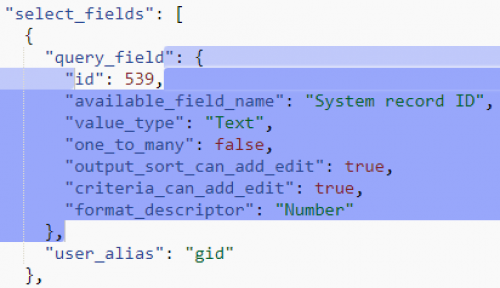
- You will do this for every select query fields, filter query fields, and sort query fields.
- Once you are done with your editing, you are ready to make an Adhoc query call. You will need to “surround” the edited JSON above with {"query": JSON_Edited,"ux_mode": "Asynchronous", "formatting_mode": "None"}
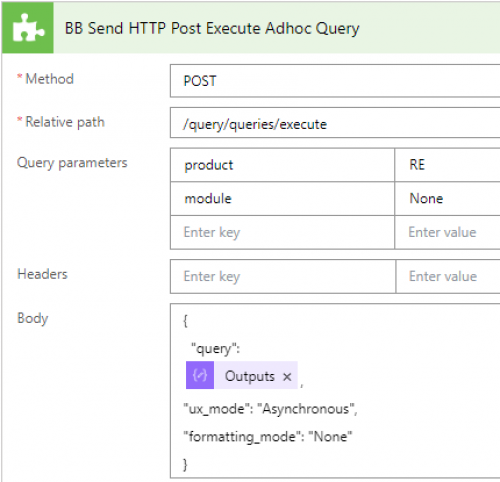
- You can follow the post above for the remainder of the process to loop and check when the query is done processing, and download the csv.
- once you got the process done, you can go ahead and delete the database query you saved, as it will not be useful anymore
Comments
-
Hey, I am looking to get Specific Custom Fields using the nodes below
"nodes": [ { "id": 453, "name": "Specific Custom Fields"The json I get is
{ "nodes": [ { "id": -179000453, "name": "Ask Amount", "fields": [ { "id": 3662, "available_field_name": "Ask Amount Comments", "selected_field_name": "Action Specific Custom Fields Ask Amount Comments", "unique_id": "179", "value_type": "Text", "one_to_many": true, "output_sort_can_add_edit": true, "criteria_can_add_edit": true, "execute_by_id_supported": true, "allowed_filter_operators": [ "Equals", "DoesNotEqual", "RelativeComparisons", "OneOf", "StringComparisons", "Blank", "Ask", "SoundsLike", "OneOfEach" ], "summary_has_available_fields": false, "summary_has_default_filters": false }, { "id": 3735, "available_field_name": "Ask Amount Date", "selected_field_name": "Action Specific Custom Fields Ask Amount Date", "unique_id": "179", "value_type": "Date", "one_to_many": true, "output_sort_can_add_edit": true, "criteria_can_add_edit": true, "execute_by_id_supported": true, "allowed_filter_operators": [ "Equals", "DoesNotEqual", "RelativeComparisons", "OneOf", "Blank", "Ask", "OneOfEach" ], "summary_has_available_fields": false, "summary_has_default_filters": false }, { "id": 3663, "available_field_name": "Ask Amount Description", "selected_field_name": "Action Specific Custom Fields Ask Amount Description", "unique_id": "179", "attribute_type_of_data": "Currency", "value_type": "Text", "one_to_many": true, "output_sort_can_add_edit": true, "criteria_can_add_edit": true, "execute_by_id_supported": true, "allowed_filter_operators": [ "Equals", "DoesNotEqual", "RelativeComparisons", "OneOf", "Blank", "Ask" ], "summary_has_available_fields": false, "summary_has_default_filters": false }, { "id": 3661, "available_field_name": "Ask Amount Import ID", "selected_field_name": "Action Specific Custom Fields Ask Amount Import ID", "unique_id": "179", "value_type": "Text", "one_to_many": true, "output_sort_can_add_edit": true, "criteria_can_add_edit": true, "execute_by_id_supported": true, "allowed_filter_operators": [ "Equals", "DoesNotEqual", "RelativeComparisons", "OneOf", "StringComparisons", "Blank", "Ask", "SoundsLike", "OneOfEach" ], "summary_has_available_fields": false, "summary_has_default_filters": false } ] }, { "id": -191000453, "name": "Ask Response", "fields": [ { "id": 3662, "available_field_name": "Ask Response Comments", "selected_field_name": "Action Specific Custom Fields Ask Response Comments", "unique_id": "191", "value_type": "Text", "one_to_many": true, "output_sort_can_add_edit": true, "criteria_can_add_edit": true, "execute_by_id_supported": true, "allowed_filter_operators": [ "Equals", "DoesNotEqual", "RelativeComparisons", "OneOf", "StringComparisons", "Blank", "Ask", "SoundsLike", "OneOfEach" ], "summary_has_available_fields": false, "summary_has_default_filters": false }, { "id": 3735, "available_field_name": "Ask Response Date", "selected_field_name": "Action Specific Custom Fields Ask Response Date", "unique_id": "191", "value_type": "Date", "one_to_many": true, "output_sort_can_add_edit": true, "criteria_can_add_edit": true, "execute_by_id_supported": true, "allowed_filter_operators": [ "Equals", "DoesNotEqual", "RelativeComparisons", "OneOf", "Blank", "Ask", "OneOfEach" ], "summary_has_available_fields": false, "summary_has_default_filters": false }, { "id": 3663, "available_field_name": "Ask Response Description", "selected_field_name": "Action Specific Custom Fields Ask Response Description", "unique_id": "191", "attribute_type_of_data": "Currency", "value_type": "Text", "one_to_many": true, "output_sort_can_add_edit": true, "criteria_can_add_edit": true, "execute_by_id_supported": true, "allowed_filter_operators": [ "Equals", "DoesNotEqual", "RelativeComparisons", "OneOf", "Blank", "Ask" ], "summary_has_available_fields": false, "summary_has_default_filters": false }, { "id": 3661, "available_field_name": "Ask Response Import ID", "selected_field_name": "Action Specific Custom Fields Ask Response Import ID", "unique_id": "191", "value_type": "Text", "one_to_many": true, "output_sort_can_add_edit": true, "criteria_can_add_edit": true, "execute_by_id_supported": true, "allowed_filter_operators": [ "Equals", "DoesNotEqual", "RelativeComparisons", "OneOf", "StringComparisons", "Blank", "Ask", "SoundsLike", "OneOfEach" ], "summary_has_available_fields": false, "summary_has_default_filters": false } ] } ] } ], "fields": [] }
Do you have an idea how do I need to structure my query to get this data?0 -
@Abdul Asim
I don't know where you copied the json from, but it is not correct.The instruction is the same as what I posted, the only difference is for the specific (custom field, or phone/email, etc), you need an extra property along with the query_field_id: unique_id
"query_field_id": 659,
"unique_id": "640"1 -
Thank you for this. it worked. Now there is another edge case for
{"id": 98840,
"available_field_name": "Blackbaud - AGL Mid online ask amount - NXT",
"selected_field_name": "Blackbaud - AGL Mid online ask amount - NXT",
"unique_id": "5018:5112",
"value_type": "Text",
"one_to_many": true,
"output_sort_can_add_edit": true,
"criteria_can_add_edit": true,
"execute_by_id_supported": true,
"allowed_filter_operators": [
"Equals",
"DoesNotEqual",
"RelativeComparisons",
"OneOf",
"Blank",
"Ask",
"OneOfEach"
],
"summary_has_available_fields": false,
"summary_has_default_filters": false
}
How will the query look for this0 -
@Abdul Asim
I don't understand what your questions is.you said something worked, but I am sure this wouldn't work:
“unique_id”: “5018:5112”
unique_id has to be one number that represent the one attribute (custom field) you are filtering/outputing/sorting.
0 -
@Alex Wong
Yes this didn't so how do you think it should be structured?0 -
@Abdul Asim
I don't understand what you need help with. nor the invalid JSON you sent in your previous post.If you are trying to build the JSON that represent a query, then start by follow the steps I laid out in the post, if you are stuck on a step, then post where you are stuck.
On one hand you said “it worked”. So what has worked? what is the JSON that has worked?
On the other hand, you are saying “edge case” and I don't understand what edge case is not working for you.
You are going to have to give more info to get helped.
0



Categories
- All Categories
- 6 Blackbaud Community Help
- 211 bbcon®
- 1.4K Blackbaud Altru®
- 402 Blackbaud Award Management™ and Blackbaud Stewardship Management™
- 1.1K Blackbaud CRM™ and Blackbaud Internet Solutions™
- 15 donorCentrics®
- 360 Blackbaud eTapestry®
- 2.6K Blackbaud Financial Edge NXT®
- 657 Blackbaud Grantmaking™
- 578 Blackbaud Education Management Solutions for Higher Education
- 3.2K Blackbaud Education Management Solutions for K-12 Schools
- 941 Blackbaud Luminate Online® and Blackbaud TeamRaiser®
- 84 JustGiving® from Blackbaud®
- 6.7K Blackbaud Raiser's Edge NXT®
- 3.8K SKY Developer
- 249 ResearchPoint™
- 120 Blackbaud Tuition Management™
- 165 Organizational Best Practices
- 240 Member Lounge (Just for Fun)
- 34 Blackbaud Community Challenges
- 37 PowerUp Challenges
- 3 (Open) PowerUp Challenge: Grid View Batch
- 3 (Closed) PowerUp Challenge: Chat for Blackbaud AI
- 3 (Closed) PowerUp Challenge: Data Health
- 3 (Closed) Raiser's Edge NXT PowerUp Challenge: Product Update Briefing
- 3 (Closed) Raiser's Edge NXT PowerUp Challenge: Standard Reports+
- 3 (Closed) Raiser's Edge NXT PowerUp Challenge: Email Marketing
- 3 (Closed) Raiser's Edge NXT PowerUp Challenge: Gift Management
- 4 (Closed) Raiser's Edge NXT PowerUp Challenge: Event Management
- 3 (Closed) Raiser's Edge NXT PowerUp Challenge: Home Page
- 4 (Closed) Raiser's Edge NXT PowerUp Challenge: Standard Reports
- 4 (Closed) Raiser's Edge NXT PowerUp Challenge: Query
- 797 Community News
- 3K Jobs Board
- 54 Blackbaud SKY® Reporting Announcements
- 47 Blackbaud CRM Higher Ed Product Advisory Group (HE PAG)
- 19 Blackbaud CRM Product Advisory Group (BBCRM PAG)