RE NXT query and accents





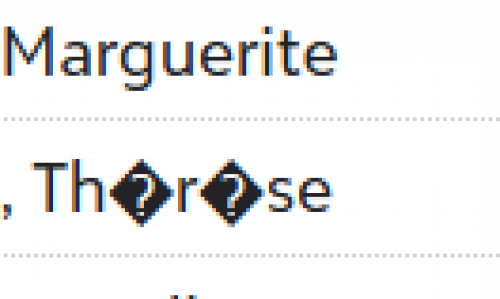
I'm wondering if any users have issues with RE NXT properly displaying accented letters? Is there a browser setting that can fix this? The black diamonds also carry into Power BI and we have to replace them back with unaccented letters…
e.g.
Comments
-
@F Omer
What is the origin of the data? If this data is coming in from imports, is the data being imported stored in UTF-8-BOM encoded files?0 -
in case anyone interested.



This is from RE database schema table, screenshotting some of the “name” fields. they are VARCHAR(), not NVARCHAR. NVARCHAR is what is capable of special characters. So this is a hard database table limitation, something that isn't easy to change.
By the way, the number after VARCHAR indicates the number of characters (byte) that can be stored. So in case you are wondering, first name limit is 50 characters, last name is 100, and org name is 60.
2 -
@Don Burrhus
It's a combination of imports and manual entry… they show up perfectly fine in excel and csv exports, merges, etc. Also fine in other areas of NXT like their record, lists, reports. It's just appears to be in NXT query from what we see…0 -
@Alex Wong
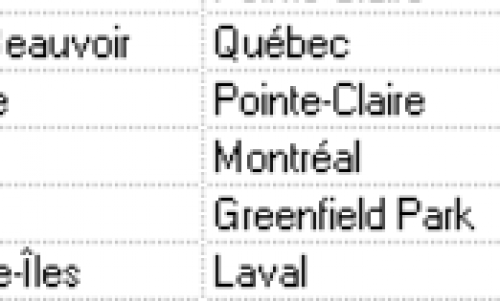
Thanks for the info! Is it possible this is specific to Canadian databases? I do see plenty of special characters in names and addresses, which is common for Quebec donorse.g.
 0
0 -
@F Omer
I am in the united states, so can only speak for how RE is in U.S.But VARCHAR “can” store some accent characters, so that's why I didn't specifically say accent character, but special characters.
You can search google on what T-SQL VARCHAR can store.
It is entirely possible that another country's RE database has a different data type used, but I wouldn't know. Something Blackbaud may need to help answer @Crystal Bruce or @Erik Leaver maybe able to get internal answer from Blackbaud.
1 -
@F Omer In a past job, I had access to RE databases for the US, Canada, the UK and Australia and all of them had some functionality with characters beyond the standard English alphabet in RE7, but none of them worked for all characters. I've also seen plenty of cases where those characters can be entered into RE7, but not cleanly exported back out.
0 -
@Christine Robertson
Thanks! Just to be clear, the accented letters look fine everywhere else (in db view, exports and even in the rest of the web view). As far as I see, it's only in the Web view query where we see this black diamond character… it's a mystery0 -
@F Omer Glad that you have what you need in RE7. I just wouldn't use web view to export information out until this is fixed there. You might log it as an Idea in the Idea Bank if it isn't there already.
2 -
@F Omer Taking a guess here, do your problematic accented characters happen to be in notes?
Having worked with hundreds of large multi-lingual organizations, I feel your pain. Often times, the issue is at the import level. RE DB view only likes Windows 1252 (if memory serves that's the right number). Importing a UTF-8 file will cause issues with all accented characters. However you will have the issue both in DB view and Web View.
When importing with proper encoding, or simply manually adding data through the UI (DB or Web), there is generally no issue in almost all fields.
We have noticed some issues in the notes fields or other long text field. There are some differences between the Web view and DB view for some of these fields (ex ability to add formatting). We have found that adding a note with accented characters in one view can cause character issues in the other view.With that in mind, and considering that the DB view will eventually be phased out, what we recommend our clients is to make sure the Web view works properly (enter notes through Web View), and continue to shift users to the Web view.
1












Categories
- All Categories
- 6 Blackbaud Community Help
- 213 bbcon®
- 1.4K Blackbaud Altru®
- 403 Blackbaud Award Management™ and Blackbaud Stewardship Management™
- 1.2K Blackbaud CRM™ and Blackbaud Internet Solutions™
- 15 donorCentrics®
- 360 Blackbaud eTapestry®
- 2.6K Blackbaud Financial Edge NXT®
- 656 Blackbaud Grantmaking™
- 577 Blackbaud Education Management Solutions for Higher Education
- 3.2K Blackbaud Education Management Solutions for K-12 Schools
- 940 Blackbaud Luminate Online® and Blackbaud TeamRaiser®
- 84 JustGiving® from Blackbaud®
- 6.7K Blackbaud Raiser's Edge NXT®
- 3.7K SKY Developer
- 249 ResearchPoint™
- 119 Blackbaud Tuition Management™
- 165 Organizational Best Practices
- 241 Member Lounge (Just for Fun)
- 34 Blackbaud Community Challenges
- 37 PowerUp Challenges
- 3 (Open) PowerUp Challenge: Grid View Batch
- 3 (Closed) PowerUp Challenge: Chat for Blackbaud AI
- 3 (Closed) PowerUp Challenge: Data Health
- 3 (Closed) Raiser's Edge NXT PowerUp Challenge: Product Update Briefing
- 3 (Closed) Raiser's Edge NXT PowerUp Challenge: Standard Reports+
- 3 (Closed) Raiser's Edge NXT PowerUp Challenge: Email Marketing
- 3 (Closed) Raiser's Edge NXT PowerUp Challenge: Gift Management
- 4 (Closed) Raiser's Edge NXT PowerUp Challenge: Event Management
- 3 (Closed) Raiser's Edge NXT PowerUp Challenge: Home Page
- 4 (Closed) Raiser's Edge NXT PowerUp Challenge: Standard Reports
- 4 (Closed) Raiser's Edge NXT PowerUp Challenge: Query
- 796 Community News
- 3K Jobs Board
- 54 Blackbaud SKY® Reporting Announcements
- 47 Blackbaud CRM Higher Ed Product Advisory Group (HE PAG)
- 19 Blackbaud CRM Product Advisory Group (BBCRM PAG)