Creating Screening Plans





Those who use “Screening Plans” for their Volunteers: would anyone mind sharing some examples of what they have as ‘Screening Plans’. The BBCRM Help just says “Add a Name and Description” of your Screening Plan, so were not sure exactly what is suppose to go in here….
Is it just something like “Screening Plan for Lifeguards” and the Actions are “Complete CPR Training”, “Get Police Check”, etc. Is this the intent?
Comments
-
@David Webb - That is how we have set them up at The Nature Conservancy. Most of ours have only 2 steps in them. The steps vary but are things like completed volunteer application, signed waiver, completed a certain training, etc.
0 -
@David Webb, screening plans can be used for a variety of steps a volunteer may need to complete before becoming eligible for service. A common set of steps would include signing a data protection or confidentiality agreement and completion of a training/onboarding session. If the volunteer is going to work with children, the screening plan would incorporate a criminal background check, etc. The purpose is to track the steps necessary to complete in order to start the volunteer role with the organization.
 0
0 -
@Clint Grossnickle
Thanks for the input!With regards to Assigning Volunteers to a Job, the JSWB don't seem to match the actual functionality of the Tasks in the Volunteer Functional Area: it says to “ go to Job openings and Click the expand icon next to the job opening.” There is no such icon that I can see. The slide image for this action is a calendar view, which I get get to by going to a Job Occurrence and click “Schedule” under the Chevron. But if I click “Assign Volunteers” button select Volunteers from the list that displays in the “Assign Volunteers for” screen that pops up, nothing appears on those Volunteer's constituent records? Is it suppose to? Is this the right way to do it?
0 -
@David Webb, if your job occurrence has more volunteers needed than assigned, you will see the schedule icon appear under the job in the openings list.
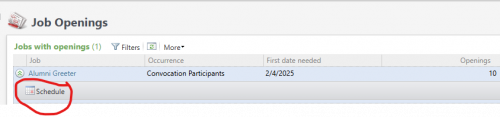
After assigning the volunteer to the job occurrence, the assigned job appears in the next job assigned under the volunteer summary on the constituent record. A data list can also be configured that lists all assigned jobs with filters for dates, volunteer type, etc. Let me know if you need assistance with creation of the data list.
 0
0 -
That would be helpful @Clint Grossnickle!
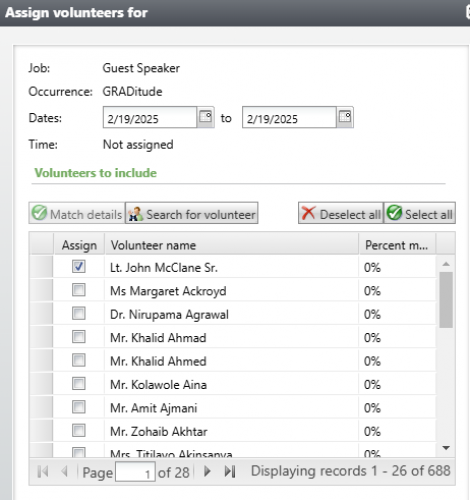
Plus, I have in our ‘tr’ environment Assigned “John McClane" to the “Guest Speaker” Job at Occurrence “GRADitude”, but that doesn't show up under his ‘Next Job’ field under “Volunteer -→ General”. Also it shows he's a 0% Match for this Job & Occurrence, even though he has the Traits associated with this Job, and Availability. What else is that matching on?
 0
0 -
@David Webb, while the volunteer was a match, you specified his availability was during the weekend, during this period, and the occurrence is scheduled on a Wednesday. I updated his availability to weekdays and now he is a 100% match. If the volunteer doesn't have availability, then they won't match regardless if they match on the volunteer type and trait(s).
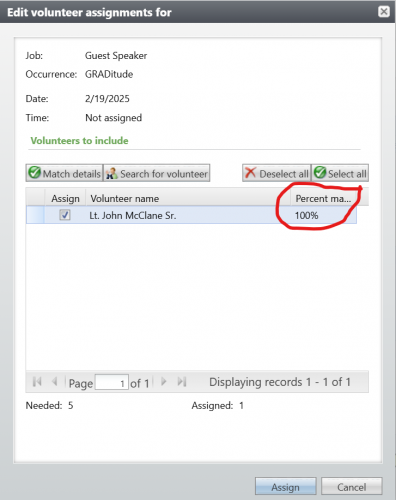
I also assigned the volunteer to the occurrence and it now appears as the next job assigned.

Happy to meet with you to discuss the volunteer functionality in more detail.
0





Categories
- All Categories
- 6 Blackbaud Community Help
- 211 bbcon®
- 1.4K Blackbaud Altru®
- 402 Blackbaud Award Management™ and Blackbaud Stewardship Management™
- 1.1K Blackbaud CRM™ and Blackbaud Internet Solutions™
- 15 donorCentrics®
- 360 Blackbaud eTapestry®
- 2.6K Blackbaud Financial Edge NXT®
- 657 Blackbaud Grantmaking™
- 577 Blackbaud Education Management Solutions for Higher Education
- 3.2K Blackbaud Education Management Solutions for K-12 Schools
- 941 Blackbaud Luminate Online® and Blackbaud TeamRaiser®
- 84 JustGiving® from Blackbaud®
- 6.7K Blackbaud Raiser's Edge NXT®
- 3.7K SKY Developer
- 248 ResearchPoint™
- 120 Blackbaud Tuition Management™
- 165 Organizational Best Practices
- 240 Member Lounge (Just for Fun)
- 34 Blackbaud Community Challenges
- 37 PowerUp Challenges
- 3 (Open) PowerUp Challenge: Grid View Batch
- 3 (Closed) PowerUp Challenge: Chat for Blackbaud AI
- 3 (Closed) PowerUp Challenge: Data Health
- 3 (Closed) Raiser's Edge NXT PowerUp Challenge: Product Update Briefing
- 3 (Closed) Raiser's Edge NXT PowerUp Challenge: Standard Reports+
- 3 (Closed) Raiser's Edge NXT PowerUp Challenge: Email Marketing
- 3 (Closed) Raiser's Edge NXT PowerUp Challenge: Gift Management
- 4 (Closed) Raiser's Edge NXT PowerUp Challenge: Event Management
- 3 (Closed) Raiser's Edge NXT PowerUp Challenge: Home Page
- 4 (Closed) Raiser's Edge NXT PowerUp Challenge: Standard Reports
- 4 (Closed) Raiser's Edge NXT PowerUp Challenge: Query
- 796 Community News
- 3K Jobs Board
- 54 Blackbaud SKY® Reporting Announcements
- 47 Blackbaud CRM Higher Ed Product Advisory Group (HE PAG)
- 19 Blackbaud CRM Product Advisory Group (BBCRM PAG)