Acknowledgement Report with Donor Advised Funds





Hi,
I am creating a gift export to use for generating acknowledgement letters. Since we hard credit the DAF, I am limited in the information I can pull on the soft credited constituent in the export. The only thing I can pull is ID and Name, however I would like to pull their address, salutation, etc. so that I can use this for the letter.
Does anyone have a suggestion for how to do this? I realize I could create a constituent query but I don't want to miss seeing any gifts and ensure that I can pull gifts from a certain time period.
Is a constituent query the best way to do this and just put parameters on the export criteria for giffts?
Thanks!
Comments
-
@Carly Foland
in a gift query, you are not going to get the soft credit's receipeient's contact info directly. there are few ways I can think of, but none is direct.- run gift query, use query option to soft credit recipient with grid amount. When you output the constituent info from the Constituent section, you will get the soft credit's ID, name, address, etc.
- This method's problem is going to be with multiple soft credit, IF your org does not allow soft credit to multiple, then your query is good to go, but
- IF your org does allow multiple soft credit, then your amount column is not going to work out as it will export the gift amount for the WHOLE of the gift, not just the soft credited amount. In this case, you will need to work with “DUP” record rows. Output from the “Soft Credits” section in the gift query for the soft credit receipient's ID and amount. You will get duplicates rows for each soft credit. (if a gift has 2 soft credits, there will be 4 rows of data). You can use a simple excel formula where Constituent ID column = Soft Credit Recipient ID column, and delete the row that has FALSE. the remaining TRUE rows will have the soft credit amount column you need for proper acknowlegement.
- Run 1 gift query on the gifts you want to do acknowledgement for. use Query Option that select soft credit to Donor. In your output, you will output the Soft Credits section's Soft Credit Recipient ID column. THEN you will need to run a Constituent query, and copy the Soft Credit Recipient ID from the gift query export and do “one of” as criteria and output the info you need (making sure you output Constituent ID column). Then use XLOOKUP in excel to wrong the constituent info into the gift export.
- IF you are self hosted and know the RE Database Schema, you can run a SQL Query to do this in one shot, if you can do this route, I can help you with the SQL statement to execute
- If you are RE NXT, you can do this using SKY API, but will require some learning curve
Maybe there is another way to do this that I'm not aware of, but #1 option is probably the least technical
0 - run gift query, use query option to soft credit recipient with grid amount. When you output the constituent info from the Constituent section, you will get the soft credit's ID, name, address, etc.
-
@Carly Foland We use RE Mail Donor Acknowledgements Letter and we have no issue when it comes to DAVF, it will pull the soft-credit of the individual.
1 -
@Alex Wong
Thank you so much! I am going to do some research on your 3rd and 4th options. I have been taking the Cons IDs from the soft credit export and building a query to get the address info, like you suggested in #2, but it's just cumbersome. I appreciate your advice!0 -
@Joe Moretti I'm wondering if you could share how you do this. In my Acknowledgement letter export it only allows me to choose the Contact for the Org.
How are you able to pull the soft credit info in WBV?0 -
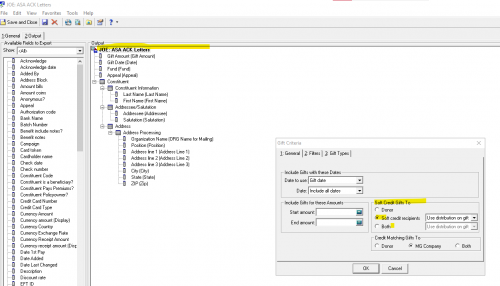
@Candy Reichert We do not use an Export, we use RE MAIL: Donor Acknowledgement Letters. On the General tab/Soft Credit Gifts to, choose either BOTH (what we do) or SOFT CREDIT RECIPIENTS. If you choose BOTH the DAF will appear in the letters (and you can remove them) and the soft credit (the donor) will appear. If you use SOFT CREDIT RECIPIENTS, on the the soft credit person will show and not the DAF. The only downside to this is if you have a couple who each have their own record the spouse gets soft credited, the spouse will appear and not the main person. But whether you use Export or RE MAIL Donor Acknowledge Letters, this is a way more simple approach than what I have heard others do and we never had any issues.

If you do use an export, you can do the same thing. On the Export, right click on the Top line of the Output and click on Criteria and choose either for the Soft Credit Gifts to of either Soft credit recipients or both. Make sure you query you are attaching is a gift query. And that on the query options you choose for the Credit Soft Credits to (in the Record Processing) you pick Recipient or Both. Also in your query, if you code your DAFs a certain way, have the query say DOES NOT EQUAL DAF (that is if you code your DAF in RE, which is always a good idea. We you an attribute for that, but as long as you code it somewhere, you can use that.
 1
1











Categories
- All Categories
- 6 Blackbaud Community Help
- 213 bbcon®
- 1.4K Blackbaud Altru®
- 403 Blackbaud Award Management™ and Blackbaud Stewardship Management™
- 1.1K Blackbaud CRM™ and Blackbaud Internet Solutions™
- 15 donorCentrics®
- 360 Blackbaud eTapestry®
- 2.6K Blackbaud Financial Edge NXT®
- 656 Blackbaud Grantmaking™
- 577 Blackbaud Education Management Solutions for Higher Education
- 3.2K Blackbaud Education Management Solutions for K-12 Schools
- 939 Blackbaud Luminate Online® and Blackbaud TeamRaiser®
- 84 JustGiving® from Blackbaud®
- 6.6K Blackbaud Raiser's Edge NXT®
- 3.7K SKY Developer
- 248 ResearchPoint™
- 119 Blackbaud Tuition Management™
- 165 Organizational Best Practices
- 241 Member Lounge (Just for Fun)
- 34 Blackbaud Community Challenges
- 37 PowerUp Challenges
- 3 (Open) PowerUp Challenge: Grid View Batch
- 3 (Closed) PowerUp Challenge: Chat for Blackbaud AI
- 3 (Closed) PowerUp Challenge: Data Health
- 3 (Closed) Raiser's Edge NXT PowerUp Challenge: Product Update Briefing
- 3 (Closed) Raiser's Edge NXT PowerUp Challenge: Standard Reports+
- 3 (Closed) Raiser's Edge NXT PowerUp Challenge: Email Marketing
- 3 (Closed) Raiser's Edge NXT PowerUp Challenge: Gift Management
- 4 (Closed) Raiser's Edge NXT PowerUp Challenge: Event Management
- 3 (Closed) Raiser's Edge NXT PowerUp Challenge: Home Page
- 4 (Closed) Raiser's Edge NXT PowerUp Challenge: Standard Reports
- 4 (Closed) Raiser's Edge NXT PowerUp Challenge: Query
- 794 Community News
- 2.9K Jobs Board
- 54 Blackbaud SKY® Reporting Announcements
- 47 Blackbaud CRM Higher Ed Product Advisory Group (HE PAG)
- 19 Blackbaud CRM Product Advisory Group (BBCRM PAG)