Import Invoices Into Webview





Has any been able to successfully import invoices into webview? Is the distribution to accounts on the import working?
Comments
-
@Carolyn White
Hello, no I didn't even know this feature was available yet. It would be good to know if it doesn't work as expected.0 -
@Carolyn White
if you are referring to FE NXT Accounts Payable invoices, Omatic Software has an Omatic Cloud integration solution for getting vendor and invoice data from third-party systems (or even just a spreadsheet) into FE NXT Accounts Payable. Please get in touch with us at info@omaticsoftware.com for further information.0 -
@Carolyn White I have! It is very easy to use if you had been doing imports via the database view previously and have your settings created.
When I tried importing invoices a couple of months ago it was a disaster, but they have fully moved the database view “process” into NXT and it works very well. Let me know if you have any questions.
0 -
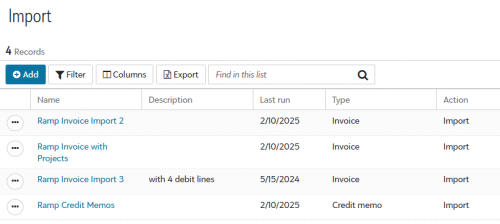
@Carolyn White This is what I mean by having the setups done previously. I use this to import all my Ramp invoices that we pay via the AP side of the Ramp credit card system.
 0
0 -
@Stu Manewith Thanks. We already have a system that creates the file - I just need to figure out how to get it into FE.
1 -
@Tanya Bakken This is great news. Maybe I can touch base with you in a week or so. I have some items to check off my to do list and then tackle this. Still waiting on the support desk to get back to me as well.
1 -
@Tanya Bakken We have tried to use our old file set up to do an import in webview but we do not see how we actually do the import. We are trying to find a support document and can't find anything. The mapping does not work like database and we have no import button. Any advice?
0 -
@Ashli Snow My FENXT is extremely slow today as I was going to do a screen recording.
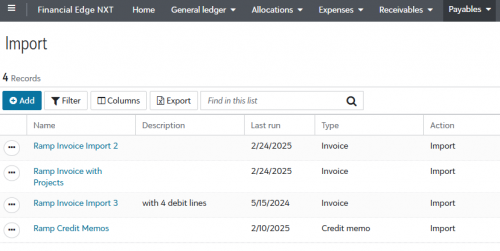
Go to Payables - Import and the set ups that I had in database are set up for me there. I pick out the template I am going to import with, add the file I am importing, and then click next and make sure the fields line up as they should. I then save and validate, then do it again and Run the import.
 1
1 -
@Carolyn White we have been successful at the import. just getting used to the steps
0 -
@Carolyn White In Web view there is a lot of unnecessary options which made it very confusing for us. They removed the Database view and we could not verify what we previously used. Our template we used in database did migrate over. We use “Vendor ID” as import match. We did need to change that toggle at the bottom of WebView because there was two options to choose from. Other than that, all we needed was the Import at the top and Validation. Someone else here did a good job of explaining how to run it after making your selections. The other notable change is now we can replace the file every time instead of using a template on a mapped drive. Good luck!
0 -
@Dawn Asbury. Thanks. My file options (from database) are there but the mapping has disappeared. Do you know which article/question this is “Someone else here did a good job of explaining how to run it after making your selections” as I can't seem to find it. Thanks
0 -
@Carolyn White that is awful. Thankfully our mapping came over. Not kidding, I would cry if it did not. The only reason I have a template is because a predecessor had a template I could copy.
These are the instructions the help desk gave me:
If you want to import vendor in FENXT, then you do not need to choose update option import but the import option
If you want to import a vendor in FENXT, please follow these steps:
- Navigate to Payable.
- Select Import.
- Click on Add.
- Choose Vendor and click Next.
- Choose Import (do not select the update option).
- Select Validate data only and click Next.
- Map the fields and save.
- Click on the three dots of the created record and validate.
- If the validation is successful, uncheck the Validate only box and save.
- Click on the three dots again and run the import.
This will import the vendor data into your system.
Also please refer below video for your reference
Tanya Bakken had the explanation I was referring to. It did not have any instructions on mapping.
1 -
Is there a button in the Web View for updating all fields from a file at once? With this button gone, this is a huge downgrade in my opinion.

Before, it was easy to do a mass import and have the fields automatically update. I do not see this functionality in Web View. This means that I either have to update the file layout manually, which is very slow, or use Excel to create a summary file instead of a horitzontal output file to reduce the number of entries.
0











Categories
- All Categories
- 6 Blackbaud Community Help
- 211 bbcon®
- 1.4K Blackbaud Altru®
- 402 Blackbaud Award Management™ and Blackbaud Stewardship Management™
- 1.1K Blackbaud CRM™ and Blackbaud Internet Solutions™
- 15 donorCentrics®
- 360 Blackbaud eTapestry®
- 2.6K Blackbaud Financial Edge NXT®
- 656 Blackbaud Grantmaking™
- 577 Blackbaud Education Management Solutions for Higher Education
- 3.2K Blackbaud Education Management Solutions for K-12 Schools
- 941 Blackbaud Luminate Online® and Blackbaud TeamRaiser®
- 84 JustGiving® from Blackbaud®
- 6.7K Blackbaud Raiser's Edge NXT®
- 3.7K SKY Developer
- 248 ResearchPoint™
- 120 Blackbaud Tuition Management™
- 165 Organizational Best Practices
- 240 Member Lounge (Just for Fun)
- 34 Blackbaud Community Challenges
- 37 PowerUp Challenges
- 3 (Open) PowerUp Challenge: Grid View Batch
- 3 (Closed) PowerUp Challenge: Chat for Blackbaud AI
- 3 (Closed) PowerUp Challenge: Data Health
- 3 (Closed) Raiser's Edge NXT PowerUp Challenge: Product Update Briefing
- 3 (Closed) Raiser's Edge NXT PowerUp Challenge: Standard Reports+
- 3 (Closed) Raiser's Edge NXT PowerUp Challenge: Email Marketing
- 3 (Closed) Raiser's Edge NXT PowerUp Challenge: Gift Management
- 4 (Closed) Raiser's Edge NXT PowerUp Challenge: Event Management
- 3 (Closed) Raiser's Edge NXT PowerUp Challenge: Home Page
- 4 (Closed) Raiser's Edge NXT PowerUp Challenge: Standard Reports
- 4 (Closed) Raiser's Edge NXT PowerUp Challenge: Query
- 796 Community News
- 3K Jobs Board
- 54 Blackbaud SKY® Reporting Announcements
- 47 Blackbaud CRM Higher Ed Product Advisory Group (HE PAG)
- 19 Blackbaud CRM Product Advisory Group (BBCRM PAG)