Adding a middle school class to an upper school transcript





This year my school is offering Biology at our middle school for high school credit. I need to find a way to add just this middle school Biology class to our upper school transcript but was told by support that this isn't possible - either all classes show up or none do. Is there anyone who has successfully made this work at their school? And also, what does the “print on transcript” checkbox in Course setup mean if not to signify that something should print on a transcript or not?
Comments
-
@Lisa Ulery
I have that issue with a few MS students that take HS classes. Our teacher has to have 2 grade books (one for MS and one for HS). If you want the high school class to show up on the MS report card/transcript, you will need to set it up accordingly on both campuses.However, if you just want the high school class to show up on the transcript once the student becomes a high school student I add as a transfer grade. Which means create a transfer school in CORE>school information>organizations>Add organization that says school year - 8 MS name:
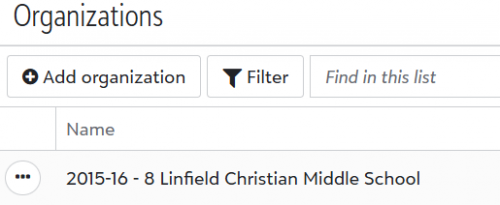
Make sure you add the transfer school enrollment to the student in CORE as well. Then input the grade in Academics>Grades management>Enter grades by student under transfer. Then it will show on the transcript as follows:

Hopefully that makes sense to you. If you have any questions, you may contact me directly either via email tmoore@linfield.com or phone 951.676.8111 x1354.
1 -
@Lisa Ulery - There is a neat hack to help schools work around this issue. We have used it for the past 3 years, and it works like a charm. I believe one of the power users in the community introduced me to this.
Create an activity in the upper school named Transcript Print. We offer the activity and create 1 section named with the current academic year. For any student in the middle school who is taking a course that needs to appear on the upper school transcript, enroll them in the activity for the year they are enrolled in that course. This tricks the system into thinking the student is an Upper School student that year.
Note: We do not produce middle school transcripts so all of our middle school courses except those we want to appear on the upper school transcript are flagged not to appear on the transcript.
Hope that might help. It has saved us many hours of repetitive work.
Scott
1 -
@Toni Moore and @Lisa Ulery
For our middle school students, if it needs to be on their transcript …. we list the high school as a “transfer” school in core so it comes up in its own column on the transcript.
1 -
@Lisa Ulery - We take a different approach solving to this situation. When a MS student takes an US course, we want that noted on the MS transcript with a notation that it earned a US credit. (We do this for the benefit of students who are transferring to another school from our MS, and for students applying to competitive summer programs.) We don't want to produce a US transcript for those students.
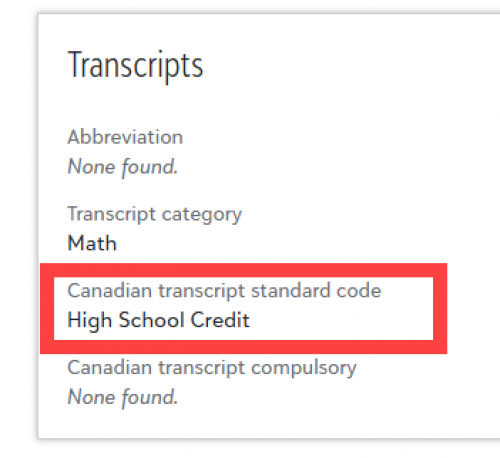
The course itself appears on the MS transcript without any extra effort. To add the notation that the course earns a US credit, we use a field that is otherwise irrelevant to us: Canadian Transcript Standard Code. (We are in Texas, so we don't have to deal with that.)
On the MS transcript, we add a column for the Standard Code to the Course section (along with the year-end grade and credit count).
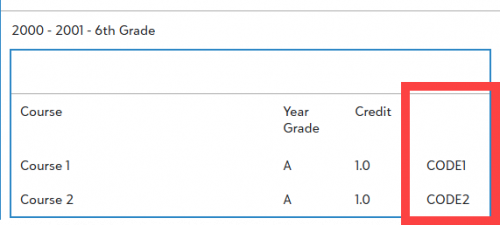
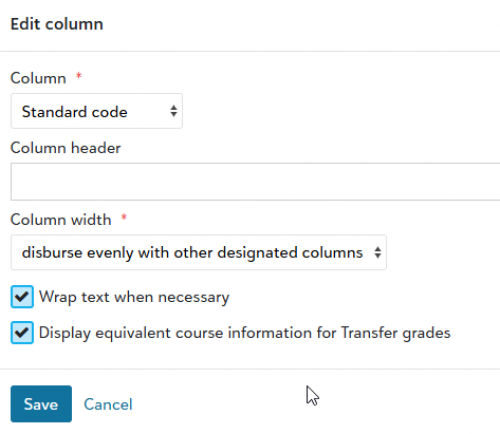
In the course record for any US course that MS students could take (some math classes, some language classes), we add text ("High School Credit") to the course record.
 1
1 -
@Brian Gray do you have an example of what this looks like on a student transcript? Does it appear with the school year?
0 -
@Lisa Ulery - Here's a screenshot of a transcript that shows the US credit earned last year. It appears on our MS transcript, which shows classes taken in 6th, 7th, and 8th grades.
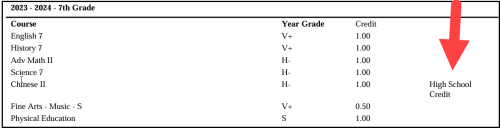
Chinese II is a course in our Upper School.
0 -
@Toni MooreThank you so much! That was incredibly helpful. We are struggling with this issue, and are still using the old template builder. But using your naming convention will totally solve our problem. Much appreciated!
0











Categories
- All Categories
- 6 Blackbaud Community Help
- 213 bbcon®
- 1.4K Blackbaud Altru®
- 400 Blackbaud Award Management™ and Blackbaud Stewardship Management™
- 1.1K Blackbaud CRM™ and Blackbaud Internet Solutions™
- 15 donorCentrics®
- 360 Blackbaud eTapestry®
- 2.6K Blackbaud Financial Edge NXT®
- 655 Blackbaud Grantmaking™
- 576 Blackbaud Education Management Solutions for Higher Education
- 3.2K Blackbaud Education Management Solutions for K-12 Schools
- 939 Blackbaud Luminate Online® and Blackbaud TeamRaiser®
- 84 JustGiving® from Blackbaud®
- 6.6K Blackbaud Raiser's Edge NXT®
- 3.7K SKY Developer
- 248 ResearchPoint™
- 119 Blackbaud Tuition Management™
- 165 Organizational Best Practices
- 241 Member Lounge (Just for Fun)
- 34 Blackbaud Community Challenges
- 34 PowerUp Challenges
- 3 (Open) PowerUp Challenge: Chat for Blackbaud AI
- 3 (Closed) PowerUp Challenge: Data Health
- 3 (Closed) Raiser's Edge NXT PowerUp Challenge: Product Update Briefing
- 3 (Closed) Raiser's Edge NXT PowerUp Challenge: Standard Reports+
- 3 (Closed) Raiser's Edge NXT PowerUp Challenge: Email Marketing
- 3 (Closed) Raiser's Edge NXT PowerUp Challenge: Gift Management
- 4 (Closed) Raiser's Edge NXT PowerUp Challenge: Event Management
- 3 (Closed) Raiser's Edge NXT PowerUp Challenge: Home Page
- 4 (Closed) Raiser's Edge NXT PowerUp Challenge: Standard Reports
- 4 (Closed) Raiser's Edge NXT PowerUp Challenge: Query
- 790 Community News
- 2.9K Jobs Board
- 53 Blackbaud SKY® Reporting Announcements
- 47 Blackbaud CRM Higher Ed Product Advisory Group (HE PAG)
- 19 Blackbaud CRM Product Advisory Group (BBCRM PAG)