Expense Manager: Non-Financial User Access





Hello,
Our organization has recently converted from using a 3rd party invoicing system to utilizing the Expense Management tab in FE NXT. Most of this migration was pretty smooth, however we have had some questions from users that I am helping someone can let me know if they have found a work around for this?
We have a majority of our organization set up with limited access so that they are only able to use expense management tab - however because Blackbaud does not allow the invoices to be paid until fully approved (& in the payables module) - our users without payables access have no way of seeing if the invoice has been paid and therefore our AP team has to continuously dig into invoice details.
Even if we tried to create a report (i.e. show me the status of all invoices added by XXXX) this is not possible because of the invoices in the payable's module are shown as “created by” the last invoice approver rather than the original requestor.
Has anyone thought of a work around, or suggested that Blackbaud should allow original invoice requestors to see that the invoice has been paid within the expense management module?
Thanks!
Comments
-
@Mikayla Owens
We have given many of our non financial users ‘Read Only’ access to Payables. This gives them the opportunity to research invoice status. We did removed media from non financial users since we do upload W-9 info there. Also removed bank info viewing. Blackbaud is extremely customizable for user permissions. We had a ‘Read Only’ role for each module in case others need that very limited access.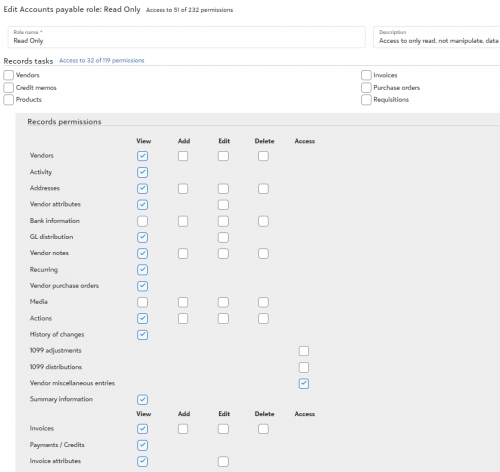 1
1 -
@Kristy Soular
Hi Kristy,Thanks so much for your response - we are exploring this as an option for our non-financial user!
0




Categories
- All Categories
- 6 Blackbaud Community Help
- 213 bbcon®
- 1.4K Blackbaud Altru®
- 401 Blackbaud Award Management™ and Blackbaud Stewardship Management™
- 1.1K Blackbaud CRM™ and Blackbaud Internet Solutions™
- 15 donorCentrics®
- 360 Blackbaud eTapestry®
- 2.6K Blackbaud Financial Edge NXT®
- 655 Blackbaud Grantmaking™
- 576 Blackbaud Education Management Solutions for Higher Education
- 3.2K Blackbaud Education Management Solutions for K-12 Schools
- 939 Blackbaud Luminate Online® and Blackbaud TeamRaiser®
- 84 JustGiving® from Blackbaud®
- 6.6K Blackbaud Raiser's Edge NXT®
- 3.7K SKY Developer
- 248 ResearchPoint™
- 119 Blackbaud Tuition Management™
- 165 Organizational Best Practices
- 241 Member Lounge (Just for Fun)
- 34 Blackbaud Community Challenges
- 34 PowerUp Challenges
- 3 (Open) PowerUp Challenge: Chat for Blackbaud AI
- 3 (Closed) PowerUp Challenge: Data Health
- 3 (Closed) Raiser's Edge NXT PowerUp Challenge: Product Update Briefing
- 3 (Closed) Raiser's Edge NXT PowerUp Challenge: Standard Reports+
- 3 (Closed) Raiser's Edge NXT PowerUp Challenge: Email Marketing
- 3 (Closed) Raiser's Edge NXT PowerUp Challenge: Gift Management
- 4 (Closed) Raiser's Edge NXT PowerUp Challenge: Event Management
- 3 (Closed) Raiser's Edge NXT PowerUp Challenge: Home Page
- 4 (Closed) Raiser's Edge NXT PowerUp Challenge: Standard Reports
- 4 (Closed) Raiser's Edge NXT PowerUp Challenge: Query
- 792 Community News
- 2.9K Jobs Board
- 53 Blackbaud SKY® Reporting Announcements
- 47 Blackbaud CRM Higher Ed Product Advisory Group (HE PAG)
- 19 Blackbaud CRM Product Advisory Group (BBCRM PAG)