Assignment Center Updates Coming





Hi Folks -
Thank you all for the feedback you've been providing concerning the new assignment experience. We have been actively listening to the issues that students are facing when engaged with the new workflow, and we have some solutions that I wanted to share with you all.
Overdue assignments are more visible now which is causing anxiety for students and parents
When we introduced the new Missing and Overdue header in the list view, our goal was to bring to the front actionable assignments. What we heard from teachers and admin was that having a way to remind students about missed/overdue work was really important in assisting students with triaging their most important work. While it is possible for students to mark their work ‘Completed’ this is a manual step that students need to take, and that can be a little cumbersome, especially for assignments that act as reminders or don't have any sort of submission method (In the LMS or otherwise).
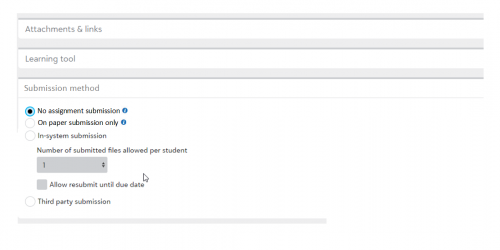
To help resolve this problem, we'll be giving teachers a new setting when adding assignments. In the near future, they will see two new options, “No assignment submission” and “On paper submission only”. When “No assignment submission” is marked, when the Due Date/Time passes, the assignment will automatically move to a ‘Completed’ status and avoid ‘Overdue’ altogether. When “On paper submission only” is selected, the assignment will move to Overdue unless the student manually marks the assignment as Completed, or the teacher Grades/Marks the assignment as ‘Collected’. This should better empower teachers and students alike to create and manage assignments that better align with the work teachers are giving.
Students can't easily track “big” assignments
In the previous assignment center, there was an ‘Active’ view students could utilize that showed assignments from when they were assigned, to when they were due. During our initial round of discovery, we found that this particular view had some value. However, it quickly became very cumbersome over the course of the marking period, often times having 20-30 assignments displaying for a single day. Students also couldn't control which of these assignments displayed or did not display, it was entirely dependent on the date range for the given assignment.
Rather than bring the ‘Active’ view back, we're looking into other potential solutions, like allowing students to Pin assignments and housing those assignments in a different view for them to easily access. This concept is still in the early stages and we're thinking through a couple other options, but I wanted to let you all know this is a problem we're actively investigating.
The assignment center can feel visually overwhelming
The filters that display on the assignment center have been hotly contested. We believe some of this is growing pains with a new experience, but there is a lot of validity in feeling overwhelmed when opening the page for the first time and seeing a long list of filters and icons. It can certainly feel like a lot and we want to give students some control over whether the filters are collapsed or open when landing on the page.
This week, we implemented a ‘sticky’ setting, so if students hide the filters that is then remembered in the session cache. So, if the student navigates to an assignment and back to the assignment center, the filter should now remain hidden. However, once that session cache is cleared, they will default back to an open state. In the future, we'll be adding a setting to allow students to set the default collapsed/open setting themselves when they go to …More > Edit view settings. This should give the student more control over how they like to best see the filters.
There's more that we're looking into, but I wanted to let you all know about some problems we've heard so far and how we plan on solving some of them. If you have any additional pieces of feedback, feel free to reach out to me at michael.morrissette@blackbaud.com. As always, as these updates are rolled out, be sure to read through our ‘What’s New' communication as we'll announce when these features will go live there!
Mike Morrissette
Product Manager, Education Management
Comments
-
@Michael Morrissette
I haven't followed all of the discussion, but I'd love to know if there's anything in the works that would allow parents to have a list of all assignments filterable by status – a couple of times, we've not seen an assignment because it's next week (but would be good to have on our radar) or because it was due last week (and now overdue!).In short: the calendar view is nice…but a list view would be super useful, too. I hope this is helpful!
0 -
@Dan Ciruli
Never mind! My helpful daughter let me know I missed the calendar view/list view affordance in the upper right. Sorry for the bother, and thanks for engaging!0 -
@Michael Morrissette Our teachers would LOVE the ability to have a bulk extension date for assignments; as the system works now, they must manually give an extension. So if they submit late, they lose points, but they can submit.
1 -
@Michael Morrissette Here's some feedback directly from teachers:
- Student's assignment center view:

- “Missing Assignments” window:
- Enable us to remove missing assignments from terms where final grades have been entered. For example, the students don't need to see assignments from Semester 1 during Semester 2, after their Sem 1 grades have been published.
- Sort missing assignments newest to oldest:
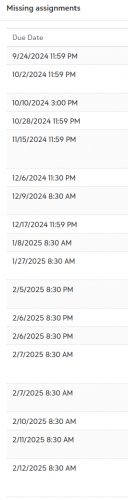
- Add feedback comments to Missing assignments list
- Add “Incomplete Assignments” button to the student assignment center. This is just as important as “Missing assignments"
2. Teacher's assignment options:

- Add “Revision needed" checkbox to Evaluation options. This is different from “Incomplete”,
3. Link feedback/comments to evaluation options. For example, it would be useful to give a student “Revisions needed" feedback, with specific suggestions. Then, there could be a separate “Incomplete” feedback with its own suggestions.
Thanks!
0








Categories
- All Categories
- 6 Blackbaud Community Help
- 213 bbcon®
- 1.4K Blackbaud Altru®
- 401 Blackbaud Award Management™ and Blackbaud Stewardship Management™
- 1.1K Blackbaud CRM™ and Blackbaud Internet Solutions™
- 15 donorCentrics®
- 360 Blackbaud eTapestry®
- 2.6K Blackbaud Financial Edge NXT®
- 655 Blackbaud Grantmaking™
- 576 Blackbaud Education Management Solutions for Higher Education
- 3.2K Blackbaud Education Management Solutions for K-12 Schools
- 939 Blackbaud Luminate Online® and Blackbaud TeamRaiser®
- 84 JustGiving® from Blackbaud®
- 6.6K Blackbaud Raiser's Edge NXT®
- 3.7K SKY Developer
- 248 ResearchPoint™
- 119 Blackbaud Tuition Management™
- 165 Organizational Best Practices
- 241 Member Lounge (Just for Fun)
- 34 Blackbaud Community Challenges
- 34 PowerUp Challenges
- 3 (Open) PowerUp Challenge: Chat for Blackbaud AI
- 3 (Closed) PowerUp Challenge: Data Health
- 3 (Closed) Raiser's Edge NXT PowerUp Challenge: Product Update Briefing
- 3 (Closed) Raiser's Edge NXT PowerUp Challenge: Standard Reports+
- 3 (Closed) Raiser's Edge NXT PowerUp Challenge: Email Marketing
- 3 (Closed) Raiser's Edge NXT PowerUp Challenge: Gift Management
- 4 (Closed) Raiser's Edge NXT PowerUp Challenge: Event Management
- 3 (Closed) Raiser's Edge NXT PowerUp Challenge: Home Page
- 4 (Closed) Raiser's Edge NXT PowerUp Challenge: Standard Reports
- 4 (Closed) Raiser's Edge NXT PowerUp Challenge: Query
- 791 Community News
- 2.9K Jobs Board
- 53 Blackbaud SKY® Reporting Announcements
- 47 Blackbaud CRM Higher Ed Product Advisory Group (HE PAG)
- 19 Blackbaud CRM Product Advisory Group (BBCRM PAG)