AR Invoicing Line Items Failing to Save





Hi is anyone else getting the same error message when trying to update an AR line item?

Once I update the line item in anyway and try to save it states that it is failing to save.
Thank you!
Comments
-
@Tara Makas Hi! Are you still seeing this error message? If so, have you reached out to Blackbaud support? If yes and you received a solution, would you mind sharing it here in case others are seeing the error message? Thanks!
0 -
@Crystal Bruce
Hi Crystal, I did reach out to Blackbaud support as I am not able to invoice/credit memo or do anything with line items needing edits. They were in fact able to duplicate the error message in their test environment and they stated that they were sending it internally to see what is the cause. Sadly we are at a standstill until this can be fixed.0 -
@Crystal Bruce
this is the fix Blackbaud support said to use, which honestly is a bit cumbersome but it at least is working.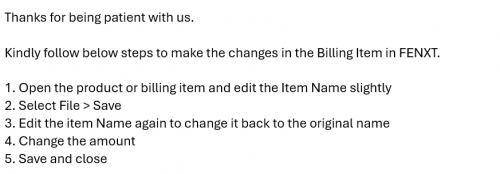
Now if only they can fix this issue with the system thinking every invoice is a duplicate and not letting us invoice. We can only invoice in data base view where it asks us if its a duplicate entry and when we confirm its not, we are able to proceed and save the invoice. In webview, you dont even have that option. It just automatically says its a duplicate and doesn't let you proceed. Sigh. I wish I could get with someone on the developmental team. I use AR all day every day and it seems like AR is having the most issues with the transition by far.
0 -
We are having the same, “We can only invoice in data base view where it asks us if its a duplicate entry and when we confirm its not, we are able to proceed and save the invoice. ”, issue.
Have you been able to find a solution?
0 -
@Jeff Trzaska good morning. I am so sorry for my delayed response. I was out of the office. We did hear back from Blackbaud. This is a known issue where it is stating that the invoice is a duplicate even though business rules allow us to do the invoice in database view. They said that they are now aware of the issue after I brought it to their attention but that there is no expected ETA on when it will be fixed. They advised that we either invoice in database view or change our business rules in webview to remove the duplicate invoice check.
0 -
I am having the same issue as of yesterday. However I can't invoice in database view either, I get the same error message.
0










Categories
- All Categories
- 6 Blackbaud Community Help
- 211 bbcon®
- 1.4K Blackbaud Altru®
- 403 Blackbaud Award Management™ and Blackbaud Stewardship Management™
- 1.2K Blackbaud CRM™ and Blackbaud Internet Solutions™
- 15 donorCentrics®
- 360 Blackbaud eTapestry®
- 2.6K Blackbaud Financial Edge NXT®
- 659 Blackbaud Grantmaking™
- 579 Blackbaud Education Management Solutions for Higher Education
- 3.2K Blackbaud Education Management Solutions for K-12 Schools
- 943 Blackbaud Luminate Online® and Blackbaud TeamRaiser®
- 84 JustGiving® from Blackbaud®
- 6.7K Blackbaud Raiser's Edge NXT®
- 3.8K SKY Developer
- 250 ResearchPoint™
- 120 Blackbaud Tuition Management™
- 165 Organizational Best Practices
- 241 Member Lounge (Just for Fun)
- 36 Blackbaud Community Challenges
- 37 PowerUp Challenges
- 3 (Open) PowerUp Challenge: Grid View Batch
- 3 (Closed) PowerUp Challenge: Chat for Blackbaud AI
- 3 (Closed) PowerUp Challenge: Data Health
- 3 (Closed) Raiser's Edge NXT PowerUp Challenge: Product Update Briefing
- 3 (Closed) Raiser's Edge NXT PowerUp Challenge: Standard Reports+
- 3 (Closed) Raiser's Edge NXT PowerUp Challenge: Email Marketing
- 3 (Closed) Raiser's Edge NXT PowerUp Challenge: Gift Management
- 4 (Closed) Raiser's Edge NXT PowerUp Challenge: Event Management
- 3 (Closed) Raiser's Edge NXT PowerUp Challenge: Home Page
- 4 (Closed) Raiser's Edge NXT PowerUp Challenge: Standard Reports
- 4 (Closed) Raiser's Edge NXT PowerUp Challenge: Query
- 798 Community News
- 3K Jobs Board
- 56 Blackbaud SKY® Reporting Announcements
- 47 Blackbaud CRM Higher Ed Product Advisory Group (HE PAG)
- 19 Blackbaud CRM Product Advisory Group (BBCRM PAG)