NXT Export to .xls





I think this was announced in a town hall-- the ability to export NXT queries as .xls files. Anyone have the functionality yet or know when it might rollout? This is the one thing keeping our org from adopting webview query, because .csv files mess with our data. Thanks!
Comments
-
@Brianna Thompson This is an interesting issue? Is there an issue with the conversion of dates and Constituent IDs? I think there's a way to resolve some of these issues, as .csv shouldn't be causing too many issues. But this is an excel issue, and not necessarily with the file itself.
3 -
@Brianna Thompson I would like to see that option for standard reports also.
1 -
@Brianna Thompson
We export in csv all the time, even from database view. Csv format is considered the most universal format which all other systems (Mailchimp, email services, other databases) can read and recognize, plus it consumes less disc space than an xls file - making it the preferred format for print merging, mailing houses, data appends, cross-system imports, and data storage.As @Dariel Dixon suggested, I'm wondering if there is something else that is needing troubleshooted here. I do recall once long ago, we had issues with date formatting in excel when outputting between csv and xls files, but that was just the excel settings. I tested a csv export just now, and the dates came out fine. The only other processing difference I'm aware of is a difference in merging dollar sign formats when merging csv or xls into a print document, so in the csv file you have to include the dollar sign on the document.
Can you share what problems you're experiencing in your csv data, and we can try to help?
3 -
@Faith Murray @Dariel Dixon Thanks for the replies! Our issue with .csv files is Constituent IDs. They are automatically converted to dates, and when converted back, the data is altered. IE: It converts the data to what the date would be, rather than what the original Constituent ID is. This causes issues when importing the data back into the database.
I can avoid this by using Import Wizard in excel to convert the text file into an .xls, but that option isn't very user friendly for many of our team members who are less comfortable with Excel. Exporting to .xls preserves the Constituent IDs via Excel's settings and would remove a lot of hassle on our end.
I think the option was mentioned in a Town Hall, so maybe this is an issue others have had as well? I've addressed it with tech support a few times without a successful resolution other than the Import Wizard work-around I've come up with.
1 -
@Brianna Thompson It is a common issue. There's a setting in Excel that will have it not convert those IDs to dates. I've since forgotten what it is, but I know it's possible. I remember it happening a lot more in earlier versions of Excel.
Which begs the question, what version of Excel are you using?
I also get this pop up when opening .csv files, which is super helpful as well. I never convert, but I'm glad to get the option to turn off the data conversion.
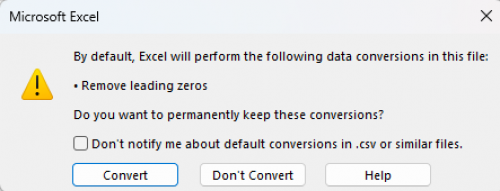
Excel Pop Up Window 4 -
@Brianna Thompson, seconding @Dariel Dixon's question what excel version you are using? I've read this was a big bug in Office 2007. I am on Office 365, and I've tested opening up my csv file and clicking “save as” two different versions, Excel workbook .xlsx, and Excel 97-2003 .xls, and both seem to retain the constituent IDs fine. But then, I get the same pop up box as Dariel, and I always tell it not to convert.
I honestly doubt that BB plans to enable direct excel file exports, because over the past 2 years it has distanced itself from direct integration with Microsoft Office products, for “security reasons”. Now, the only way to integrate with Office is through third-party plugins like Power Automate, but I'm not sure if that would be very helpful for you.
1 -
@Brianna Thompson - Think Dariel is onto something. Try taking a look at this blog, it includes instructions for how to turn off automatic data conversion including converting numbers into a date:
2 -
@Faith Murray it's not just for security reasons despite the fact that is why they initially “ de-integrated ” Word. When BB was providing the integration with Microsoft Word it was an old version of word that was on their servers, that was never updated, in updates or security patches. Word 2010 2011 2012 2016-2019 all came and passed us by while we were still using Word 2003. We were basically being forced to use a palm pilot while the rest of the world was on an iPhone. Microsoft refused to certify that version anymore because of the security risks with this in it, and I don't even think that version is available on anything anymore unless you have an old installation disc. MS has also stopped selling the discs for direct installation of office in any way shape or form, because everything is now only offered as a cloud-based subscription. One of the things that happens as a benefit of that is that you always have the latest and greatest, but you also always get the most current security patches (and yes, glitches). Blackbaud itself doesn't offer us the latest and greatest all the time, so imagine the problem that would occur when you have office 365 and your CRM is actually lagging behind it. BB also has not indicated in any way shape or form a willingness to provide a free subscription based version of Word or Excel built within NXT. They are working with Microsoft on other things like copilot and fabric to be built in but not with the office products.
4 -
@Brianna Thompson
if your excel is opening a csv file and converting Constituent ID as date, that means MS excel thinks the column Constituent ID contains “text” that looks like a date to it. (everything in csv is text, excel when opening it makes assumption if the column “may” be number or date based on what it “sees”So the question is, what is your Constituent ID like? does it contains info that would make excel think it is date. (i.e. 2024-xx-xx or simliar). I do know some org add “year of acquisition” to Constituent ID, also know many consultant recommend that to their client. In my opinion, totally non-sensical.
1 -
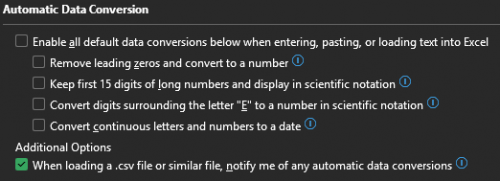
@Dariel Dixon @Faith Murray Settings have been adjusted, readjusted, reattempted, updated, etc. Alas, here we are. We do not get a warning message, nor does any conversion setting fix the problem. Again, I CAN fix this by using Text to Columns/Import Wizard as is mentioned near the end of the article @Austen Brown posted (thanks!). But that solution isn't user-friendly for coworkers who are less than comfortable in Excel. It's also one more step that's not very welcome when dealing with huge datasets. It's avoidable with an .xlsx file, which predictably follows Excel's settings.
As stated in my original post, Blackbaud already announced they would put out this functionality, I was only asking if anyone had heard when, or if anyone already had the ability. I'm trying to smooth the transition to NXT as much as I can for my team, and while I'd like them to be able to use NXT query, I'm hoping we can wait on this upgrade. Screenshot from the Query Townhall with that announcement is below. (Blackbaud Raiser's Edge NXT®️ Town Hall: Query Functionality in Web View (January 14, 2025))
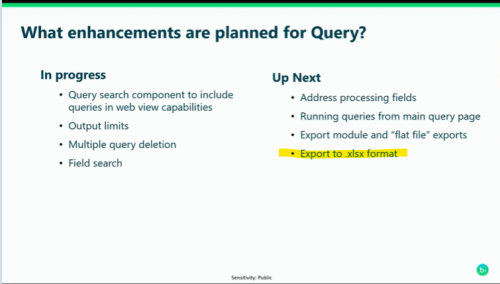 1
1 -
@Alex Wong The ironic part is that they don't really look like dates. Older ones will occasionally start with a double digit and a dash, which is the ones that Excel converts, but into nonsensical things like September 89th. It's rare one comes through that is even a real calendar day. That nonsense combined with the fact that the .csv simply refuses to follow Excel settings makes this a really frustrating conundrum.
2

















Categories
- All Categories
- 6 Blackbaud Community Help
- 211 bbcon®
- 1.4K Blackbaud Altru®
- 402 Blackbaud Award Management™ and Blackbaud Stewardship Management™
- 1.1K Blackbaud CRM™ and Blackbaud Internet Solutions™
- 15 donorCentrics®
- 360 Blackbaud eTapestry®
- 2.6K Blackbaud Financial Edge NXT®
- 656 Blackbaud Grantmaking™
- 577 Blackbaud Education Management Solutions for Higher Education
- 3.2K Blackbaud Education Management Solutions for K-12 Schools
- 941 Blackbaud Luminate Online® and Blackbaud TeamRaiser®
- 84 JustGiving® from Blackbaud®
- 6.7K Blackbaud Raiser's Edge NXT®
- 3.7K SKY Developer
- 248 ResearchPoint™
- 120 Blackbaud Tuition Management™
- 165 Organizational Best Practices
- 240 Member Lounge (Just for Fun)
- 34 Blackbaud Community Challenges
- 37 PowerUp Challenges
- 3 (Open) PowerUp Challenge: Grid View Batch
- 3 (Closed) PowerUp Challenge: Chat for Blackbaud AI
- 3 (Closed) PowerUp Challenge: Data Health
- 3 (Closed) Raiser's Edge NXT PowerUp Challenge: Product Update Briefing
- 3 (Closed) Raiser's Edge NXT PowerUp Challenge: Standard Reports+
- 3 (Closed) Raiser's Edge NXT PowerUp Challenge: Email Marketing
- 3 (Closed) Raiser's Edge NXT PowerUp Challenge: Gift Management
- 4 (Closed) Raiser's Edge NXT PowerUp Challenge: Event Management
- 3 (Closed) Raiser's Edge NXT PowerUp Challenge: Home Page
- 4 (Closed) Raiser's Edge NXT PowerUp Challenge: Standard Reports
- 4 (Closed) Raiser's Edge NXT PowerUp Challenge: Query
- 796 Community News
- 3K Jobs Board
- 54 Blackbaud SKY® Reporting Announcements
- 47 Blackbaud CRM Higher Ed Product Advisory Group (HE PAG)
- 19 Blackbaud CRM Product Advisory Group (BBCRM PAG)