Athletic Roster & GPA's




How can I print a team roster with the student's cumulative or term gpa?
Comments
-
@Christine Lamar - I don't see a way to get team rosters and GPAs in the same report. I would generate two separate lists: Team Rosters (from an Advanced List), and GPAs (from a SKY list), then put it all together in a spreadsheet.
Include the student User ID in both reports. Export the results to CSVs, and put the data into Excel or Google Sheets - each of the CSVs on a separate sheet. Use XLOOKUP to pull the GPA for each player onto the roster page.
1 -
@Brian Gray - That is what I thought. Thank you!
0 -
@Christine Lamar We were able to do this through an Advanced list; it requires having the sports, teams, and rosters set up under Extracurricular > Athletics > Athletics Setup first. I've added some screenshots below (had to split the Select Objects into two screenshots); make sure to update the Filters as applicable for your school and setup.
I export the results then use Excel for sorting, filtering, pivot tables, etc. Hope this helps!
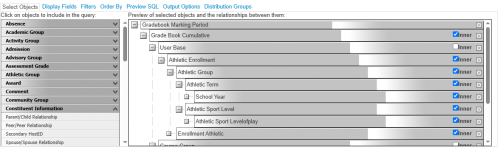

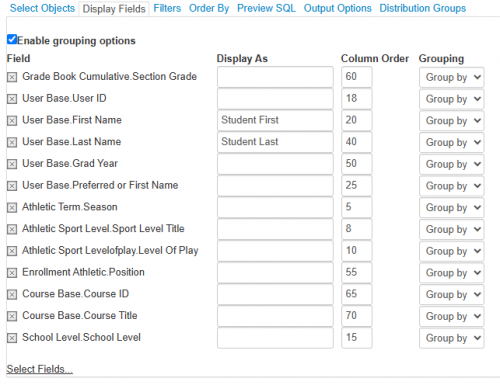
 2
2 -
@Erin Caprielian this is awesome! Thank you
0










Categories
- All Categories
- 6 Blackbaud Community Help
- 211 bbcon®
- 1.4K Blackbaud Altru®
- 402 Blackbaud Award Management™ and Blackbaud Stewardship Management™
- 1.1K Blackbaud CRM™ and Blackbaud Internet Solutions™
- 15 donorCentrics®
- 360 Blackbaud eTapestry®
- 2.6K Blackbaud Financial Edge NXT®
- 656 Blackbaud Grantmaking™
- 577 Blackbaud Education Management Solutions for Higher Education
- 3.2K Blackbaud Education Management Solutions for K-12 Schools
- 941 Blackbaud Luminate Online® and Blackbaud TeamRaiser®
- 84 JustGiving® from Blackbaud®
- 6.7K Blackbaud Raiser's Edge NXT®
- 3.7K SKY Developer
- 248 ResearchPoint™
- 120 Blackbaud Tuition Management™
- 165 Organizational Best Practices
- 240 Member Lounge (Just for Fun)
- 34 Blackbaud Community Challenges
- 37 PowerUp Challenges
- 3 (Open) PowerUp Challenge: Grid View Batch
- 3 (Closed) PowerUp Challenge: Chat for Blackbaud AI
- 3 (Closed) PowerUp Challenge: Data Health
- 3 (Closed) Raiser's Edge NXT PowerUp Challenge: Product Update Briefing
- 3 (Closed) Raiser's Edge NXT PowerUp Challenge: Standard Reports+
- 3 (Closed) Raiser's Edge NXT PowerUp Challenge: Email Marketing
- 3 (Closed) Raiser's Edge NXT PowerUp Challenge: Gift Management
- 4 (Closed) Raiser's Edge NXT PowerUp Challenge: Event Management
- 3 (Closed) Raiser's Edge NXT PowerUp Challenge: Home Page
- 4 (Closed) Raiser's Edge NXT PowerUp Challenge: Standard Reports
- 4 (Closed) Raiser's Edge NXT PowerUp Challenge: Query
- 796 Community News
- 3K Jobs Board
- 54 Blackbaud SKY® Reporting Announcements
- 47 Blackbaud CRM Higher Ed Product Advisory Group (HE PAG)
- 19 Blackbaud CRM Product Advisory Group (BBCRM PAG)