Unable to understand the connection between tables in the .bak file





Good morning!
Background: We opted to receive nightly backup files (our database is Raisers Edge NXT) from Blackbaud. We restored one of the backup file into SQL SERVER and trying to understand the table structure.
Scenario: We need to extract the proposals information from the backup file and display their visualizations in Qlik sense.
My approach to this: found that combining three different tables gives me the desired data.
Table name : PROPOSAL
This table contains information such as Proposal Name, Proposal System Record id (Which is referred as ID in the table), Proposal is active (Which is referred as INACTIVE in the table), PROSPECT_ID, etc..

ER Diagram:
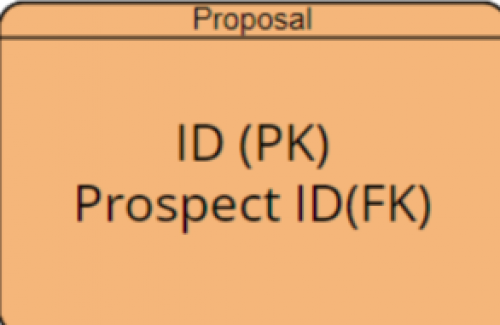
From the PROPOSAL table I found a column named PROSPECT_ID which led me to look at PROSPECT table for additional information.
Table Name: PROSPECT
This table contains the following fields

ER Diagram:
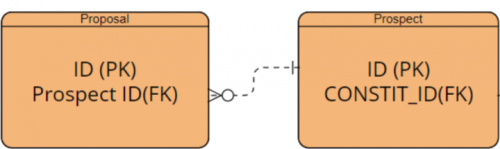
The column CONSTIT_ID leads me to look at the CONSTITUENT table to get the prospect details such as first name, last name, etc..
Final table: CONSTITUENT
This table has following columns of information

ER Diagram:
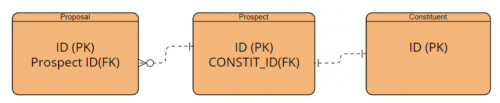
This process seems correct, but the problem arises when I track it as it gives me incorrect information. For example I have a proposal named “FY2022-XYZ” that was only listed on James record. When I tracked the tables it led me to Smiths record instead of James record.
This approach may be incorrect. Please advise me on which tables provide the correct information?
You can download the schema from here
Thank you!
Comments
-
@Venky Immadisetty
You are not connecting the foreign key properly to get what you want.Proposal Table has a Foreign Key (PROSPECT_ID) which points to PROSPECT.ID (Prospect Table ID column), which you got this correct.
Prospect Table has a Foreign Key (CONSTIT_ID) which points to RECORDS.ID (Records Table ID column), which you got this incorrect.
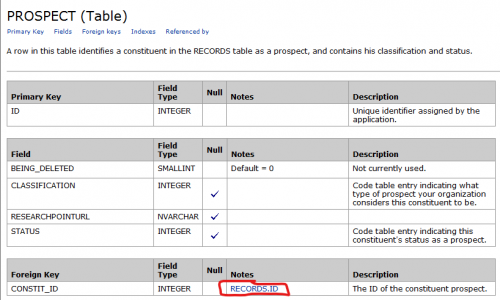
Looking at the Constituent table is a common mistake that many make when they started working on the Table Schema. Don't assume the name of table, follow the Foreign key
2 -
Hi @Alex Wong,
Thank you for the information provided. How can I access the view that you provided for the PROSPECT table? When I open my schema it is just showing blank page as below: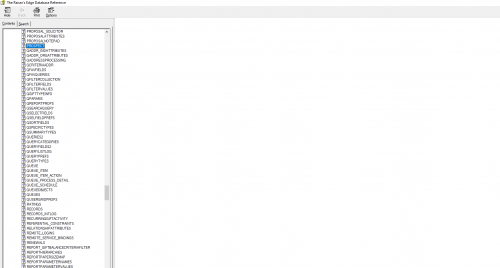
Do I need to use tool to open the schema?
I am looking for an overall ER model diagram for the Schema. Is there any way to get that?
Thank you0 -
@Venky Immadisetty
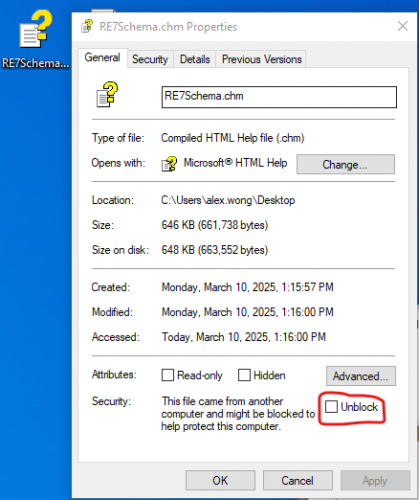
WHen you first download the .chm file (windows help file) from the internet or email that someone send to you, it is “blocked”. You need to right click on the file and go to Properties. In the at the bottom of the General tab should be a checkbox where you can unblock the file.There is no ER model diagram that I know of.
1 -
@Alex Wong
I am able to see detailed information in the schema now. Thank you!0 -
@Alex Wong
I have a quick question Alex. I am looking at the PROPOSAL table and trying to extract the Proposal Rating, Status and Reason.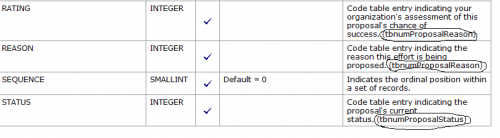
But these are not connect to any table they say:
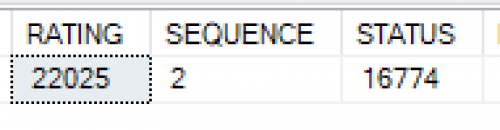
(tbnumProposalStatus) (tbnumProposalReason What is the meaning of this? I also looked at the CODETABLES but found nothing related to codetable. How can I retrieve the RATING, REASON and STATUS of a Proposal? When I ran query they are just showing an numbers as they have the Data type as integer
 0
0 -
@Venky Immadisetty
code table entries are in TABLEENTRIES table, mapping to TABLEENTRIESID column2 -
@Alex Wong
thank you!0 -
@Venky Immadisetty
Hi, that's what I see too. Did you ever find an answer to this?0 -
@AJ Minogue
The answer to his question on this post was answered in my replies. Did my replies not help you? or what other question you have?0 -
@Alex Wong thanks so much! I'm having the same problem that I see others on the thread. I can open RE7Schema but only see the table names, not the fields.
0 -
@Venky Immadisetty
WHen you first download the .chm file (windows help file) from the internet or email that someone send to you, it is “blocked”. You need to right click on the file and go to Properties. In the at the bottom of the General tab should be a checkbox where you can unblock the file.0 -
@Alex Wong this is the question I do not see your answer on
0 -
@AJ Minogue
That is my answer? So I'm a little confuse if you understood it.The chm file will not display the content b/c it is blocked. my replies tells you to go into file property of the chm file and unblock the file.
0 -
-
@Alex Wong
oh my goodness - I'm so grateful to you! Thanks Alex!1









Categories
- All Categories
- 6 Blackbaud Community Help
- 211 bbcon®
- 1.4K Blackbaud Altru®
- 402 Blackbaud Award Management™ and Blackbaud Stewardship Management™
- 1.1K Blackbaud CRM™ and Blackbaud Internet Solutions™
- 15 donorCentrics®
- 360 Blackbaud eTapestry®
- 2.6K Blackbaud Financial Edge NXT®
- 656 Blackbaud Grantmaking™
- 577 Blackbaud Education Management Solutions for Higher Education
- 3.2K Blackbaud Education Management Solutions for K-12 Schools
- 941 Blackbaud Luminate Online® and Blackbaud TeamRaiser®
- 84 JustGiving® from Blackbaud®
- 6.7K Blackbaud Raiser's Edge NXT®
- 3.7K SKY Developer
- 248 ResearchPoint™
- 120 Blackbaud Tuition Management™
- 165 Organizational Best Practices
- 240 Member Lounge (Just for Fun)
- 34 Blackbaud Community Challenges
- 37 PowerUp Challenges
- 3 (Open) PowerUp Challenge: Grid View Batch
- 3 (Closed) PowerUp Challenge: Chat for Blackbaud AI
- 3 (Closed) PowerUp Challenge: Data Health
- 3 (Closed) Raiser's Edge NXT PowerUp Challenge: Product Update Briefing
- 3 (Closed) Raiser's Edge NXT PowerUp Challenge: Standard Reports+
- 3 (Closed) Raiser's Edge NXT PowerUp Challenge: Email Marketing
- 3 (Closed) Raiser's Edge NXT PowerUp Challenge: Gift Management
- 4 (Closed) Raiser's Edge NXT PowerUp Challenge: Event Management
- 3 (Closed) Raiser's Edge NXT PowerUp Challenge: Home Page
- 4 (Closed) Raiser's Edge NXT PowerUp Challenge: Standard Reports
- 4 (Closed) Raiser's Edge NXT PowerUp Challenge: Query
- 796 Community News
- 3K Jobs Board
- 54 Blackbaud SKY® Reporting Announcements
- 47 Blackbaud CRM Higher Ed Product Advisory Group (HE PAG)
- 19 Blackbaud CRM Product Advisory Group (BBCRM PAG)