Imports Gone from Database View!!





I've lost my import capability in database view! And it's not fully functional in WebView yet. Is anyone else having trouble with the validate box being greyed out? or it not remembering the file path?
Comments
-
You need to upload a file each time. No filepath to enter. I had started a question awhile ago here in the Community called ‘Import Invoices Into Webview’ and a few other members have posted good information.
0 -
@Carolyn White Ugh, that is a HUGE productivity killer for us.
0 -
https://kb.blackbaud.com/knowledgebase/articles/Article/205704
Hopefully this will help you. I wish support would have provided me this article over a month ago when I asked. Instead they provide a link to something that said limited availability and then database instructions. And they wonder why we are frustrated.
2 -
Is there a button in the Web View for updating all fields from a file at once? With this button gone, this is a huge downgrade in my opinion.
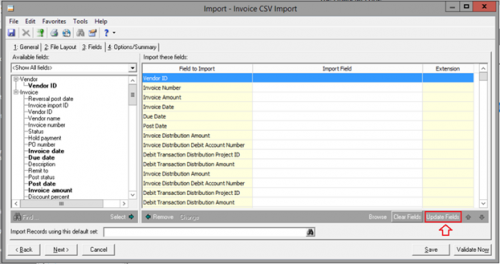
Before, it was easy to do a mass import and have the fields automatically update. I do not see this functionality in Web View. This means that I either have to update the file layout manually, which is very slow, or use Excel to create a summary file instead of a horitzontal output file to reduce the number of entries.
0 -
@Stephen Dignam I agree! also the Find option when searching for a specific field is gone. That's a huge time killer.
1 -
@Carolyn White are your imports saving the csv file when you update it? I've tried replacing, renaming, but nothing saves. It reverts back to the original file.
0 -
@Stephen Dignam I agree! also the Find option when searching for a specific field is gone. That's a huge time killer.
Yeah, I wound up building a file and made a template with the maximum import lines and saving it. Now, I simply always use that format and make sure I only import files that have the maximum allowed, it's inefficient, but faster than updating the template every time. So, now, I simply have to remember to max out every CSV that I import to not overwrite what I created. Annoying, but better than it overwriting whenever I import a new CSV.
0 -
@Lauren Chivers Unfortunately no. So when I validate, I save the file. And then when I run/import, I have to save the file again. Just hoping I use the correct file. Very frustrating.
0 -
@Carolyn White Mine aren't saving at all. They keep reverting back to the old file.
0 -
@Carolyn White
This is the same thing that I do. You have to make sure you choose the correct file when you validate and then make sure you choose the same file when you run it. <sigh>0






Categories
- All Categories
- 6 Blackbaud Community Help
- 213 bbcon®
- 1.4K Blackbaud Altru®
- 403 Blackbaud Award Management™ and Blackbaud Stewardship Management™
- 1.1K Blackbaud CRM™ and Blackbaud Internet Solutions™
- 15 donorCentrics®
- 360 Blackbaud eTapestry®
- 2.6K Blackbaud Financial Edge NXT®
- 656 Blackbaud Grantmaking™
- 577 Blackbaud Education Management Solutions for Higher Education
- 3.2K Blackbaud Education Management Solutions for K-12 Schools
- 940 Blackbaud Luminate Online® and Blackbaud TeamRaiser®
- 84 JustGiving® from Blackbaud®
- 6.7K Blackbaud Raiser's Edge NXT®
- 3.7K SKY Developer
- 249 ResearchPoint™
- 119 Blackbaud Tuition Management™
- 165 Organizational Best Practices
- 241 Member Lounge (Just for Fun)
- 34 Blackbaud Community Challenges
- 37 PowerUp Challenges
- 3 (Open) PowerUp Challenge: Grid View Batch
- 3 (Closed) PowerUp Challenge: Chat for Blackbaud AI
- 3 (Closed) PowerUp Challenge: Data Health
- 3 (Closed) Raiser's Edge NXT PowerUp Challenge: Product Update Briefing
- 3 (Closed) Raiser's Edge NXT PowerUp Challenge: Standard Reports+
- 3 (Closed) Raiser's Edge NXT PowerUp Challenge: Email Marketing
- 3 (Closed) Raiser's Edge NXT PowerUp Challenge: Gift Management
- 4 (Closed) Raiser's Edge NXT PowerUp Challenge: Event Management
- 3 (Closed) Raiser's Edge NXT PowerUp Challenge: Home Page
- 4 (Closed) Raiser's Edge NXT PowerUp Challenge: Standard Reports
- 4 (Closed) Raiser's Edge NXT PowerUp Challenge: Query
- 796 Community News
- 3K Jobs Board
- 54 Blackbaud SKY® Reporting Announcements
- 47 Blackbaud CRM Higher Ed Product Advisory Group (HE PAG)
- 19 Blackbaud CRM Product Advisory Group (BBCRM PAG)