Constituent List Search help needed





Please tell me there is a fix for this. The issue I'm having is I need to know the exact name of the person I'm searching for including middle intial in order for the name to be found. We have lists that we cannot search for names unless we know the exact naming convention of each individual in Raisers Edge.
For instance, my name in the database is written as Wendy D. Dann-Marcel. If you search for versions of my name (Dann, W) (Dan, Wen) (Wendy Dann), or (Wendy Dann-Marcel) you will not be able to find my name on a constituent list. It must be exactly Wendy D. Dann-Marcel, including the period so my name can be found. Am I doing something wrong? Adding an asterisk doesn't work. Does anyone have a workaround besides scrolling through thousands of names or exporting and searching in excel?
Comments
-
@Wendy DannMarcel
can you clarify what you mean by “search” for a name? are you searching on RE NXT top bar on constituent search? are you searching inside a constituent list?I tried both, so for example, if we got a donor John J. Smith
I can search “john smith” and this will show as one of the possible match. I can search “john” and “smith” too.
1 -
@Wendy DannMarcel I tried it with a partial name and it worked me for me also.
1 -
@Alex Wong
Hi, thank you for reaching out.I am searching on a Constituent List, not the search bar that used to be on the top of the screen (it was recently moved to the left side of the screen). I created a list of everyone in the database and wanted to weed out anyone that had already given in the past two months. I went back to check to see if the spouses were still on the list. This is when I found that the truncated name search didn't work. Support is saying this is the way it's supposed to work. It seems that Marie doesn't have the same issue.
0 -
@Wendy DannMarcel I'm not able to recreate this error in lists. Searching for any text will populate any fields that match that logic.
That said, I think this problem would be better served using query. It might be worth considering.
1 -
@Wendy DannMarcel
I am not having problem just liek Marie, so to clarify:If you are using the Find in this list search bar within the constituent list (shown below circled in red), this will give you constituent by partial name search
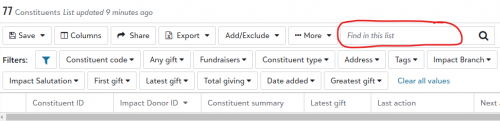
However, you mentioned “spouse”. This search will not search spouse record (constituent spouse) that does not itself show in the list to begin with, nor will it search non-constituent spouse name.
0 -
Thanks for your input. It's good to know that this isn't the way the system is supposed to work.
I have had the same case closed twice. The reason was the system is working as designed. I will take this problem back to my account rep and to support.
0 -
@Alex Wong
Thanks, Alex. I will take this up with Support. It seems to me it's an issue with my system.0 -
@Wendy DannMarcel:
For instance, my name in the database is written as Wendy D. Dann-Marcel. If you search for versions of my name (Dann, W) (Dan, Wen) (Wendy Dann), or (Wendy Dann-Marcel) you will not be able to find my name on a constituent list. It must be exactly Wendy D. Dann-Marcel, including the period so my name can be found. Am I doing something wrong? Adding an asterisk doesn't work. Does anyone have a workaround besides scrolling through thousands of names or exporting and searching in excel?Let me make something clear. Support is right that you can't use truncated searches. In your above example, the search is looking for that string in your name. It won't find any of these, however if you just search for a part of a name, that should come up. For instance, your name should come up with Dan; Wend; Dann-Mar; or something of that logic. When I did this attempt, I didn't even realize that your search string isn't ever found in your name.
The list search doesn't have the logic like the omnisearch at the top. The list is only supposed to sort by a specific criteria, it should make searching within the list easier. I think you wrote that your list searches your entire database, which is a lot.
1 -
@Alex Wong
I forgot to mention that the spouse has his own record in RE.0 -
@Dariel Dixon
Thank you so much for helping me with this. I couldn't understand why this was "working as designed."If my name was Wendy D. Smith, I can search for Smith and scroll through the hundreds of Smiths that show up. Or search for Wendy and navigate from there. Is there a way to narrow the search more?
0 -
@Wendy DannMarcel Not really. I would use some filters if you had some other information like constituent code or maybe some address information. I think that might be easier. I'm assuming you are using a list search because you see so much information on the list page as opposed to the omnisearch at the top. That makes sense. However, it would be much easier if you were able to limit the results in the list, and then perform the search. Searching for all of the Smiths does sound like a bit of a nightmare.
0 -
@Dariel Dixon
You all have been so helpful. Thanks so much!!0 -
@Wendy DannMarcel:
I forgot to mention that the spouse has his own record in RE.You didn't confirm if you were using the search within list search box I red circled in the screenshot I provided.
If yes, then it should work like mine, part of name or full name should all work fine.
As I mentioned, if your org does constituent spouse (have his/her own record in RE), for example John Smith and Mary Jones. If only John Smith matches your Constituent List filter, then trying to use the “search in list” function to search for “jones” will not result in you finding Mary Jones, as she is not in the list to begin with.
0 -
@Alex Wong
Hi Alex, I'm sorry I missed your question. Yes, I am doing the search in “Find in this list,” the area you circled. Also, the spouse has their own constituent ID in RE and is linked in the Relationship record. The person is definitely on the list because I scrolled through several screens to find them. When I used the Find in the list search box, I can only find them if I use the exact first name, middle initial and last name(in that exact order). I think Dariel called this a string. Dariel clarified that,“Support is right that you can't use truncated searches. In your above example, the search is looking for that string in your name. It won't find any of these, however if you just search for a part of a name, that should come up. For instance, your name should come up with Dan; Wend; Dann-Mar; or something of that logic. When I did this attempt, I didn't even realize that your search string isn't ever found in your name.”
0 -
@Wendy DannMarcel
Rather than more explanation, let's see some screenshots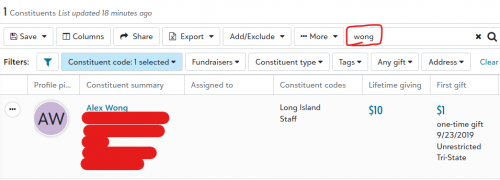
only search by my last name “wong” 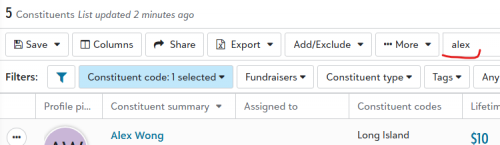
only search by my first name “alex” 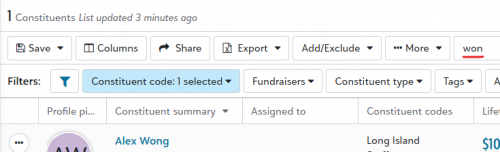
searching by part of my last name “won” 0











Categories
- All Categories
- 6 Blackbaud Community Help
- 211 bbcon®
- 1.4K Blackbaud Altru®
- 402 Blackbaud Award Management™ and Blackbaud Stewardship Management™
- 1.1K Blackbaud CRM™ and Blackbaud Internet Solutions™
- 15 donorCentrics®
- 360 Blackbaud eTapestry®
- 2.6K Blackbaud Financial Edge NXT®
- 656 Blackbaud Grantmaking™
- 577 Blackbaud Education Management Solutions for Higher Education
- 3.2K Blackbaud Education Management Solutions for K-12 Schools
- 941 Blackbaud Luminate Online® and Blackbaud TeamRaiser®
- 84 JustGiving® from Blackbaud®
- 6.7K Blackbaud Raiser's Edge NXT®
- 3.7K SKY Developer
- 248 ResearchPoint™
- 120 Blackbaud Tuition Management™
- 165 Organizational Best Practices
- 240 Member Lounge (Just for Fun)
- 34 Blackbaud Community Challenges
- 37 PowerUp Challenges
- 3 (Open) PowerUp Challenge: Grid View Batch
- 3 (Closed) PowerUp Challenge: Chat for Blackbaud AI
- 3 (Closed) PowerUp Challenge: Data Health
- 3 (Closed) Raiser's Edge NXT PowerUp Challenge: Product Update Briefing
- 3 (Closed) Raiser's Edge NXT PowerUp Challenge: Standard Reports+
- 3 (Closed) Raiser's Edge NXT PowerUp Challenge: Email Marketing
- 3 (Closed) Raiser's Edge NXT PowerUp Challenge: Gift Management
- 4 (Closed) Raiser's Edge NXT PowerUp Challenge: Event Management
- 3 (Closed) Raiser's Edge NXT PowerUp Challenge: Home Page
- 4 (Closed) Raiser's Edge NXT PowerUp Challenge: Standard Reports
- 4 (Closed) Raiser's Edge NXT PowerUp Challenge: Query
- 796 Community News
- 3K Jobs Board
- 54 Blackbaud SKY® Reporting Announcements
- 47 Blackbaud CRM Higher Ed Product Advisory Group (HE PAG)
- 19 Blackbaud CRM Product Advisory Group (BBCRM PAG)