Sharing my Power Automate and Power BI template: Power BI use of Query API via Power Automate





NOTE A BREAKING CHANGE: Due to a Breaking Change from Blackbaud, the Power Automate flow will have error on the last step to provide data to Power BI. I will likely update the template in the future, but for now, you can delete the content in the Body field of Response JSON Data action and replace it with the Body dynamic content from the HTTP Get Query Result action.

=======================================================
Downloadable zip for Power Automate import updated per above Breaking Change.
=======================================================
- Description: Use of Power Automate HTTP request received trigger to run Query API to gather RE data that is not easily obtainable using SKY API endpoints. This is an updated template where the Power Automate flow does not require creating multiple per different data being gathered through Query API. The Power BI is build with 2 sets of data: all constituent assigned solicitor (fundraiser); all constituent no valid address and request no email.
- Required connections: Blackbaud SKY Add-ins, SharePoint, Microsoft Teams
- Suggested skill level required to use this template: Intermediate
- Configuration details:
Create a SharePoint List that store the authentication key to be used for authenticated use of the Power Automate flow
- this authentication key should be at least 32 characters in length, with only alphanumeric characters only. You can use any encoding tool, or just type a bunch of random characters and numbers.
- Category: Automation, Data Management, Power Query
- Instructions:
- Download:
- Go to https://make.powerautomate.com/ > My flows
- Import flow by Import > Import Package (Legacy)
- While importing, you will receive some error as you do not have the same SharePoint List I have, You can ignore the error, and look somewhere at the top for a link to “Open the flow”, click on that.
Update flow
Get SharePoint List Item for Auth Key
- update the SharePoint site, list name, and id to get the authentication key
Condition Auth Key Not Match
- update right side of condition by removing the dynamic content there, and then replace it with the dynamic content obtained from Get SharePoint List Item for Auth Key action's auth key
Save flow to get the URL to trigger the flow, copy it.
- you must save the flow first before the URL is available on the trigger for you to copy
- Make sure to turn on the flow, imported file is generally “off” to begin with.
- Download:
- Unzip the file and open it in Power BI Desktop
- Go into Power Query for RE Query Data table by right click on one of the Data table on the right panel and select Edit query
- Click on FlowURL on the left panel, and replace the Current Value with the flow URL you copied.
This Power BI comes with the Query JSON definition for getting Assigned Fundraiser and No Valid Address? and Requet No Email?
- JSON Assigned Fundraiser
- JSON NVA RNE
- Go to Assigned Fundraiser query, and click on the “gear” icon on the Source step


- Change the Site URL to the SharePoint URL that you created the SharePoint List for authentication key
- Click on the “gear” icon on the Navigation step


- Select the SharePoint List that has the authentication key
- Click on the “gear” icon on the Filtered Rows step


- Filter on the ID equals to the ID number of the record row that has the authenticate key
- Click on AuthKey step and update the formula bar with the column name of the authentication key. (I named mine “Access Token”, so change “Access Token” to your column name.

Refresh Preview (this is going to take at least 30 seconds for Query API to run and get data)
- ignore any error that you may see, and refresh again, if you still have error after 1 or 2 refresh, you will need help troubleshooting, then reply here.
- Repeart the above for the NVA RNE query if you want that, or delete the NVA RNE query if you don't want this data table
Comments
-
This post is to give you instruction on how to get a new query data into power bi.
You do not need to update the flow, it is capable of running any query definition and returning result to Power BI.
First you will need a Query JSON definition for the data you want to pull into Power BI
- Go to RE NXT > Query in webview
Open an existing Query that you already did and want the output into Power BI
- or create a new query, and config all the criteria, output, sort and option
- go to the Options tab, and click on Copy query JSON button
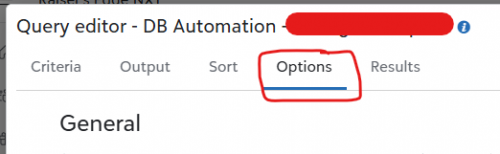
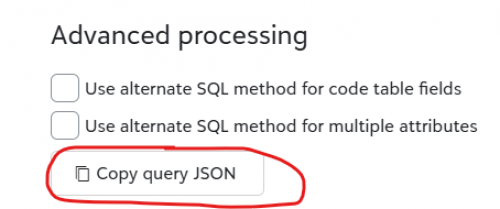
- Go to a JSON Editor, many available on the web, but I use this one: https://jsoneditoronline.org/
- Paste the copied Query JSON into the left panel
Remove these JSON properties (if they are there, if you are not using a saved query, some of them wouldn't be there):
- category_id
- description
- name
- others_can_execute
- others_can_modify
- Click on the icon that will Compact the JSON into ONE line of text
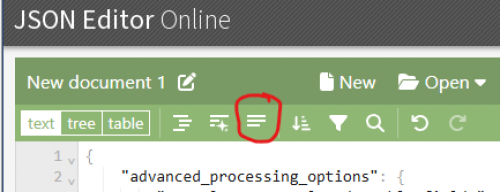
- Copy the now-compacted Query JSON
- Open the Power BI, and enter Power Query
- On the left panel: Queries, right click on an empty area and select New Parameter…
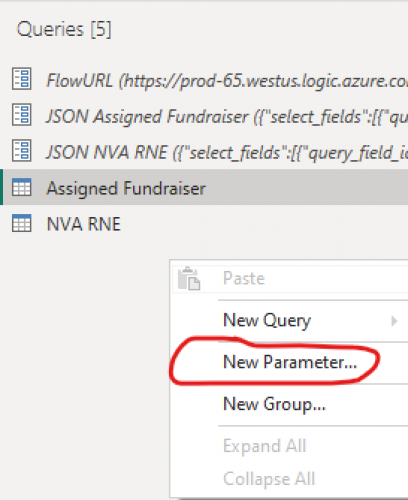
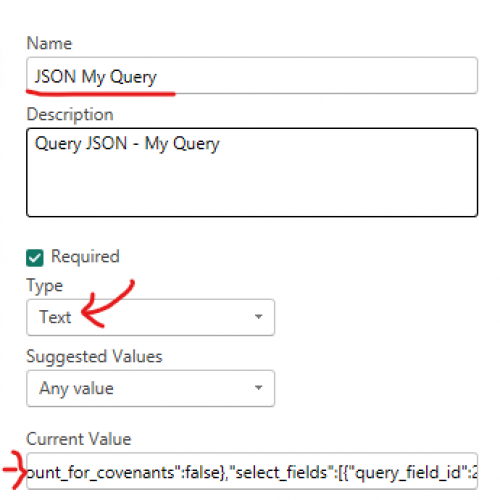
- Name your parameter (i.e. JSON My Query); Select Text as the Type; Paste the copied Query JSON in the Current Value field; (you can add a Description if you want, but not needed)
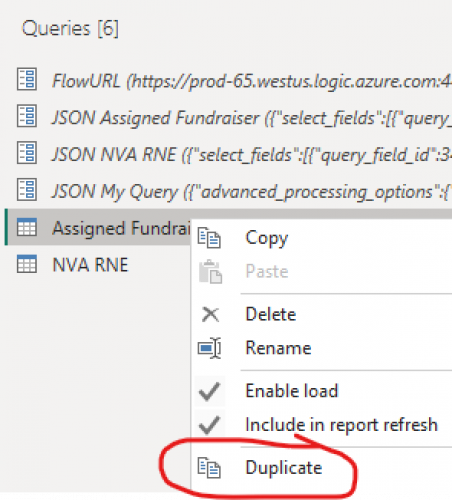
- Right-click on Assigned Fundraiser (or an existing query that is using Power Automate flow to run Query API for data) and select Duplicate
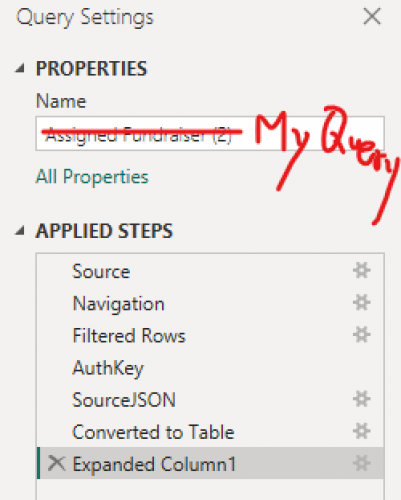
- Name your query to somethign meaningful for the data table (i.e. My Query)
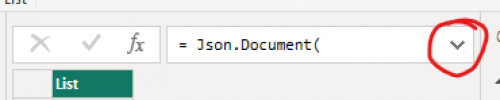
- Click on SourceJSON step and go to the formula bar and click the down error to expand on it
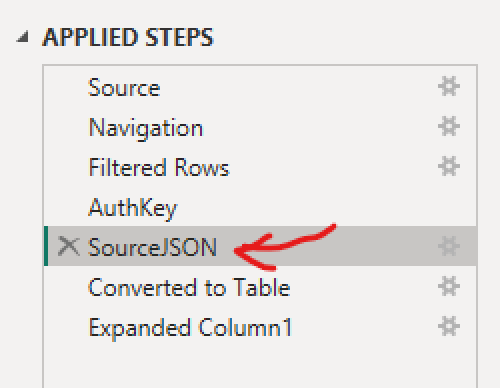
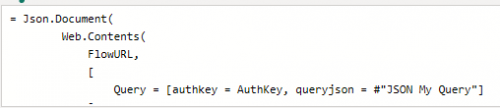
- Replace where you see #"JSON Assigned Fundraiser" with the name of the parameter you created

- Right click on Expanded Column 1 step and Delete
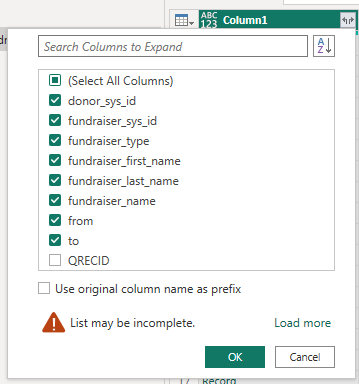
- It will take some time to load data, then click on the icon to the right of Column1 and select the data field you want. Suggest to uncheck Use original column name as prefix and uncheck QRECID.
- Click Refresh Preview icon at the top menu.
1 -
@Alex Wong I am attempting to follow your instructions.
Sadly, I am stumbling at the first hurdle! I don't see any option to “Open the flow” in power Automate.
I clicked the import legacy flow option. Then I get this screen and there is NO option to “Edit the flow” or similar.
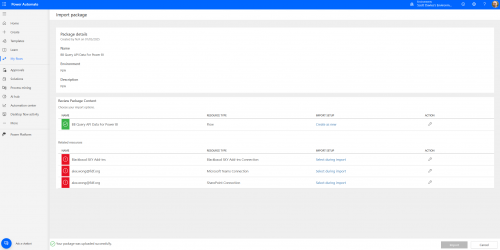
Any suggestions? Thank you!
0 -
@Scott Davies
You need to click on the icon in the “ACTION” column and follow through to create the flow, and create the connection needed for the flow.0 -
@Alex Wong when I click the action (spanner) column, it gives me the option to create as new, which I do and then click save.
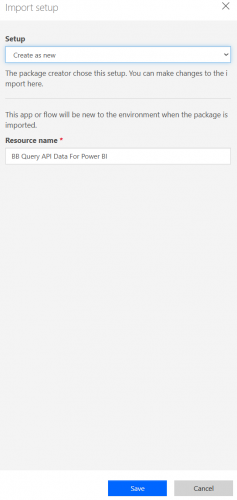
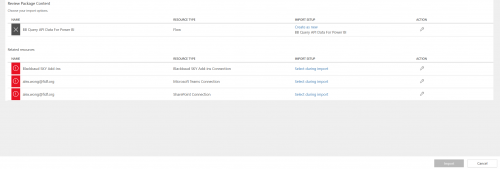
However, the import button at the bottom of the page is greyed out. It's obviously missing something.
0 -
@Scott Davies
there are 3 more rows of Action icon you need to click on.0 -
@Alex Wong when I click on the action (spanner) icon, I get this:
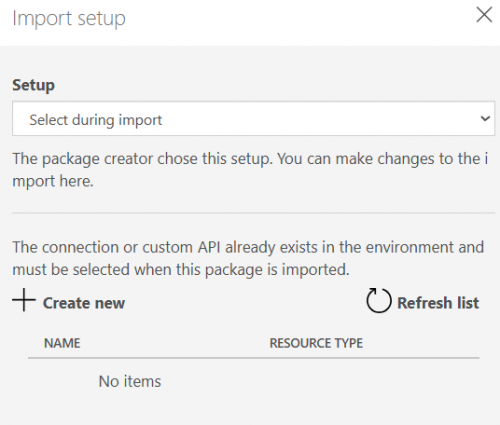
Clicking on +Create new opens a new window with these options:
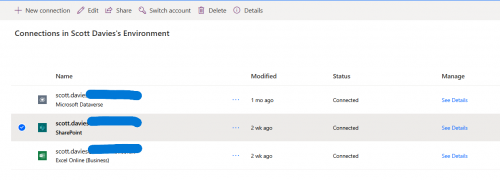
I don't see any option to use the connection or add it to the flow. How do I allocate one of these options to the flow?
0 -
@Scott Davies
First order of business, Blackbaud connector are “premium” connectors, so you will need to be using a paid license of power automate (i.e. Power Automate per user license, for non profit, it should be $3 / month).If you do have that, then for each “Related resources”, you will need to choose a connection, if a connection already exist, you should be able to just select it (i.e. Microsoft Teams and SharePoint), but for one that you never used before, you will need to click on “+Create new” then on next page, click on the “+ New connector” at the upper left of your 2nd screenshot.
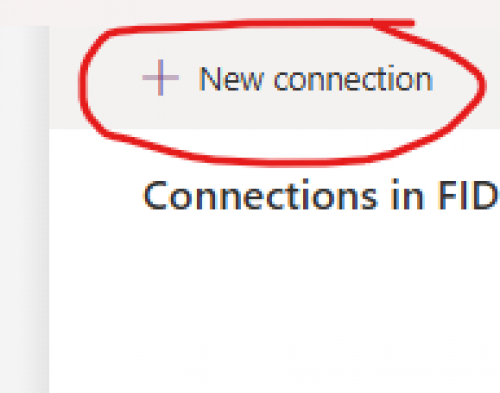
then on the next screen, search for name of the connector you trying to create a connection for. “Blackbaud SKY Add-ins”, once found, click on the + on the RIGHT to login to your RE NXT environment.
 0
0 -
@Alex Wong I'm attempting to access this flow and am getting the below error message which I can't get past. Any thoughts on what might be causing this? All the related resources appear to be connecting correctly, they have the green checkmark.
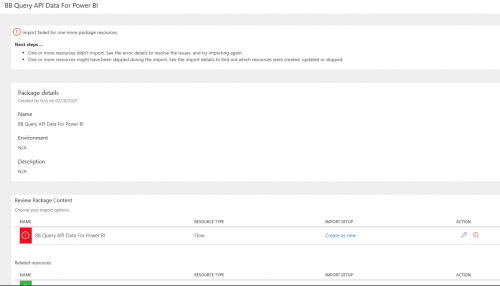
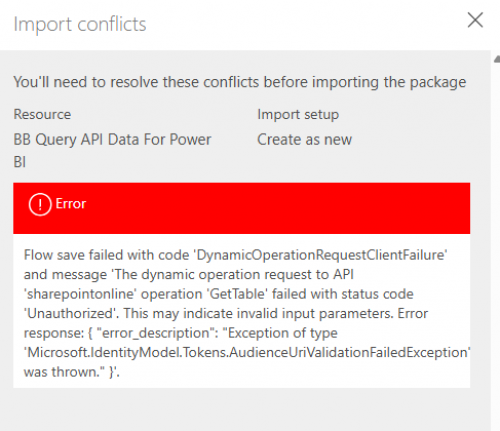 0
0 -
@Becky Griswold
please show the full screen of the import.if you setup all the connection, sharepoint will give you an error b/c you can't access my sharepoint list. you will then see near the top, somewhere that will say “Open Flow”. Click on that to update the SharePoint get item as per instruction
0 -
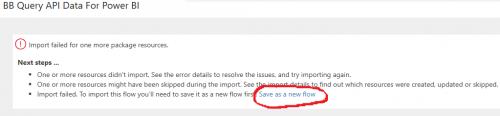
@Alex Wong Thank you! I was looking for a button or something similar. This morning I was trying again in order to get a full screenshot to post and found the “Save as a new flow” link within the Next Steps section. That seems to have gotten me into the flow to make the needed edits. Hopefully I won't need to bug you again
 I really appreciate your help and expertise.
 0
0 -
I can't download the Power BI Using Query API.zip. Is there any alternative way to download this file?
0 -
@Crystal Bruce can you help retrieve the file from old community?
0 -
Let me know if this works!
1 -
@Crystal Bruce & @Alex Wong, still not seeing the file Power BI Using Query API.zip. I think what Crystal linked above is the Power Automate flow, not the Power BI file for the second part of setup?
0 -
@Alex Wong, does this solution resolve the issue of the Power BI semantic model erroring on refresh because BB expires the authorization after about an hour? I have to keep re-credentialing my connector in the gateway to run the refresh and cannot schedule a refresh because of this
0 -
@Kelly Hogan looks like the recovery of the Power BI Using Query API.zip is unsuccessful, I also can't find a copy myself right now. I might need to rebuild one, which is going to take time
@Howie Sell yes, it does resolve all the issue you mentioned.
1 -
@Alex Wong , I have a copy of your .pbix. We'll get it uploaded here for you!
1 -
@Alex Wong, this .zip file contains Power Automate Query API.pbix. The date I downloaded this was 12/20/2024, so I think it is from your first post on this subject and it is not the same file mentioned in this post. Sorry!
0 -
Thank you Rebecca. This is a good starting point.
I just took a look and the pbix file is the "first version" where you identified an issue that made it not work when published to power bi service (authkey in URL dynamically is not allowed in BI servcie).
But this will give me a good starting point instead of recreating the whole thing again.
@Kelly Hogan please wait before using the attachment Rebecca put on her post. I will update it and provide one that works in Power BI service.
1 -
@Rebecca Sundquist @Kelly Hogan updated the original post to have the downloadable for the Power BI Desktop file (zipped) for downloading that has been updated.
- Download:
2 -
Thank you everyone!
0 -
@Alex Wong, just finally getting around to testing this all out and it seems to be working well! Your instructions are perfect and I am so excited to rebuild and improve on my reports!
0 -
Hey guys, just curious. I know it says that it is required to have Blackbaud SKY Add-ins, SharePoint and Microsoft Teams but would this be an option for Google Suites users?
0 -
Yes you can do Google Suites. You will need to find a different way to code a secret key for security purpose.
Sharepoint is used so that that "common" key can be read from PA flow to compare to what PBI read and pass to flow to ensure security of the flow not being run and returning sensitive donor data outside of your org.
You will have to make modification to the PBI code and PA flow on retrieving the code and comparing it.
0
















Categories
- All Categories
- 6 Blackbaud Community Help
- 211 bbcon®
- 1.4K Blackbaud Altru®
- 403 Blackbaud Award Management™ and Blackbaud Stewardship Management™
- 1.2K Blackbaud CRM™ and Blackbaud Internet Solutions™
- 15 donorCentrics®
- 360 Blackbaud eTapestry®
- 2.6K Blackbaud Financial Edge NXT®
- 657 Blackbaud Grantmaking™
- 579 Blackbaud Education Management Solutions for Higher Education
- 3.2K Blackbaud Education Management Solutions for K-12 Schools
- 943 Blackbaud Luminate Online® and Blackbaud TeamRaiser®
- 84 JustGiving® from Blackbaud®
- 6.7K Blackbaud Raiser's Edge NXT®
- 3.8K SKY Developer
- 250 ResearchPoint™
- 120 Blackbaud Tuition Management™
- 165 Organizational Best Practices
- 241 Member Lounge (Just for Fun)
- 34 Blackbaud Community Challenges
- 37 PowerUp Challenges
- 3 (Open) PowerUp Challenge: Grid View Batch
- 3 (Closed) PowerUp Challenge: Chat for Blackbaud AI
- 3 (Closed) PowerUp Challenge: Data Health
- 3 (Closed) Raiser's Edge NXT PowerUp Challenge: Product Update Briefing
- 3 (Closed) Raiser's Edge NXT PowerUp Challenge: Standard Reports+
- 3 (Closed) Raiser's Edge NXT PowerUp Challenge: Email Marketing
- 3 (Closed) Raiser's Edge NXT PowerUp Challenge: Gift Management
- 4 (Closed) Raiser's Edge NXT PowerUp Challenge: Event Management
- 3 (Closed) Raiser's Edge NXT PowerUp Challenge: Home Page
- 4 (Closed) Raiser's Edge NXT PowerUp Challenge: Standard Reports
- 4 (Closed) Raiser's Edge NXT PowerUp Challenge: Query
- 798 Community News
- 3K Jobs Board
- 55 Blackbaud SKY® Reporting Announcements
- 47 Blackbaud CRM Higher Ed Product Advisory Group (HE PAG)
- 19 Blackbaud CRM Product Advisory Group (BBCRM PAG)