Reviewing A/R deposits in NXT - Applications detail?





When reviewing deposits that have been entered into NXT, I noticed that there is considerably less detail regarding the application of the payment to an invoice. In database, I am able to see the line item date, transaction ID, owner, description, and the amount applied to the line item. However, in NXT, I see only “Line Item 1” and the posting date.

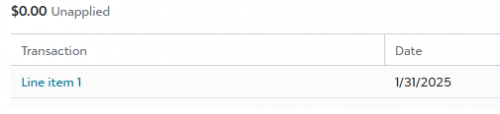
Does anyone know if there are any plans to expand the NXT view to include the detail that is in database? When I click through to the line item, I can see the invoice total, the amount applied and the remaining balance but it doesn't confirm for me the amount that has been applied from the deposit that I am viewing.
Thanks, all!
Comments
-
@Karen Patterson As we finalize full functionality for AR in webview, this item will likely be addressed soon. In the meantime, please report this issue to support to ensure it is tracked and reviewed.
1 -
@Heather LeVan hi, is it possible some organizations still don't have access to apply payments to AR invoices? I can apply payments in database view but in webview it doesnt give me the option. I can add the payment but I cannot apply.
1 -
@Tara Makas - I am not able to apply payments yet either
1 -
@Tara Makas at this time, you can apply payments to not yet posted transactions only, remaining functionality coming soon. Until then, you would continue to use database view.
0 -
@Renee Elliott at this time, you can apply payments to not yet posted transactions only, remaining functionality coming soon. Until then, you would continue to use database view.
1 -
@Renee Elliott
ditto. I cannot apply payments.1 -
@Heather LeVan I have the apply payment button but it is not showing outstanding invoices to apply the payment to. For a few days I was able to and it was showing outstanding invoices, then it just stopped. Has this happened to anyone else?
1 -











Categories
- All Categories
- 6 Blackbaud Community Help
- 211 bbcon®
- 1.4K Blackbaud Altru®
- 402 Blackbaud Award Management™ and Blackbaud Stewardship Management™
- 1.1K Blackbaud CRM™ and Blackbaud Internet Solutions™
- 15 donorCentrics®
- 360 Blackbaud eTapestry®
- 2.6K Blackbaud Financial Edge NXT®
- 655 Blackbaud Grantmaking™
- 577 Blackbaud Education Management Solutions for Higher Education
- 3.2K Blackbaud Education Management Solutions for K-12 Schools
- 940 Blackbaud Luminate Online® and Blackbaud TeamRaiser®
- 84 JustGiving® from Blackbaud®
- 6.7K Blackbaud Raiser's Edge NXT®
- 3.7K SKY Developer
- 248 ResearchPoint™
- 119 Blackbaud Tuition Management™
- 165 Organizational Best Practices
- 240 Member Lounge (Just for Fun)
- 34 Blackbaud Community Challenges
- 37 PowerUp Challenges
- 3 (Open) PowerUp Challenge: Grid View Batch
- 3 (Closed) PowerUp Challenge: Chat for Blackbaud AI
- 3 (Closed) PowerUp Challenge: Data Health
- 3 (Closed) Raiser's Edge NXT PowerUp Challenge: Product Update Briefing
- 3 (Closed) Raiser's Edge NXT PowerUp Challenge: Standard Reports+
- 3 (Closed) Raiser's Edge NXT PowerUp Challenge: Email Marketing
- 3 (Closed) Raiser's Edge NXT PowerUp Challenge: Gift Management
- 4 (Closed) Raiser's Edge NXT PowerUp Challenge: Event Management
- 3 (Closed) Raiser's Edge NXT PowerUp Challenge: Home Page
- 4 (Closed) Raiser's Edge NXT PowerUp Challenge: Standard Reports
- 4 (Closed) Raiser's Edge NXT PowerUp Challenge: Query
- 796 Community News
- 3K Jobs Board
- 54 Blackbaud SKY® Reporting Announcements
- 47 Blackbaud CRM Higher Ed Product Advisory Group (HE PAG)
- 19 Blackbaud CRM Product Advisory Group (BBCRM PAG)