Problem re-linking existing credit card feed that had been linked





First of all, I tried support chat, and I don't think the support representative truly understood my problem in this case.
In a nutshell, I had 2 credit card accounts linked with Yodlee. This was working very nicely for many months up until a couple weeks ago, when all of a sudden, the feeds were somehow broken. I tried to re-enter the credentials. The system accepted the credentials for both accounts successfully. Then, I tried to refresh the feed. It worked - except for that the new feed actually duplicated 1 feed under the other's name! It was my credit card - the feed showed my charges under my card account like it should have, but then it also showed my charges under my co-worker's card account.
Under Credit Card Accounts in Treasury, it only shows 1 of 1 accounts linked. That should be 2 of 2, yet when I go in to edit the credit card feeds, it shows both cards. I think something got mixed up with the links, yet I do not see any way to edit the particular links. The support rep just sent me the knowledge base article on linking an account - I don't believe that is the problem here. Any ideas?
Comments
-
@Patrick Lunn
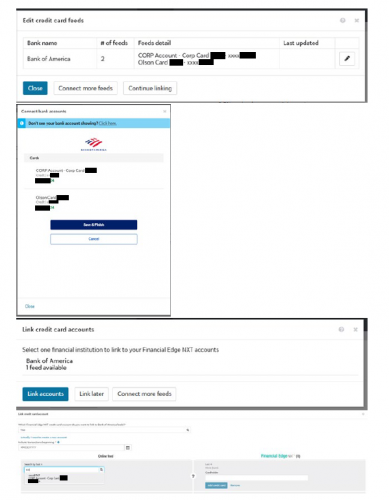
I'm having pretty much the same issue, due to having our card replaced. We only have one true card, but because we're a small business account for Bank of America, their online portal shows the upper CORP account and the individual card(s).In Blackbaud, the Feeds Detail section indicates the two (2) feeds, referencing our CORP account (master) and the individual's card number. When I click on the pencil icon to edit, the same two account numbers are reflected. But when I attempt to link, it's only bringing over the feed for the master CORP account, not the new card number. It would be great if there was a way to clear out the feed/link and start all over. Or if it gave me the option to select which feed I needed to update.
 0
0



Categories
- All Categories
- 6 Blackbaud Community Help
- 211 bbcon®
- 1.4K Blackbaud Altru®
- 402 Blackbaud Award Management™ and Blackbaud Stewardship Management™
- 1.1K Blackbaud CRM™ and Blackbaud Internet Solutions™
- 15 donorCentrics®
- 360 Blackbaud eTapestry®
- 2.6K Blackbaud Financial Edge NXT®
- 656 Blackbaud Grantmaking™
- 577 Blackbaud Education Management Solutions for Higher Education
- 3.2K Blackbaud Education Management Solutions for K-12 Schools
- 941 Blackbaud Luminate Online® and Blackbaud TeamRaiser®
- 84 JustGiving® from Blackbaud®
- 6.7K Blackbaud Raiser's Edge NXT®
- 3.7K SKY Developer
- 248 ResearchPoint™
- 120 Blackbaud Tuition Management™
- 165 Organizational Best Practices
- 240 Member Lounge (Just for Fun)
- 34 Blackbaud Community Challenges
- 37 PowerUp Challenges
- 3 (Open) PowerUp Challenge: Grid View Batch
- 3 (Closed) PowerUp Challenge: Chat for Blackbaud AI
- 3 (Closed) PowerUp Challenge: Data Health
- 3 (Closed) Raiser's Edge NXT PowerUp Challenge: Product Update Briefing
- 3 (Closed) Raiser's Edge NXT PowerUp Challenge: Standard Reports+
- 3 (Closed) Raiser's Edge NXT PowerUp Challenge: Email Marketing
- 3 (Closed) Raiser's Edge NXT PowerUp Challenge: Gift Management
- 4 (Closed) Raiser's Edge NXT PowerUp Challenge: Event Management
- 3 (Closed) Raiser's Edge NXT PowerUp Challenge: Home Page
- 4 (Closed) Raiser's Edge NXT PowerUp Challenge: Standard Reports
- 4 (Closed) Raiser's Edge NXT PowerUp Challenge: Query
- 796 Community News
- 3K Jobs Board
- 54 Blackbaud SKY® Reporting Announcements
- 47 Blackbaud CRM Higher Ed Product Advisory Group (HE PAG)
- 19 Blackbaud CRM Product Advisory Group (BBCRM PAG)