Trouble entering an invoice with a lot of line items





Hi All, wondering if anyone has the same issue. I've reached out to Blackbaud, and their answer was to “clear history and erase your cookies” which did not work. I've been having problems when entering a recurring invoice with a lot of line items either my invoice amount changes, or all my GL lines amount gets reset to match total. Resetting all the GL lines that were already entered. Also, it used to be that if you hit “enter” twice (2x) it would take you to the next line item. NOW you have to actually “click” with the mouse to jump to the next line. Anyone else run into the same issue? How did you fix it?
Comments
-
@Marie Estrella hi Marie, I haven't encountered this issue just yet but was wondering if you have the settings on the line item to allow for changes to the amount?
0 -
@Tara Makas when I delete a line there is a message pop-up to prompt you to “keep original total or reset to match” but that message only comes up when a line is deleted. Since I just came across this issue in the last few months, I had not thought to look into our main invoice settings to see if there is anything that may had caused this. thanks!
0 -
@Marie Estrella
No worries! I hope this helps. If you go into the billing item set up, the box is there to “allow for changes” Let me know if this helps, if not then we know there maybe a bigger issue FE has. I know there have been issues for us for AR too.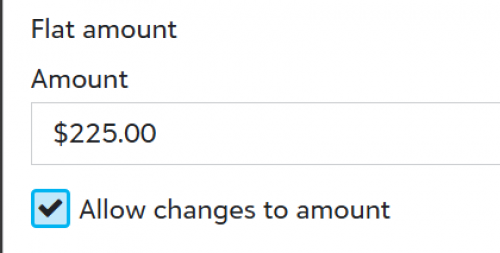 1
1 -
@Marie Estrella
Hi Marie, I had this happen yesterday with a 54 line purchase order. I reached out to Blackbaud and they told me to change my browser and it worked. I was on Firefox and open NXT in Chrome and it worked so much better.0





Categories
- All Categories
- 6 Blackbaud Community Help
- 211 bbcon®
- 1.4K Blackbaud Altru®
- 402 Blackbaud Award Management™ and Blackbaud Stewardship Management™
- 1.1K Blackbaud CRM™ and Blackbaud Internet Solutions™
- 15 donorCentrics®
- 360 Blackbaud eTapestry®
- 2.6K Blackbaud Financial Edge NXT®
- 656 Blackbaud Grantmaking™
- 577 Blackbaud Education Management Solutions for Higher Education
- 3.2K Blackbaud Education Management Solutions for K-12 Schools
- 941 Blackbaud Luminate Online® and Blackbaud TeamRaiser®
- 84 JustGiving® from Blackbaud®
- 6.7K Blackbaud Raiser's Edge NXT®
- 3.7K SKY Developer
- 248 ResearchPoint™
- 120 Blackbaud Tuition Management™
- 165 Organizational Best Practices
- 240 Member Lounge (Just for Fun)
- 34 Blackbaud Community Challenges
- 37 PowerUp Challenges
- 3 (Open) PowerUp Challenge: Grid View Batch
- 3 (Closed) PowerUp Challenge: Chat for Blackbaud AI
- 3 (Closed) PowerUp Challenge: Data Health
- 3 (Closed) Raiser's Edge NXT PowerUp Challenge: Product Update Briefing
- 3 (Closed) Raiser's Edge NXT PowerUp Challenge: Standard Reports+
- 3 (Closed) Raiser's Edge NXT PowerUp Challenge: Email Marketing
- 3 (Closed) Raiser's Edge NXT PowerUp Challenge: Gift Management
- 4 (Closed) Raiser's Edge NXT PowerUp Challenge: Event Management
- 3 (Closed) Raiser's Edge NXT PowerUp Challenge: Home Page
- 4 (Closed) Raiser's Edge NXT PowerUp Challenge: Standard Reports
- 4 (Closed) Raiser's Edge NXT PowerUp Challenge: Query
- 796 Community News
- 3K Jobs Board
- 54 Blackbaud SKY® Reporting Announcements
- 47 Blackbaud CRM Higher Ed Product Advisory Group (HE PAG)
- 19 Blackbaud CRM Product Advisory Group (BBCRM PAG)