Power Automate - Condition not evaluating array name



Hi,
This is my first post so please let me know if this needs to be structured differently.
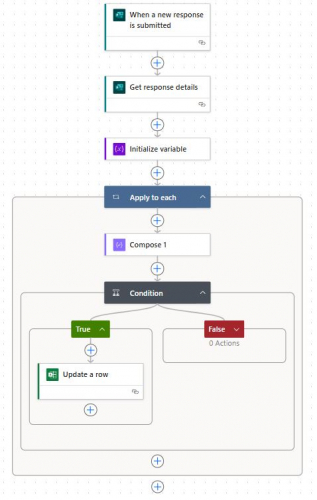
I have created an automated cloud flow which takes inputs from an MS Form before creating the Name and Value of the inputs into an array. I assess each of the array items in an apply to each loop and if the condition is true, then the value of the array item is written to an excel workbook.
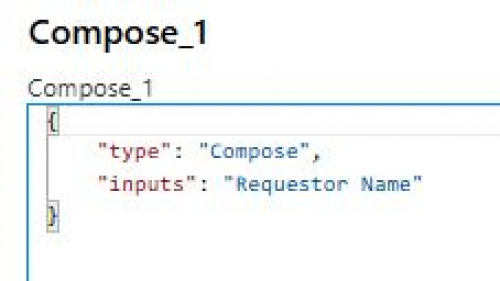
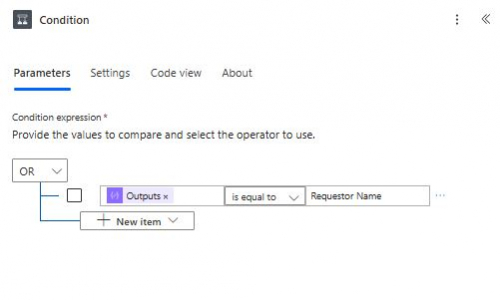
The first item in my array has a Name of Requestor Name and a value which is the MS Form input. I've created a compose to bring back only the Name from the array, which shows in the outputs as Requestor Name. When my condition looks at the output of the compose and assesses whether this is equal to Requestor Name, the result is false. Please help.
Comments
-
@Dave Wright
It looks like you posted this in the wrong forum; however the issue is on your Condition, you've hardcoded the word “Requestor Name” instead of using a variable value from the MS Form.
Thus, it's trying to compare the value of your Compose Output literally to “Requester Name”.0 -
@Dave Wright discussion moved to SKY Developer community. Thanks!
0 -
@Dave Wright
to know if your flow is structured properly or not, going to need to know your business needs / intention of doing this, and what your MS form's question looks like.As for the flow itself:
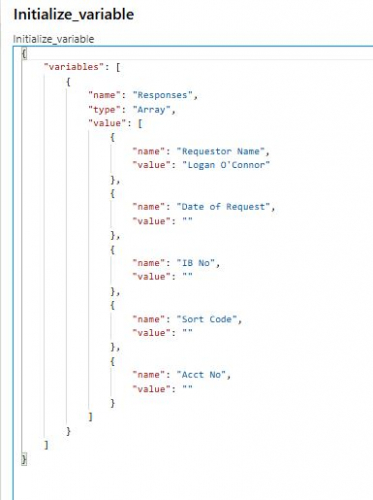
- your initialize array variable is static array of object with property “name” and “value”. I don't know what you want to achieve with this, are you just testing and planning in the future for this array to be pulled from somewhere else (i.e. sharepoint or excel?)
- Assuming you are trying to compare the MS form input to the array variable's value where name="Requestor Name", then (1) your condition is wrong (2) you don't need apply to each, just use Filter Array
- Using Apply to Each
- Compose_1 is not needed, or if you feel its easy to read, then you need to select the dynamic content of “name” property within the array variable, then replace what I stated on next bullet point as the “left” side of the condition with the Compose_1 dynamic content instead
- Condition should be (dynamic content of “name” within the array variable = “Requestor Name”) AND (dynamic content of “value” within the array variable = dynamic content of the Get response details answer to the name question from MS form
- your “TRUE” is not doing what you said neither, your screenshot show Update a row, but you said on your post you want to add to excel, so change this if you are trying to Add a row instead.
- Using Filter Array
- After your Initialize variable action, don't need the Apply to each or anything within it, instead use Filter array action, and provide the array variable as the input and condition on “name” dynamic content = “Requestor Name” AND “value” dynamic content = MS Form response, this does require you to use “Advance” mode so it's a littl harder, but more efficient
- Then condition on the “lenght()” of the filter array, if 0 = NOT FOUND, otherwise, at least one is found and do your excel action
0










Categories
- All Categories
- 6 Blackbaud Community Help
- 213 bbcon®
- 1.4K Blackbaud Altru®
- 401 Blackbaud Award Management™ and Blackbaud Stewardship Management™
- 1.1K Blackbaud CRM™ and Blackbaud Internet Solutions™
- 15 donorCentrics®
- 360 Blackbaud eTapestry®
- 2.6K Blackbaud Financial Edge NXT®
- 655 Blackbaud Grantmaking™
- 576 Blackbaud Education Management Solutions for Higher Education
- 3.2K Blackbaud Education Management Solutions for K-12 Schools
- 939 Blackbaud Luminate Online® and Blackbaud TeamRaiser®
- 84 JustGiving® from Blackbaud®
- 6.6K Blackbaud Raiser's Edge NXT®
- 3.7K SKY Developer
- 248 ResearchPoint™
- 119 Blackbaud Tuition Management™
- 165 Organizational Best Practices
- 241 Member Lounge (Just for Fun)
- 34 Blackbaud Community Challenges
- 34 PowerUp Challenges
- 3 (Open) PowerUp Challenge: Chat for Blackbaud AI
- 3 (Closed) PowerUp Challenge: Data Health
- 3 (Closed) Raiser's Edge NXT PowerUp Challenge: Product Update Briefing
- 3 (Closed) Raiser's Edge NXT PowerUp Challenge: Standard Reports+
- 3 (Closed) Raiser's Edge NXT PowerUp Challenge: Email Marketing
- 3 (Closed) Raiser's Edge NXT PowerUp Challenge: Gift Management
- 4 (Closed) Raiser's Edge NXT PowerUp Challenge: Event Management
- 3 (Closed) Raiser's Edge NXT PowerUp Challenge: Home Page
- 4 (Closed) Raiser's Edge NXT PowerUp Challenge: Standard Reports
- 4 (Closed) Raiser's Edge NXT PowerUp Challenge: Query
- 791 Community News
- 2.9K Jobs Board
- 53 Blackbaud SKY® Reporting Announcements
- 47 Blackbaud CRM Higher Ed Product Advisory Group (HE PAG)
- 19 Blackbaud CRM Product Advisory Group (BBCRM PAG)