Sorting the Gift Detail and Summary Report





I run a Gift Detail and Summary Report, but I would like to sort it by Fund, not by Constituent or Gift Date. Is there a way to do that? My only workaround that I have found is to run it for just Fund x, then Fund y, then Fund z, etc. Thanks
Comments
-
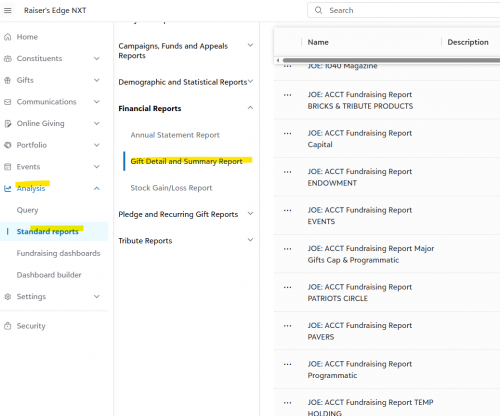
@Amy Horrocks You can sort by Fund in RE NXT in the standard reports (if you have that right now), but not in the RE Database View. Export your report as a CVS, not PDF and then in the CVS sort by Fund.
 2
2 -
@Amy Horrocks @Joe Moretti gives you a solid suggestion, and thanks Joe, I hadn't gotten deep enough in the weeds in web view to notice you can not sort by query order there (yet?) I just created an idea in the idea bank, as I couldn't find one that existed.
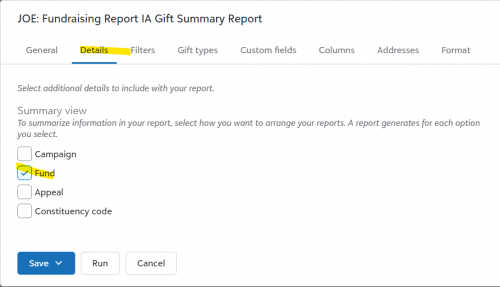
In the database view, if you summarize by fund, it will sort by fund ID, whether you have that as a column or not. You could also set up a query to include in the report and set the sort order there. Then on the Format tab in Sort/Break, set the Sort by query order box. If you go that route, just make sure your query is broad enough not to limit any gifts you may need.
2 -
@Joe Moretti @Elizabeth Johnson Thank you both for the replies. I think just running it by each fund separately ends up being quicker. Oh well. But thanks again!
1 -
@Amy Horrocks
Hi Amy,If I am understanding this right, you want to sort the whole report by fund ID, rather than filtering in or out which fund codes you want. If that is the case I would suggest running the report in Database view. (You would still have to enter dates, but if you are looking for your whole history pick a date before org data starts to present) Then export the report as an a CSV. (Which I don't think you can do in NXT yet, I believe it defaults to adobe)
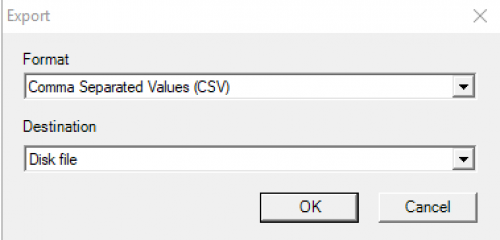
You will have to add back in a header but from there you could sort the excel sheet by the fund ID column. For example:

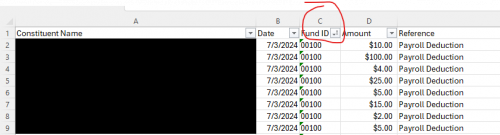
Hope this helps!
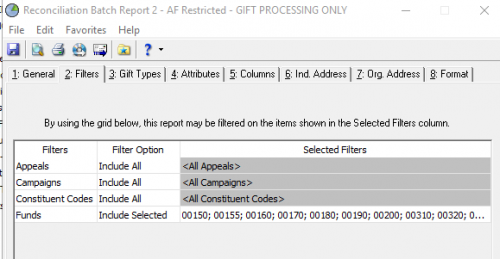
Alternatively… if I have misunderstood the question and you are looking to produce reports by groups of funds - you are correct the only way at present is to filter based on including multiple fund codes. At my org we run one for unrestricted gifts, another for restricted, endowed etc. We essentially just have reports saved that reflect each group and run as needed for reconciliation and reporting.
 1
1











Categories
- All Categories
- 6 Blackbaud Community Help
- 213 bbcon®
- 1.4K Blackbaud Altru®
- 402 Blackbaud Award Management™ and Blackbaud Stewardship Management™
- 1.1K Blackbaud CRM™ and Blackbaud Internet Solutions™
- 15 donorCentrics®
- 360 Blackbaud eTapestry®
- 2.6K Blackbaud Financial Edge NXT®
- 655 Blackbaud Grantmaking™
- 576 Blackbaud Education Management Solutions for Higher Education
- 3.2K Blackbaud Education Management Solutions for K-12 Schools
- 939 Blackbaud Luminate Online® and Blackbaud TeamRaiser®
- 84 JustGiving® from Blackbaud®
- 6.6K Blackbaud Raiser's Edge NXT®
- 3.7K SKY Developer
- 248 ResearchPoint™
- 119 Blackbaud Tuition Management™
- 165 Organizational Best Practices
- 241 Member Lounge (Just for Fun)
- 34 Blackbaud Community Challenges
- 34 PowerUp Challenges
- 3 (Open) PowerUp Challenge: Chat for Blackbaud AI
- 3 (Closed) PowerUp Challenge: Data Health
- 3 (Closed) Raiser's Edge NXT PowerUp Challenge: Product Update Briefing
- 3 (Closed) Raiser's Edge NXT PowerUp Challenge: Standard Reports+
- 3 (Closed) Raiser's Edge NXT PowerUp Challenge: Email Marketing
- 3 (Closed) Raiser's Edge NXT PowerUp Challenge: Gift Management
- 4 (Closed) Raiser's Edge NXT PowerUp Challenge: Event Management
- 3 (Closed) Raiser's Edge NXT PowerUp Challenge: Home Page
- 4 (Closed) Raiser's Edge NXT PowerUp Challenge: Standard Reports
- 4 (Closed) Raiser's Edge NXT PowerUp Challenge: Query
- 792 Community News
- 2.9K Jobs Board
- 54 Blackbaud SKY® Reporting Announcements
- 47 Blackbaud CRM Higher Ed Product Advisory Group (HE PAG)
- 19 Blackbaud CRM Product Advisory Group (BBCRM PAG)