Sharing my Power Automate Flow(s): Get Query Results as JSON





While we already have the templates to get query results in a .CSV file, we can now get query results as JSON thanks to the updated Query connectors. After running this flow you can then use the JSON output for further manipulating and processing directly within Power Automate.
Attached you will find 4 different templates: 2 for RENXT, and 2 for FENXT. The ones noted with (gmail) include the gmail connector instead of the Outlook connector for email notifications.
Steps to update:
- Update Initialize variable emailToNotify with the email address that should be used to notify of flow/query failures.
- Update Start a query job to include the query you need to run.
- Update the schema in Parse JSON query results.
- To update the schema you'll need to run the flow once.
- Click into the run history of that run and copy the output from Compose JSON results.
- Go back to Edit the Flow and on the Parse JSON action, click Use sample payload to generate schema.
- Then paste in the output copied above. Click Done.
Note: On 2/10/2026 something changed that causes another configuration step to be needed. See notes below from Austen Brown on 2/10 and 8:56 AM. I'll work on getting the .zip files updated, but until then, please follow Austen's notes!
GetRENXTqueryresultsasJSON_20250311145820.zip
GetRENXTqueryresultsasJSON(withgmail)_20250311145559.zip
Comments
-
@Ashley Moose Thank you so much for this! I got this to work for me to have fundraiser notification emails be sent automatically when one of their assigned donors gives a gift (with link to donor record included). This will help them thank their donors much quicker.
3 -
@Ashley Moose, thanks for the Gmail versions!
0 -
Adding in, as of this morning running the Body output from the HTTP action following the query call is causing errors.
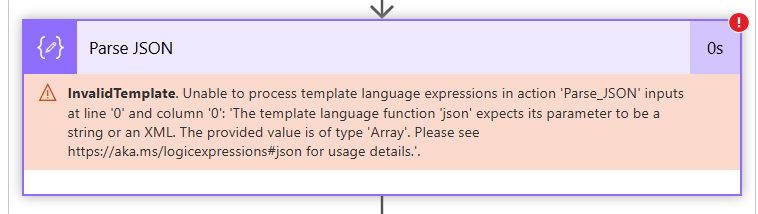
To resolve the error, you need to remove the json() expression within the Parse JSON action to be only the dynamic output from the HTTP action above.
With the change, the flow runs as expected.
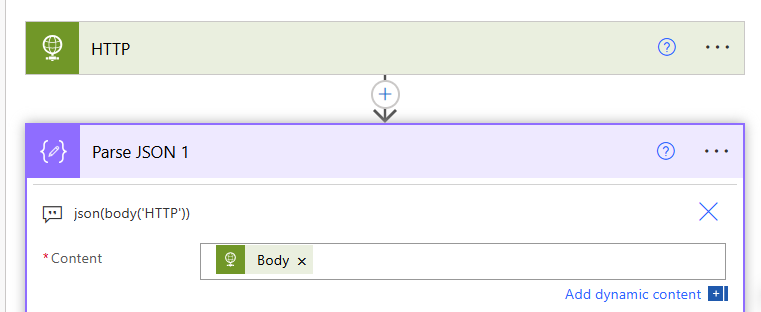
Ashley (can't tag you for some reason), you may want to update your templates to remove the json() expression from this step.2 -
Thanks @Austen Brown. I just uncovered the same thing while working in one of my flows and was like "hmm" didn't I just see this in my Community email?? Not sure what changed. I'll aim to get the templates updated one of these days. Until then, noting above :)
1












Categories
- All Categories
- 6 Blackbaud Community Help
- 211 bbcon®
- 1.4K Blackbaud Altru®
- 403 Blackbaud Award Management™ and Blackbaud Stewardship Management™
- 1.2K Blackbaud CRM™ and Blackbaud Internet Solutions™
- 15 donorCentrics®
- 360 Blackbaud eTapestry®
- 2.6K Blackbaud Financial Edge NXT®
- 659 Blackbaud Grantmaking™
- 579 Blackbaud Education Management Solutions for Higher Education
- 3.2K Blackbaud Education Management Solutions for K-12 Schools
- 943 Blackbaud Luminate Online® and Blackbaud TeamRaiser®
- 84 JustGiving® from Blackbaud®
- 6.7K Blackbaud Raiser's Edge NXT®
- 3.8K SKY Developer
- 250 ResearchPoint™
- 120 Blackbaud Tuition Management™
- 165 Organizational Best Practices
- 241 Member Lounge (Just for Fun)
- 36 Blackbaud Community Challenges
- 37 PowerUp Challenges
- 3 (Open) PowerUp Challenge: Grid View Batch
- 3 (Closed) PowerUp Challenge: Chat for Blackbaud AI
- 3 (Closed) PowerUp Challenge: Data Health
- 3 (Closed) Raiser's Edge NXT PowerUp Challenge: Product Update Briefing
- 3 (Closed) Raiser's Edge NXT PowerUp Challenge: Standard Reports+
- 3 (Closed) Raiser's Edge NXT PowerUp Challenge: Email Marketing
- 3 (Closed) Raiser's Edge NXT PowerUp Challenge: Gift Management
- 4 (Closed) Raiser's Edge NXT PowerUp Challenge: Event Management
- 3 (Closed) Raiser's Edge NXT PowerUp Challenge: Home Page
- 4 (Closed) Raiser's Edge NXT PowerUp Challenge: Standard Reports
- 4 (Closed) Raiser's Edge NXT PowerUp Challenge: Query
- 798 Community News
- 3K Jobs Board
- 56 Blackbaud SKY® Reporting Announcements
- 47 Blackbaud CRM Higher Ed Product Advisory Group (HE PAG)
- 19 Blackbaud CRM Product Advisory Group (BBCRM PAG)