Journal Entries Report





Is there a way to run a report of all the JE's that were posted to the the GL for a specific year (ex. 2024)?
Comments
-
0
-
@Brian Rojo Thank you. I did run the report, but the results are based on the date I posted the entries, not the date they were actually recorded in the GL. For example, I may have transactions from December where I manually set the post date to December, but the final posting occurred in January. As a result, those transactions aren't appearing in my 2024 report.
1 -
@Karen Stocking, if you'd like to see the transactions by their individual Post dates and not the batch post date, you'll want to run a Transaction Query. You can filter by the date range you want and put the information you'd like to see about the transactions on the Output tab and then view/export your results.
1 -
@Nikki Baldwin Thank you!
0 -
@Karen Stocking I asked this question a few years back because we need to give our auditors a file with all the journal entries that have been posted in the fiscal year they are auditing. The problem with the reports (Batch Detail Report and others) are like you said, they ask for date posted, but not period posted. The date posted needs to be changed to Period posted so we can get an accurate listing of all entries related to a particular fiscal year or period. I was told the same you are being told, run the Batch Detail or run a query - it doesn't help because they all by the date it was posted. Obviously not an accountant creating the query or report options.
0 -
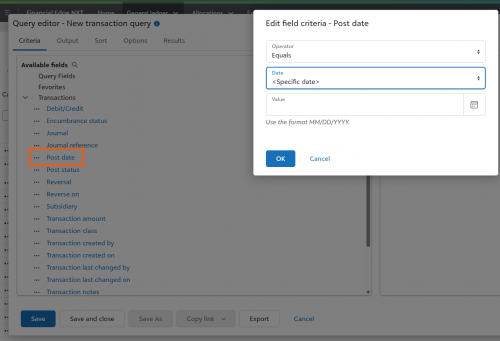
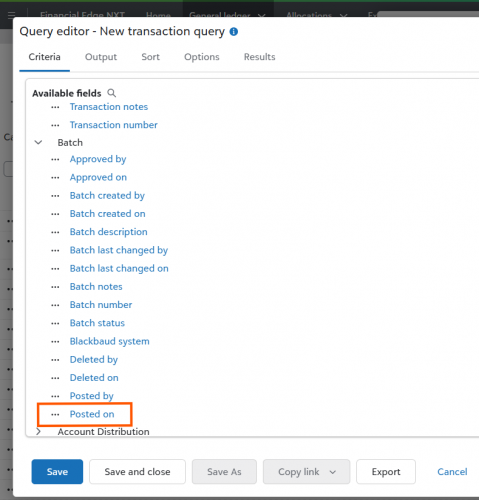
@Sharelle Buyer with the Transaction Query I suggested below, you can choose post date and not date posted (batch), so that you can sort/filter/export the transactions as needed there. Not to say the report couldn't use that same improvement, but you can absolutely get to the data you need with a query.
Screenshots show the 'post date' info along with the different batch ‘posted on’ date so you know it's pulling those two pieces of information separately. Hope this helps!0








Categories
- All Categories
- 6 Blackbaud Community Help
- 211 bbcon®
- 1.4K Blackbaud Altru®
- 403 Blackbaud Award Management™ and Blackbaud Stewardship Management™
- 1.2K Blackbaud CRM™ and Blackbaud Internet Solutions™
- 15 donorCentrics®
- 360 Blackbaud eTapestry®
- 2.6K Blackbaud Financial Edge NXT®
- 658 Blackbaud Grantmaking™
- 579 Blackbaud Education Management Solutions for Higher Education
- 3.2K Blackbaud Education Management Solutions for K-12 Schools
- 943 Blackbaud Luminate Online® and Blackbaud TeamRaiser®
- 84 JustGiving® from Blackbaud®
- 6.7K Blackbaud Raiser's Edge NXT®
- 3.8K SKY Developer
- 250 ResearchPoint™
- 120 Blackbaud Tuition Management™
- 165 Organizational Best Practices
- 241 Member Lounge (Just for Fun)
- 36 Blackbaud Community Challenges
- 37 PowerUp Challenges
- 3 (Open) PowerUp Challenge: Grid View Batch
- 3 (Closed) PowerUp Challenge: Chat for Blackbaud AI
- 3 (Closed) PowerUp Challenge: Data Health
- 3 (Closed) Raiser's Edge NXT PowerUp Challenge: Product Update Briefing
- 3 (Closed) Raiser's Edge NXT PowerUp Challenge: Standard Reports+
- 3 (Closed) Raiser's Edge NXT PowerUp Challenge: Email Marketing
- 3 (Closed) Raiser's Edge NXT PowerUp Challenge: Gift Management
- 4 (Closed) Raiser's Edge NXT PowerUp Challenge: Event Management
- 3 (Closed) Raiser's Edge NXT PowerUp Challenge: Home Page
- 4 (Closed) Raiser's Edge NXT PowerUp Challenge: Standard Reports
- 4 (Closed) Raiser's Edge NXT PowerUp Challenge: Query
- 798 Community News
- 3K Jobs Board
- 56 Blackbaud SKY® Reporting Announcements
- 47 Blackbaud CRM Higher Ed Product Advisory Group (HE PAG)
- 19 Blackbaud CRM Product Advisory Group (BBCRM PAG)