is there a way to run duplicate search in NXT





Fine, I read the documentation on why (not thrilled that criteria can't be edited). The duplicates are not appearing in Data Health > Possible duplicates. Staff member found them when processing registrations.
Is there any way to manually run a search in NXT so the records can be merged on the NXT side. I know it creates extra step of having to then go to db and manually delete but when I merged one duplicate from the db side we lost the name in the pending NXT gift batch. As it was first one we at least knew who it was and could re-enter her name.
It's creating more work either way. A bit frustrating. Is there a way to say in NXT that two records are dups when their criteria doesn't flag tthem? Is there something I should do differently when merging in db?
Any advise appreciated.
Comments
-
Check out the message that I just sent you, JoAnn Strommen.
In general, because of this cool webinar I attended with BB recently, I am now merging in webview first, then merging in database view for anything left over that webview didn't catch and deleting the dead record immediately. I also still am using both duplicate search tools. Plus my people tell me when they notice one.
I didn't know about the name being removed from a pending webview gift batch. I'm glad to learn that!
I don't have a great answer for your actual question about being able to search for duplicates outside of the tool that BB has, sorry!0 -
JoAnn Strommen - can you give us a more clear example of what information was different on the duplicate record that was created from the record that was the actual match? What criteria would you want to change on the duplicate matching criteria? We are always looking for concrete examples to continue refining our duplicate process.
As much as possible, especially for someone that came in from an event registration, you'll want to modify them in NXT before going to delete anything in database view. If you've identified from your event participant list in NXT that someone that came in from online registration needs to be changed, you can edit the participant and change them to a different constituent.
Thank you for any additional information you can provide!
Samantha McGuin
Principal Product Manager0 -
Heather, I assume that merging in webview first is to take care of any attachments, etc., that exist in webview but not in db view? Any other reasons we should be aware of?
We do not use attachments unless absolutely necessary, because -- until they are able to be included in nightly data backups and restores -- they are at high risk of data loss in the case of calamity. Once BB is able to include data backups and restores for webview data, we will consider them more properly functional.0 -
@Heather MacKenzie, we are new to all things Blackbaud and set up our first event to feed our sandbox because we noticed the duplicate record problem while we were testing our setup. We came to learn that the registration information "stays" with the newly created record when RE is unable to match a registrant to a constituent. So merging in web-view first is essential. It is MADDENING that something that is supposed to save time, creates so much work. The merging in web view and then in db view is crazy making.0
-
Samantha McGuin - I will also send a screen shot directly to you. I've merged and deleted those records from last week - don't recall the differences except for one - Name entered : A Adam Anderson vs Allan Adam Anderson with address and email that matched.
Have a few for this week now.
I have records matched on name and address showing as possible duplicates. We have multiple events we are registering for - some via NXT, some through NetCommunity. So, I can't even tell without opening up each record which side the duplicate was created on.
I agree with the comments about having to merge in NXT and then db is a pain. NXT we're definitely ending up with more duplicate records where in NetC/OLX is was just duplicates on participant lists. Just time consuming extra work.
Appreciate any changes that can be made to avoid creating duplicates.0 -
I did find a box I had missed right below the heading where I can enter a name and have it search for that record. Have to type name in again for target record but it did help me find the duplicates in web view so I could merge them there and not lose event info.
I appreciate the work Samantha and others have been doing to improve the process to prevent duplicate records. Our reunion NXT event registration is done so I don't anticipate the duplicates I was getting. If you are getting them reach out to support to provide examples for analysis.
0 -
Hi JoAnn,
In NXT if you go to Tools, Data Health, you can see Possible Duplicates, if you click on the total number of them it will allow you to view and merge them. HOWEVER it does not delete the record that you don't want, which is ludicrous, so be aware those records will still be hanging around. In Database View in Admin you can run Duplicate Constituent Management Tool, and this will allow you see all the duplicates and you can merge one into another and the record you don't want can be deleted if you check the box.
Be careful when merging, I always take over most of the fields, so as not to lose any information.
Dawn
0 -
Thanks @Dawn Cox . But what I posted about was searching for known duplicates not identified by NXT. I needed to find them in NXT to merge so I wouldn't lose the NXT Event registration info before I deleted the duplicate in db view. The search box allowed me to do this.
Yes, care is needed and the extra steps are a time-sucking irritation.
0 -
Dear Community,
Is anyone else experiencing this scenario with merging records to get the event data from a newly created record to an existing record? I searched the community with no luck; this was the closest thread and feels relevant enough, although many things have changed since the last posting.
Let me paint the picture:
You have an event registration form.
Someone is coming to your event! Yay.
RE doesn't recognize the record and creates a new record automatically.
You pause and dream of a day when the same functionality that exists in the Gift Management opens up for events:
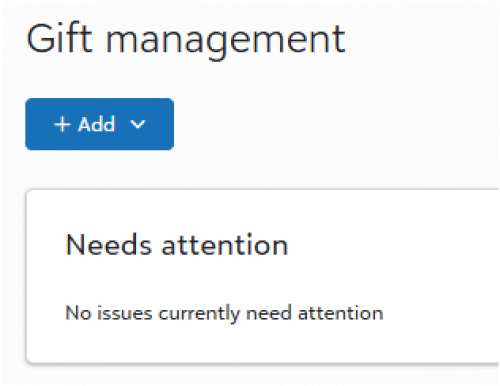
You have systems in place to catch when the web view creates new records.
You open the new record and select merge into another record.
You compare the records and realize all you need to merge is the event participation section.
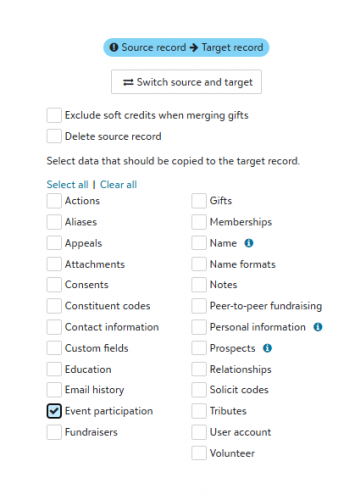
You get an error that occurs and nothing merges.
You start to troubleshoot and select another section to merge, and it works.
Other areas you might be exploring - is there an issue because maybe the person was marked as inactive, they have no constituent code, or that the record you are merging into already has the event?
I think it is one of these areas, however, I'm finding inconsistencies.
I'm exploring this a little more before I start a case.
With curiosity,
Elizabeth
0 -
@Elizabeth Johnson
I dont' know if this is a recent experience you have, but I do know it was previously this way where merging on webview cannot merge 2 records together when both record as event registration for the same event.This has been changed since last major webview merge update. You are able to merge now (like dbview) even if the 2 constituents both have event registration for the same event, it will just have 2 participant records for the same event.
0 -
@Alex Wong
Thanks for that information, unfortunately, the fix does not seem to work. I had to merge event registration information yesterday and it did not come over. The record the information was going into already had a registration.Adding a bit more detail, the already existing record which had a registration for the same event did have the participant marked as attending so I wonder if that would stop the creation of a second participant record for the same event since they would also have the same status of attending? The only other thing is the participant record to be merged into an existing constituent record had a guest on it. Just throwing out information.
0 -
@Dan Snyder
Hmm, i will have to ask my CRM team to confirm if we have problem too0



















Categories
- All Categories
- 6 Blackbaud Community Help
- 211 bbcon®
- 1.4K Blackbaud Altru®
- 402 Blackbaud Award Management™ and Blackbaud Stewardship Management™
- 1.1K Blackbaud CRM™ and Blackbaud Internet Solutions™
- 15 donorCentrics®
- 360 Blackbaud eTapestry®
- 2.6K Blackbaud Financial Edge NXT®
- 656 Blackbaud Grantmaking™
- 577 Blackbaud Education Management Solutions for Higher Education
- 3.2K Blackbaud Education Management Solutions for K-12 Schools
- 941 Blackbaud Luminate Online® and Blackbaud TeamRaiser®
- 84 JustGiving® from Blackbaud®
- 6.7K Blackbaud Raiser's Edge NXT®
- 3.7K SKY Developer
- 248 ResearchPoint™
- 120 Blackbaud Tuition Management™
- 165 Organizational Best Practices
- 240 Member Lounge (Just for Fun)
- 34 Blackbaud Community Challenges
- 37 PowerUp Challenges
- 3 (Open) PowerUp Challenge: Grid View Batch
- 3 (Closed) PowerUp Challenge: Chat for Blackbaud AI
- 3 (Closed) PowerUp Challenge: Data Health
- 3 (Closed) Raiser's Edge NXT PowerUp Challenge: Product Update Briefing
- 3 (Closed) Raiser's Edge NXT PowerUp Challenge: Standard Reports+
- 3 (Closed) Raiser's Edge NXT PowerUp Challenge: Email Marketing
- 3 (Closed) Raiser's Edge NXT PowerUp Challenge: Gift Management
- 4 (Closed) Raiser's Edge NXT PowerUp Challenge: Event Management
- 3 (Closed) Raiser's Edge NXT PowerUp Challenge: Home Page
- 4 (Closed) Raiser's Edge NXT PowerUp Challenge: Standard Reports
- 4 (Closed) Raiser's Edge NXT PowerUp Challenge: Query
- 796 Community News
- 3K Jobs Board
- 54 Blackbaud SKY® Reporting Announcements
- 47 Blackbaud CRM Higher Ed Product Advisory Group (HE PAG)
- 19 Blackbaud CRM Product Advisory Group (BBCRM PAG)