Global Changes to Constituent Codes





I'm a new user hired to support RENXT. I support a user at a high school. When students graduate, the user must move the constituent code from “student” to “alumni." Is there a way to globally change a constituent list's codes from student to alumni (assume we have the list of Seniors identified). Thanks, Jack
Comments
-
@Jack Wagner My suggestion would be to keep the “student” Code for Historical perspective and then attach a query of all the records that need to have the Alumni code to a Global Add. Add Constituent Code and again, include that query. Add the Alumni Code, Date From and Click the box Primary.
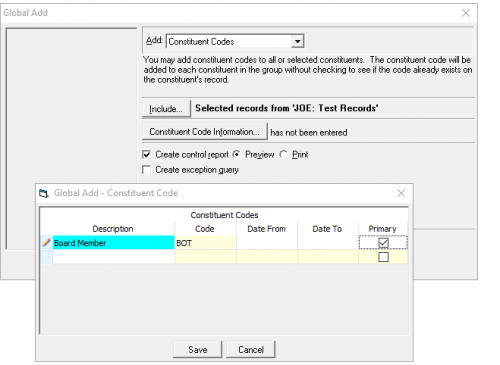
If you want to just change the Student Code to Alumni Code, use the Global Change (attach the query with those records), under the Constituent Code, use Code and Replace the Student Code with the Alumni Code.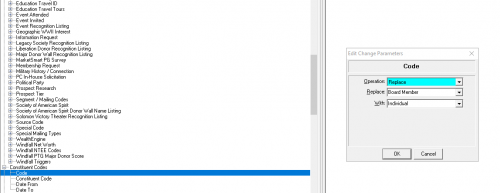 2
2 -
@Jack Wagner As @Joe Moretti it can be done. As a new user, use caution! Test with a couple of records. If change has option for query outputs of records changed/not changed, mark to create them.
We do not keep our ‘student’ code. If doing a global change, be sure you have a static query of only the records you want to change or you'll change all the underclassmen too.
This is the KB article on the process.
- Knowledgebase Article 39936
How to globally change primary constituent codes or move an existing constituent code to the primary constituent code
2 -
@Jack Wagne or this KB might be better if not primary code.
- Knowledgebase Article 38950
How to globally replace constituency codes
3 -
@Jack Wagner - If you utilize Power Automate (or are interested in automation) this process can be automated. Not only to change a specific code from A to B, but also re-arrange the codes so the correct on is ‘primary’ on the record. I'm presenting a webinar later today (1pm CT) on this type of automation, here's link if you'd like to join - it will be recorded.
3 -
@Austen Brown, thank you for replying. I signed up for the course. I'm busy at that time but I should get access to a recording. All the best, Jack
2 -
@Joe Moretti I'm curious why you would keep the constituent code of "Student" for these records?
2 -
@Spring Velazquez Just for historical purposes. Now I know if someone is an alumni they would have been a student at some point. But like I said, just historical. But you can choose just to globally change student to alumni.
2 -
@Jack Wagner
Does your school use LMS? If so, I have my Connect RE set up to automatically change an alumni from current student to Alumni and make them a constituent. Easy peasy!1 -
@Joe Moretti I'm curious why you would keep the constituent code of "Student" for these records?
Putting dates to these constituent codes can also really helpful. For example, you could see that someone was a student from 2020-2024 and then became an alum starting in 2024 when they graduated.
2 -
@Sharon Yokelson
Thanks for your comment. If we're using Connect RE, we can set the system up to automatically change students to alumni when they graduate? Is that setup completed in the LMS?0 -
@Jack Wagner Congrats on your new job! What a great thread.
@Spring Velazquez We use the start and end dates for our students so we want to keep that.
I'm excited to build some automations to handle this work as @Austen Brown is a constant source of inspiration.
What I've done it the past works well. I use the import tools to handle this in the meantime and it has worked for the last 19 school years and is fast and easy. I export all the students. Duplicate the information in the same .imp file and save it as a .csv file. I then wipe out the IDs for the second set, and change Student to Alumnus/a for the first set, save again. Import the csv.
When I first started, I took @JoAnn Strommen's sound advice and tested a few records first.
I use a similar practice for parents, grandparents, and employees as they become past. For those with complex relationships with the school (e.g. also trustees, alumni parent/grandparent, etc.) I manage those separately. We are small so that has been doable.
0






















Categories
- All Categories
- 6 Blackbaud Community Help
- 213 bbcon®
- 1.4K Blackbaud Altru®
- 401 Blackbaud Award Management™ and Blackbaud Stewardship Management™
- 1.1K Blackbaud CRM™ and Blackbaud Internet Solutions™
- 15 donorCentrics®
- 360 Blackbaud eTapestry®
- 2.6K Blackbaud Financial Edge NXT®
- 655 Blackbaud Grantmaking™
- 576 Blackbaud Education Management Solutions for Higher Education
- 3.2K Blackbaud Education Management Solutions for K-12 Schools
- 939 Blackbaud Luminate Online® and Blackbaud TeamRaiser®
- 84 JustGiving® from Blackbaud®
- 6.6K Blackbaud Raiser's Edge NXT®
- 3.7K SKY Developer
- 248 ResearchPoint™
- 119 Blackbaud Tuition Management™
- 165 Organizational Best Practices
- 241 Member Lounge (Just for Fun)
- 34 Blackbaud Community Challenges
- 34 PowerUp Challenges
- 3 (Open) PowerUp Challenge: Chat for Blackbaud AI
- 3 (Closed) PowerUp Challenge: Data Health
- 3 (Closed) Raiser's Edge NXT PowerUp Challenge: Product Update Briefing
- 3 (Closed) Raiser's Edge NXT PowerUp Challenge: Standard Reports+
- 3 (Closed) Raiser's Edge NXT PowerUp Challenge: Email Marketing
- 3 (Closed) Raiser's Edge NXT PowerUp Challenge: Gift Management
- 4 (Closed) Raiser's Edge NXT PowerUp Challenge: Event Management
- 3 (Closed) Raiser's Edge NXT PowerUp Challenge: Home Page
- 4 (Closed) Raiser's Edge NXT PowerUp Challenge: Standard Reports
- 4 (Closed) Raiser's Edge NXT PowerUp Challenge: Query
- 791 Community News
- 2.9K Jobs Board
- 53 Blackbaud SKY® Reporting Announcements
- 47 Blackbaud CRM Higher Ed Product Advisory Group (HE PAG)
- 19 Blackbaud CRM Product Advisory Group (BBCRM PAG)