Microsoft Power BI data refresh issue - recent last 3 days





Has Blackbaud changed anything in the SKY API for authorization in the Power BI connector?
We have several dashboards that rely on the Power BI connector. All was working well until a few days ago when we are getting similar errors on all of our reports. I updated the gateway 3 weeks ago and all was working well until 4-24-25 when we received errors like the following:
Data source error: {"error":{"code":"DM_GWPipeline_Gateway_MashupDataAccessError","pbi.error":{"code":"DM_GWPipeline_Gateway_MashupDataAccessError","parameters":{},"details":[{"code":"DM_ErrorDetailNameCode_UnderlyingErrorCode","detail":{"type":1,"value":"-2147467259"}},{"code":"DM_ErrorDetailNameCode_UnderlyingErrorMessage","detail":{"type":1,"value":"The remote name could not be resolved: 'api.sky.blackbaud.com'"}},{"code":"DM_ErrorDetailNameCode_UnderlyingHResult","detail":{"type":1,"value":"-2147467259"}},{"code":"Microsoft.Data.Mashup.ErrorCode","detail":{"type":1,"value":"19005"}},{"code":"Microsoft.Data.Mashup.ValueError.Detail","detail":{"type":1,"value":"https://api.sky.blackbaud.com/fundraising/v1/funds?include_inactive=true&limit=5000"}},{"code":"Microsoft.Data.Mashup.ValueError.Reason","detail":{"type":1,"value":"DataSource.Error"}}],"exceptionCulprit":1}}} Table: Fund.
Cluster URI: WABI-WEST-US-C-PRIMARY-redirect.analysis.windows.net
Activity ID: d6d19b61-5c55-42c6-8617-ea767abced63
Request ID: bbe63751-1569-4bdb-a289-cd48be9c0f1c
Time: 2025-04-25 19:09:06Z
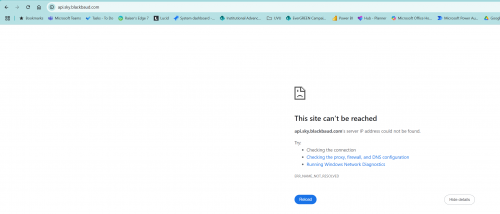
The issue seems to be that we cannot connect to api.sky.blackbaud.com - verified this in another browser window and on two different machines with different users.
Comments
-
@Megan Densley I successfully just used the “Try it” for the get fund api in the sky developer console. Have you tried that as a first troubleshooting step?
0 -
@Megan Densley, the Power BI custom connector from GitHub has been working consistently for me. Today I downloaded and set up the latest version of the Power BI custom connector from GitHub - blackbaud/powerbi-connector: Blackbaud data connectors for Power Query and Power BI , just to make sure all is still good.
The reason Erik mentioned trying the fund api in the Sky Developer Console is because this is the way to authenticate and confirm that the APIs are working. Popping that URL into a browser will not initiate the authentication for you. Using the developer console requires having the Sky API Console application added to your environment from the Marketplace, which your organization has probably completed already.
Authentication to the Power BI custom connector also relies on an application added to your environment. You will want to verify that your Power BI Connector's app is still authorized and has scope to read data.
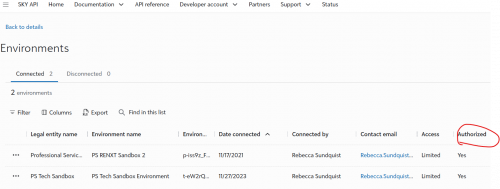
Are you an owner of the application that was created for the Power BI connector? Below is a screen shot of my app's Environments list. We've seen cases recently where Authorized = No. Other organizations have resolved this by removing the app from their environment and adding it again. Is this happening for you?
 0
0 -
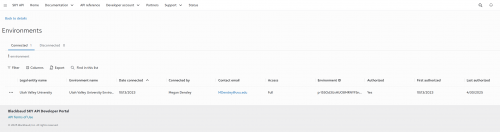
Thank you for messaging. Yes, I have been able to verify that I am the application owner and access is authorized.
We didn't change anything, on 4-24 the powerBI refreshes started failing. The gateway is up-to-date so that isn't the issue. I am having issues with connecting to the connector on the university network but am able to at home.
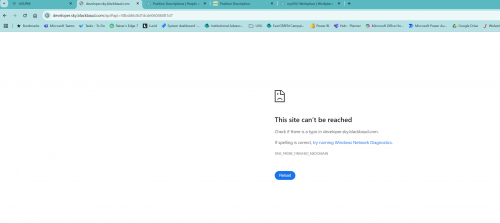
When I click on the endpoint reference in the sky developer console, I get the following error (2nd image).
 0
0 -
@Megan Densley, sorry if my link to the Fund List end point was messed up. You should find the “Try It” button here: https://developer.sky.blackbaud.com/api#api=58bdd6c8d7dcde06046081d7&operation=ListFunds
Hearing that you are able to connect at home and not on campus, makes me think it is a case where the custom connector's Blackbaud.mez file is not found in the expected file path. Are you using a different PC at home? The .mez file must be saved in the user's file path \\Documents\\Power BI Desktop\\Custom Connectors
For me, this is nested in my rsundquist\\OneDrive\\Documents path. For a gateway, this will be under the gateway's registered user's path. By default, the gateway typically installs under the user NT SERVICE\\PBIEgwService. This is mentioned in the documentation GitHub - blackbaud/powerbi-connector: Blackbaud data connectors for Power Query and Power BI under Schedule Refresh Power BI Service > Step 2 - Set up the service account.
It sounds like the way you are logging in while on campus is different from home. Therefore the .mez file is not located under the file path for your campus user. As for the gateway, since the refresh continued to work on Power BI Service after your initial update to the gateway, I didn't think this user and file path issue would be the root. There may yet be another issue in play.
0







Categories
- All Categories
- 6 Blackbaud Community Help
- 213 bbcon®
- 1.4K Blackbaud Altru®
- 403 Blackbaud Award Management™ and Blackbaud Stewardship Management™
- 1.1K Blackbaud CRM™ and Blackbaud Internet Solutions™
- 15 donorCentrics®
- 360 Blackbaud eTapestry®
- 2.6K Blackbaud Financial Edge NXT®
- 656 Blackbaud Grantmaking™
- 576 Blackbaud Education Management Solutions for Higher Education
- 3.2K Blackbaud Education Management Solutions for K-12 Schools
- 939 Blackbaud Luminate Online® and Blackbaud TeamRaiser®
- 84 JustGiving® from Blackbaud®
- 6.6K Blackbaud Raiser's Edge NXT®
- 3.7K SKY Developer
- 248 ResearchPoint™
- 119 Blackbaud Tuition Management™
- 165 Organizational Best Practices
- 241 Member Lounge (Just for Fun)
- 34 Blackbaud Community Challenges
- 34 PowerUp Challenges
- 3 (Open) PowerUp Challenge: Chat for Blackbaud AI
- 3 (Closed) PowerUp Challenge: Data Health
- 3 (Closed) Raiser's Edge NXT PowerUp Challenge: Product Update Briefing
- 3 (Closed) Raiser's Edge NXT PowerUp Challenge: Standard Reports+
- 3 (Closed) Raiser's Edge NXT PowerUp Challenge: Email Marketing
- 3 (Closed) Raiser's Edge NXT PowerUp Challenge: Gift Management
- 4 (Closed) Raiser's Edge NXT PowerUp Challenge: Event Management
- 3 (Closed) Raiser's Edge NXT PowerUp Challenge: Home Page
- 4 (Closed) Raiser's Edge NXT PowerUp Challenge: Standard Reports
- 4 (Closed) Raiser's Edge NXT PowerUp Challenge: Query
- 793 Community News
- 2.9K Jobs Board
- 54 Blackbaud SKY® Reporting Announcements
- 47 Blackbaud CRM Higher Ed Product Advisory Group (HE PAG)
- 19 Blackbaud CRM Product Advisory Group (BBCRM PAG)