How to set up the HTTP header when connecting Power Automate to BBGM




Hi,
I'd like to use Power Automate to extract all the request ID's from BBGM that were changed yesterday using the SearchRequests API, however, I'm getting the following error (after it runs for a few hours):
“Action 'Send_an_HTTP_request' failed: Misused header name, 'Content-Type'. Make sure request headers are used with HttpRequestMessage, response headers with HttpResponseMessage, and content headers with HttpContent objects.”
Can anyone see the error in what I've done?

I'm also not sure how to dynamically set the start_date to yesterday, so if anyone knows how to do that, please do let me know.
Thanks in advance
Comments
-
Hi @Matt Storm - You don't need to specify the content-type and cache-control headers in the Send an HTTP request action - it is programmed to know those values are required.
All you should need is something like this:
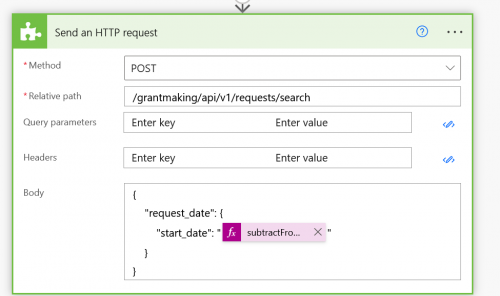
Then for the dynamic formula for “yesterday” you can use:
subtractFromTime(formatDateTime(utcNow(),'yyyy-MM-dd'),1,'Day')
0 -
Hi @Ashley Moose,
Thank you for your response! If I remove the headers, I get the error shown below. I thought the reason why I was getting the error message was because it was trying the wrong content type i.e. it tried text/html, when it should be set to application/json.
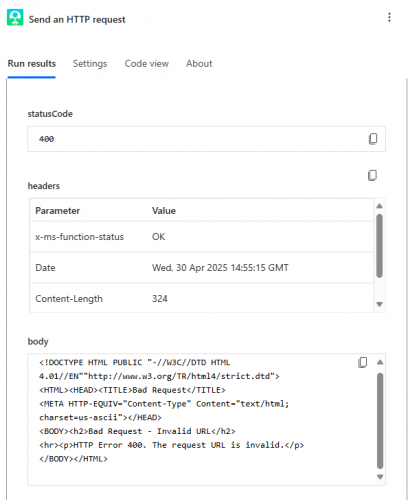
Error message copied
<!DOCTYPE HTML PUBLIC "-//W3C//DTD HTML 4.01//EN""http://www.w3.org/TR/html4/strict.dtd"> <HTML><HEAD><TITLE>Bad Request</TITLE> <META HTTP-EQUIV="Content-Type" Content="text/html; charset=us-ascii"></HEAD> <BODY><h2>Bad Request - Invalid URL</h2> <hr><p>HTTP Error 400. The request URL is invalid.</p> </BODY></HTML>
I've noticed that your ‘Send an HTTP request’ action has a different icon to the one I'm using. Are you using Blackbaud SKY Add-in?
For completeness, this was the HTTP request I tried
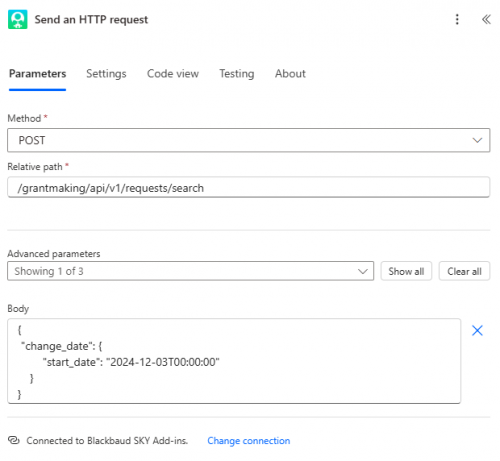 0
0 -
@Matt Storm - I am using the Blackbaud SKY Add-ins connector but the logo difference indicates you are on the new version whereas I'm still on the old version. There was a known bug in the new version and the fix for that is due to be rolled out by Microsoft this week. It may or may not be what is causing the issue here, but we'd like to verify that first to see if there is still an issue. Can you test this again next week and let me know if the issue is still occurring?
0 -
@Ashley Moose - Ahh, I'd wondered if it might be something like that. It's strange that the connector works for some APIs but not others. It works with GetOrganizationClassifications for example.
I'll check again on Tuesday and will get back to you. Thanks again for your help.
1 -
@Ashley Moose- Unfortunately it's still not working. I've tried both with and without headers this morning, and I get the same errors as before.
Where would I go to find out if there was a bug with the connector in the future? That feels like it could be a useful website to know about.
0 -
@Matt Storm This particular error/bug was reported here in the Community. If you weren't sure if there was a known error or issue though, then submitting a ticket to Support would be the correct path.
That said, I was able to get access to the new Connector in a different Power Automate environment and the test is working for me there too.

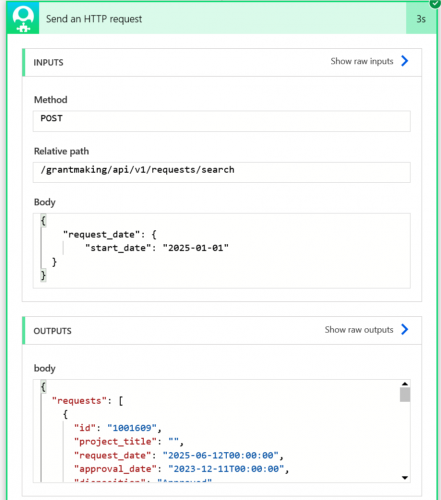
Since this is working here for me, it shouldn't be an issue or bug in the connector. If you test the endpoint using the Try it feature from the developer portal does the error occur there?
1 -
@Ashley Moose - I've managed to get it to work ? I deleted the connector and re-built the flow from scratch, using exactly the same coding as before (without the headers) and then it worked!
Thanks for you help with this. It looks like the fix Microsoft did last week did work after all.
0 -
@Matt Storm Glad to hear it's working!!
0




Categories
- All Categories
- 6 Blackbaud Community Help
- 211 bbcon®
- 1.4K Blackbaud Altru®
- 403 Blackbaud Award Management™ and Blackbaud Stewardship Management™
- 1.2K Blackbaud CRM™ and Blackbaud Internet Solutions™
- 15 donorCentrics®
- 360 Blackbaud eTapestry®
- 2.6K Blackbaud Financial Edge NXT®
- 659 Blackbaud Grantmaking™
- 579 Blackbaud Education Management Solutions for Higher Education
- 3.2K Blackbaud Education Management Solutions for K-12 Schools
- 943 Blackbaud Luminate Online® and Blackbaud TeamRaiser®
- 84 JustGiving® from Blackbaud®
- 6.7K Blackbaud Raiser's Edge NXT®
- 3.8K SKY Developer
- 250 ResearchPoint™
- 120 Blackbaud Tuition Management™
- 165 Organizational Best Practices
- 241 Member Lounge (Just for Fun)
- 36 Blackbaud Community Challenges
- 37 PowerUp Challenges
- 3 (Open) PowerUp Challenge: Grid View Batch
- 3 (Closed) PowerUp Challenge: Chat for Blackbaud AI
- 3 (Closed) PowerUp Challenge: Data Health
- 3 (Closed) Raiser's Edge NXT PowerUp Challenge: Product Update Briefing
- 3 (Closed) Raiser's Edge NXT PowerUp Challenge: Standard Reports+
- 3 (Closed) Raiser's Edge NXT PowerUp Challenge: Email Marketing
- 3 (Closed) Raiser's Edge NXT PowerUp Challenge: Gift Management
- 4 (Closed) Raiser's Edge NXT PowerUp Challenge: Event Management
- 3 (Closed) Raiser's Edge NXT PowerUp Challenge: Home Page
- 4 (Closed) Raiser's Edge NXT PowerUp Challenge: Standard Reports
- 4 (Closed) Raiser's Edge NXT PowerUp Challenge: Query
- 798 Community News
- 3K Jobs Board
- 56 Blackbaud SKY® Reporting Announcements
- 47 Blackbaud CRM Higher Ed Product Advisory Group (HE PAG)
- 19 Blackbaud CRM Product Advisory Group (BBCRM PAG)