Alt Text in RENXT Email Not Showing





Hi,
Our marketing team just finished drafting up an email and for some reason it isn't populating the alt text we use for screen readers. Has anyone experienced this or aware of a fix?
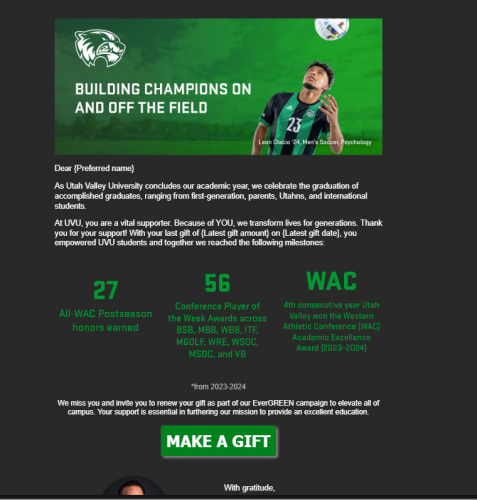
The blue text inside of the grey boxes are what the screen readers are supposed to be reading but the below the first two paragraphs there are three empty grey boxes that should have similar text.
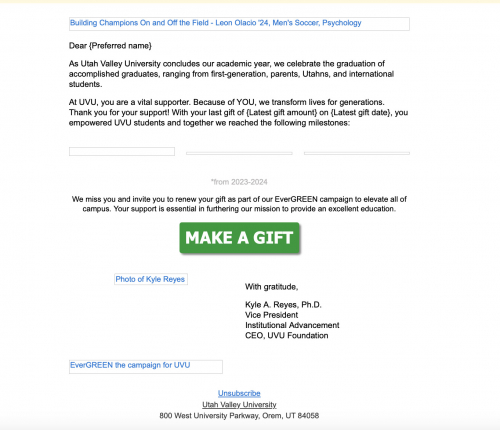
For context, the green text is what it's supposed to be describing in the alt text:
Comments
-
@Tanner Patnode If I'm reading this correctly, it is working for some of your images but not all of your images?
I'm thinking it is safe to say you verified the email had the alt text filled out before you created this thread.
I've been noticing some strange things between NXT Email, receipts, and gift confirmations lately and haven't gathered enough intel yet to draw any conclusions or start a case. I will say the few emails we have sent out recently from Online Express have been fine. I went back to an email I sent in September from the web view emails and it was fine. Before I dig deeper, should time allow (as this is a big concern for me as well - accessibility is everything) if you can confirm I'm understanding you correctly. I'm also curious if you have since started a case for this? If so, what have you found?
1 -
@Elizabeth Johnson yes you are correct that the alt text is populating for some images but not all, despite the fact that we have put it in for all images. We send to over 100,000 recipients so we can't use Online Express as it literally takes all day to send one email to that many for us.
Just so I understand, you are having the same issue with alt text not populating?0





Categories
- All Categories
- 6 Blackbaud Community Help
- 213 bbcon®
- 1.4K Blackbaud Altru®
- 402 Blackbaud Award Management™ and Blackbaud Stewardship Management™
- 1.1K Blackbaud CRM™ and Blackbaud Internet Solutions™
- 15 donorCentrics®
- 360 Blackbaud eTapestry®
- 2.6K Blackbaud Financial Edge NXT®
- 656 Blackbaud Grantmaking™
- 576 Blackbaud Education Management Solutions for Higher Education
- 3.2K Blackbaud Education Management Solutions for K-12 Schools
- 939 Blackbaud Luminate Online® and Blackbaud TeamRaiser®
- 84 JustGiving® from Blackbaud®
- 6.6K Blackbaud Raiser's Edge NXT®
- 3.7K SKY Developer
- 248 ResearchPoint™
- 119 Blackbaud Tuition Management™
- 165 Organizational Best Practices
- 241 Member Lounge (Just for Fun)
- 34 Blackbaud Community Challenges
- 34 PowerUp Challenges
- 3 (Open) PowerUp Challenge: Chat for Blackbaud AI
- 3 (Closed) PowerUp Challenge: Data Health
- 3 (Closed) Raiser's Edge NXT PowerUp Challenge: Product Update Briefing
- 3 (Closed) Raiser's Edge NXT PowerUp Challenge: Standard Reports+
- 3 (Closed) Raiser's Edge NXT PowerUp Challenge: Email Marketing
- 3 (Closed) Raiser's Edge NXT PowerUp Challenge: Gift Management
- 4 (Closed) Raiser's Edge NXT PowerUp Challenge: Event Management
- 3 (Closed) Raiser's Edge NXT PowerUp Challenge: Home Page
- 4 (Closed) Raiser's Edge NXT PowerUp Challenge: Standard Reports
- 4 (Closed) Raiser's Edge NXT PowerUp Challenge: Query
- 793 Community News
- 2.9K Jobs Board
- 54 Blackbaud SKY® Reporting Announcements
- 47 Blackbaud CRM Higher Ed Product Advisory Group (HE PAG)
- 19 Blackbaud CRM Product Advisory Group (BBCRM PAG)