Static query





Does anyone know how to refresh a static query in webview? I don't see a Refresh option.
Comments
-
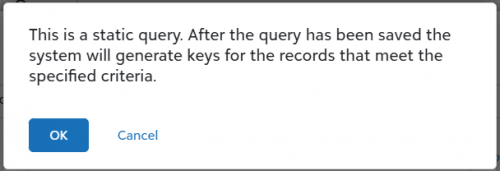
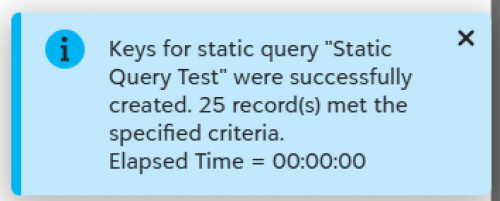
@Marie Stark To refresh a static query, you need to click the Save button. You need to see the pop up that says “This is a static query. After the query has been saved the system will generate keys for the records that meet the specified criteria.” Once you click OK on that message, the query is being refreshed, and you'll see a blue message at the bottom of your screen notifying you that the keys have been created. Using the “Refresh” button on the “Results” tab does not actually refresh the query, it just shows you what records would be included if you saved.
You may need to make a change to the query to get the query to save properly. So if you click the Save button and don't see the messages below, try changing something in the query like changing the sort, then click Save again.
 2
2 -
@Stacy Cope Thank you, that worked but only if I clicked Save from the Results tab.
0 -
@Marie Stark, good to know! Glad you got it working!
1 -
@Marie Stark in addition to what has been mentioned, if you have queue you can schedule refresh of static queries.
0 -
@Kisha Baker I don't but thank you.
0 -
@Marie Stark
SKY API's Query API has a refresh static query endpoint.https://developer.sky.blackbaud.com/api#api=query&operation=StartRefreshStaticQueryByID
in case you want a way to auto-refresh the static query or on demand refresh with a button.
2












Categories
- All Categories
- 6 Blackbaud Community Help
- 213 bbcon®
- 1.4K Blackbaud Altru®
- 402 Blackbaud Award Management™ and Blackbaud Stewardship Management™
- 1.1K Blackbaud CRM™ and Blackbaud Internet Solutions™
- 15 donorCentrics®
- 360 Blackbaud eTapestry®
- 2.6K Blackbaud Financial Edge NXT®
- 656 Blackbaud Grantmaking™
- 576 Blackbaud Education Management Solutions for Higher Education
- 3.2K Blackbaud Education Management Solutions for K-12 Schools
- 939 Blackbaud Luminate Online® and Blackbaud TeamRaiser®
- 84 JustGiving® from Blackbaud®
- 6.6K Blackbaud Raiser's Edge NXT®
- 3.7K SKY Developer
- 248 ResearchPoint™
- 119 Blackbaud Tuition Management™
- 165 Organizational Best Practices
- 241 Member Lounge (Just for Fun)
- 34 Blackbaud Community Challenges
- 34 PowerUp Challenges
- 3 (Open) PowerUp Challenge: Chat for Blackbaud AI
- 3 (Closed) PowerUp Challenge: Data Health
- 3 (Closed) Raiser's Edge NXT PowerUp Challenge: Product Update Briefing
- 3 (Closed) Raiser's Edge NXT PowerUp Challenge: Standard Reports+
- 3 (Closed) Raiser's Edge NXT PowerUp Challenge: Email Marketing
- 3 (Closed) Raiser's Edge NXT PowerUp Challenge: Gift Management
- 4 (Closed) Raiser's Edge NXT PowerUp Challenge: Event Management
- 3 (Closed) Raiser's Edge NXT PowerUp Challenge: Home Page
- 4 (Closed) Raiser's Edge NXT PowerUp Challenge: Standard Reports
- 4 (Closed) Raiser's Edge NXT PowerUp Challenge: Query
- 793 Community News
- 2.9K Jobs Board
- 54 Blackbaud SKY® Reporting Announcements
- 47 Blackbaud CRM Higher Ed Product Advisory Group (HE PAG)
- 19 Blackbaud CRM Product Advisory Group (BBCRM PAG)