How To Search On Constituent ID





New to RE NXT. How can I search on the Constituent ID? For example: Constituent ID begins with “F”. In RE7 you could just put an “F” in the Constituent ID search box. I can't find this option anywhere in NXT.
Comments
-
@Tyson Clugy
In web view, you click on the frying pan/magnifying glass symbol and it opens the search box for you to start typing in the constituent ID/name/address. I don't know that you could just type in “F” and get a useful selection of results to pick from though because it'd bring up constituents with names that start with that first - but if you already know the whole constituent ID you could put that in and get the constituent you wanted.
Screenshot of the frying pan/magnifying glass search symbol in RE NXT web view 0 -
@Tyson Clugy
I agree with everything Rachel said. We can search in NXT for our constituent IDs. In addition, when we converted to RENXT we saved our ERP id in Constituent ID and also saved it as an Alias. And in Database View I have the check box set to check aliases.0 -
Adding on to what others have said, it's harder to search using two pieces of info at a time in web view if you're wanting to search by partial constituent ID and some other piece of data than in database view, but there is a way that works most of the time for me: put the first piece of info into the search bar, say, ‘F1’, then press view all results for a list of all the records with F1, then put the second piece of info, ‘Gary’ in the ‘find in this list’ box. That brings up a list of all the records with those two pieces of data.
The best way I've found to search for a constituent using multiple pieces of data in web view that I know of is to skip search and use lists, because lists run on basically the same UI as search but I can use search filters. With my org's database with a lot of repeat organization names like ‘Saint John’s Lutheran', that functionality isn't optional. Unfortunately, I'm testing it now and I don't think there's any way to search by constituent ID in lists with filters (I don't see a constituent ID filter) or the ‘find in this list’ box (tried filtering for my home city/state, then putting in digits from my constituent code - didn't work).3 -
@Christopher Horn it's becoming clear that web view search just isn't going to cut it for many of our common scenarios. I've started looking at Lists but I don't even see Constituent ID as a criteria. Did they rename it or am I just missing it somewhere?
0 -
I was not able to find a filter in Lists for searching by constituent ID either. And even though typing constituent IDs into the “find in this list” box works in Search, it wasn't working when I tested it in Lists. Would be happy to be corrected, but as far as I can tell, the search bar lets you search for constituent IDs but not use filters, while Lists lets you use filters but not search by constituent ID…
From what you said on Facebook, you're using a letter at the beginning of constituent IDs to mark what type of constituent that is, right? So that you can use the first letter of the constituent ID to filter to individuals, orgs, foundations, etc? I know the goal is to avoid lists, but like I've said, I've given up on that myself and started using lists instead of search most of the time if I have to search in web view because lists is more functional. And if one is already using lists for searches, filtering by constituent code or filtering by attribute are both options in list that could be used to search within a specific type of constituent. That might achieve the same kind of result?
0 -
@Tyson C - I'm having an issue with people whose Constituent IDs are only a few characters. Some of our older records have Constit IDs with 2-4 numeric characters only, and since NXT Search does such a good job of finding Aliases that match, it pulls back tons of records with that character string somewhere. I need the ability to do an “exact” search in web view so I can limit it to exact matches and exclude those with partial string matches.
0 -
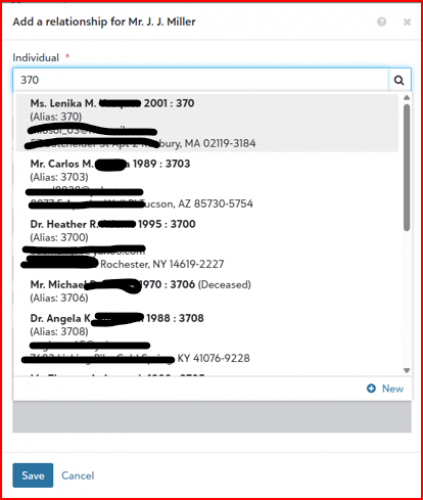
@Christopher Horn - The time when this doesn't work is when you're trying to pull in a record to a relationship and it requires two steps to narrow it down to be sure you've found the correct record. If it's one of our older records, the Constituent ID might only be 2-4 numeric characters, which will match to many records b/c of the Alias matching. It's difficult to be sure you're pulling in the right matched record in this scenario, and it doesn't even display all matches, nor is there a way to tell it to show you the next set of matched records.
0












Categories
- All Categories
- 6 Blackbaud Community Help
- 213 bbcon®
- 1.4K Blackbaud Altru®
- 402 Blackbaud Award Management™ and Blackbaud Stewardship Management™
- 1.1K Blackbaud CRM™ and Blackbaud Internet Solutions™
- 15 donorCentrics®
- 360 Blackbaud eTapestry®
- 2.6K Blackbaud Financial Edge NXT®
- 656 Blackbaud Grantmaking™
- 576 Blackbaud Education Management Solutions for Higher Education
- 3.2K Blackbaud Education Management Solutions for K-12 Schools
- 939 Blackbaud Luminate Online® and Blackbaud TeamRaiser®
- 84 JustGiving® from Blackbaud®
- 6.6K Blackbaud Raiser's Edge NXT®
- 3.7K SKY Developer
- 248 ResearchPoint™
- 119 Blackbaud Tuition Management™
- 165 Organizational Best Practices
- 241 Member Lounge (Just for Fun)
- 34 Blackbaud Community Challenges
- 34 PowerUp Challenges
- 3 (Open) PowerUp Challenge: Chat for Blackbaud AI
- 3 (Closed) PowerUp Challenge: Data Health
- 3 (Closed) Raiser's Edge NXT PowerUp Challenge: Product Update Briefing
- 3 (Closed) Raiser's Edge NXT PowerUp Challenge: Standard Reports+
- 3 (Closed) Raiser's Edge NXT PowerUp Challenge: Email Marketing
- 3 (Closed) Raiser's Edge NXT PowerUp Challenge: Gift Management
- 4 (Closed) Raiser's Edge NXT PowerUp Challenge: Event Management
- 3 (Closed) Raiser's Edge NXT PowerUp Challenge: Home Page
- 4 (Closed) Raiser's Edge NXT PowerUp Challenge: Standard Reports
- 4 (Closed) Raiser's Edge NXT PowerUp Challenge: Query
- 793 Community News
- 2.9K Jobs Board
- 54 Blackbaud SKY® Reporting Announcements
- 47 Blackbaud CRM Higher Ed Product Advisory Group (HE PAG)
- 19 Blackbaud CRM Product Advisory Group (BBCRM PAG)