Single class for one course with multiple skill levels





We have electives with multiple skill levels, but they all meet at the same time, same room, same teacher. Is there a way to set up the course and sections so it's easy to see the skill level on reports, but still have a single group, roster, grade book, etc.?
Enrollment Type doesn't appear on reports, student lists, or on group rosters/gradebooks/grading/new grading.
For example, we have Film 1+2+3+AP. There are students from 4 different sections, but they all have same block, same time, same place, same teacher.
- Is there a field I can use, that shows up on reports and grading, to define the specific group?
- If not, is there a way to set up sections so that multiple sections show up as one group?
Comments
-
@Art Bryman Our art electives are very much this scenario. We handle each one as a separate class. It may seem at a glance that it would be a bit of a pain for the faculty member attendance-wise, but from the main schedule page it's pretty easy to mark “All Present”
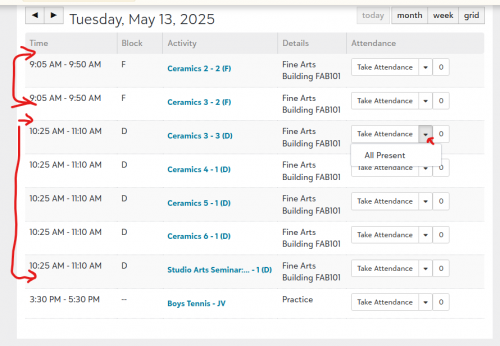
I would think that gradebook (assuming that each level would have separate assignments), report card, transcript-wise it is way easier to keep them separate.
2 -
@Art Bryman
We have many classes like this. We keep them separate. As Jamie mentioned, taking attendance for the entire group is easy. My biggest challenge is making sure our teachers understand that they can create one assignment and publish it to multiple classes.1




Categories
- All Categories
- 6 Blackbaud Community Help
- 213 bbcon®
- 1.4K Blackbaud Altru®
- 403 Blackbaud Award Management™ and Blackbaud Stewardship Management™
- 1.1K Blackbaud CRM™ and Blackbaud Internet Solutions™
- 15 donorCentrics®
- 360 Blackbaud eTapestry®
- 2.6K Blackbaud Financial Edge NXT®
- 656 Blackbaud Grantmaking™
- 576 Blackbaud Education Management Solutions for Higher Education
- 3.2K Blackbaud Education Management Solutions for K-12 Schools
- 939 Blackbaud Luminate Online® and Blackbaud TeamRaiser®
- 84 JustGiving® from Blackbaud®
- 6.6K Blackbaud Raiser's Edge NXT®
- 3.7K SKY Developer
- 248 ResearchPoint™
- 119 Blackbaud Tuition Management™
- 165 Organizational Best Practices
- 241 Member Lounge (Just for Fun)
- 34 Blackbaud Community Challenges
- 34 PowerUp Challenges
- 3 (Open) PowerUp Challenge: Chat for Blackbaud AI
- 3 (Closed) PowerUp Challenge: Data Health
- 3 (Closed) Raiser's Edge NXT PowerUp Challenge: Product Update Briefing
- 3 (Closed) Raiser's Edge NXT PowerUp Challenge: Standard Reports+
- 3 (Closed) Raiser's Edge NXT PowerUp Challenge: Email Marketing
- 3 (Closed) Raiser's Edge NXT PowerUp Challenge: Gift Management
- 4 (Closed) Raiser's Edge NXT PowerUp Challenge: Event Management
- 3 (Closed) Raiser's Edge NXT PowerUp Challenge: Home Page
- 4 (Closed) Raiser's Edge NXT PowerUp Challenge: Standard Reports
- 4 (Closed) Raiser's Edge NXT PowerUp Challenge: Query
- 793 Community News
- 2.9K Jobs Board
- 54 Blackbaud SKY® Reporting Announcements
- 47 Blackbaud CRM Higher Ed Product Advisory Group (HE PAG)
- 19 Blackbaud CRM Product Advisory Group (BBCRM PAG)