Formatting Learning Profile forms?


I created a form for a Learning Profile and the test shows just columns of info - no spaces, no bold or divisions by categories, etc. Can anyone suggest how to format the final so it looks presentable and easy to read? I'm missing doing something for sure!
Comments
-
@Danielle Corriveau If you figure out a way, then you should sell your solution to the rest of us! ?
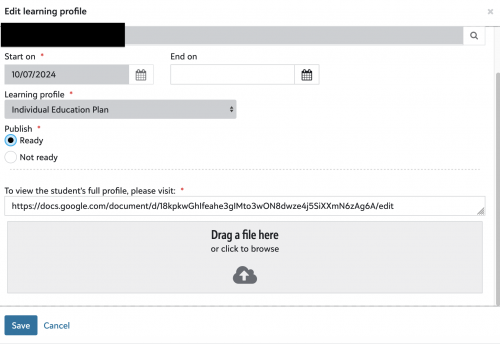
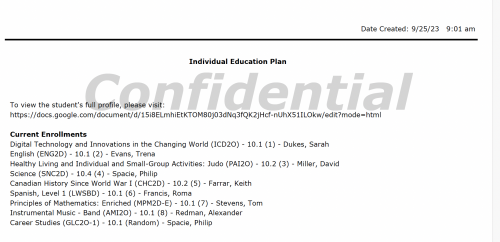
We actually became frustrated with the layout/design of the Learning profile forms, but we needed to use them in order to display the LP flag on student records. Our solution was to build the Learning Profiles using Google Docs so that they're designed using our preferred layout and include all relevant information. Then, we simply add the link to the Google Doc on the Learning Profile Form associated with the student's record. Now, when faculty open the LP, they see a list of the student's current enrollment, and there's a live link that takes them directly to their student's designed IEP (stored in Google Drive) that lists all accommodations and other detailed information about the student's profile. Updating the IEP is super easy for our Learning Strategists too! And access to the Google Doc is restricted, so only users who need to view the IEP are granted access to it.
 1
1 -
@Shirley Wagar Thank you for sharing your suggestion. Greatly appreciated!
0 -
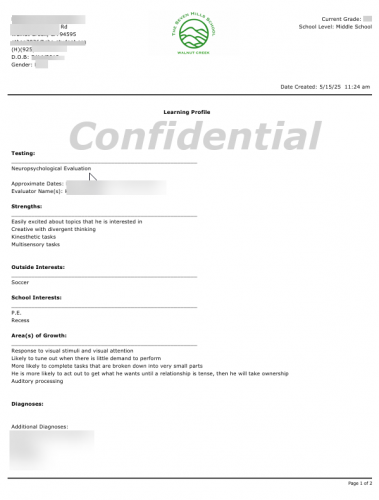
@Danielle Corriveau, Here is a sample of our Learning Profiles if it helps. The formatting is rather limited as you have observed, but our current layout has been working well for us.
61ec9064-584b-4553-b528-089646400f6d.pdf0 -
@Geoffrey Goodfellow Thank you for sharing. This is more toward what I was thinking our form should look like. Can you tell me how you got the centering, bold, and spacing put in place, or could you link me to a resource that shows me more about formatting? The training I took didn't cover that aspect of creating a form. Again, many thanks for your response.
0 -
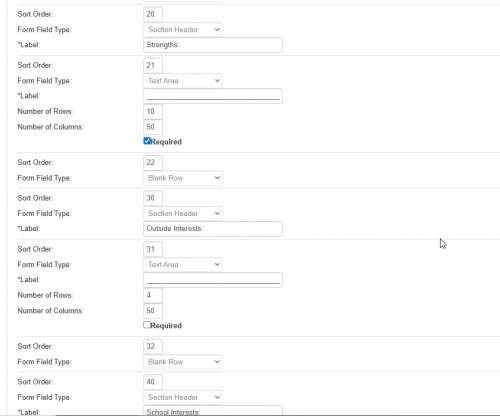
@Danielle Corriveau, below is a print screen of the Learning Profile setup that goes along with the Learning Profile sample I uploaded previously. You'll see that we've added “Blank Row” field types to add the space and have added the “Section Header” field types to add the Bold sections.
0 -
@Geoffrey Goodfellow So helpful! Thank you!
0 -
I've added some lines under the headings to help make it easier to read. Just made a text box label with a bunch of underscores. And added blank rows as well to help with spacing. The centered bold part where ours says learning profile I believe is coming from the name of the form.
 1
1









Categories
- All Categories
- 6 Blackbaud Community Help
- 211 bbcon®
- 1.4K Blackbaud Altru®
- 403 Blackbaud Award Management™ and Blackbaud Stewardship Management™
- 1.2K Blackbaud CRM™ and Blackbaud Internet Solutions™
- 15 donorCentrics®
- 360 Blackbaud eTapestry®
- 2.6K Blackbaud Financial Edge NXT®
- 658 Blackbaud Grantmaking™
- 579 Blackbaud Education Management Solutions for Higher Education
- 3.2K Blackbaud Education Management Solutions for K-12 Schools
- 943 Blackbaud Luminate Online® and Blackbaud TeamRaiser®
- 84 JustGiving® from Blackbaud®
- 6.7K Blackbaud Raiser's Edge NXT®
- 3.8K SKY Developer
- 250 ResearchPoint™
- 120 Blackbaud Tuition Management™
- 165 Organizational Best Practices
- 241 Member Lounge (Just for Fun)
- 36 Blackbaud Community Challenges
- 37 PowerUp Challenges
- 3 (Open) PowerUp Challenge: Grid View Batch
- 3 (Closed) PowerUp Challenge: Chat for Blackbaud AI
- 3 (Closed) PowerUp Challenge: Data Health
- 3 (Closed) Raiser's Edge NXT PowerUp Challenge: Product Update Briefing
- 3 (Closed) Raiser's Edge NXT PowerUp Challenge: Standard Reports+
- 3 (Closed) Raiser's Edge NXT PowerUp Challenge: Email Marketing
- 3 (Closed) Raiser's Edge NXT PowerUp Challenge: Gift Management
- 4 (Closed) Raiser's Edge NXT PowerUp Challenge: Event Management
- 3 (Closed) Raiser's Edge NXT PowerUp Challenge: Home Page
- 4 (Closed) Raiser's Edge NXT PowerUp Challenge: Standard Reports
- 4 (Closed) Raiser's Edge NXT PowerUp Challenge: Query
- 798 Community News
- 3K Jobs Board
- 56 Blackbaud SKY® Reporting Announcements
- 47 Blackbaud CRM Higher Ed Product Advisory Group (HE PAG)
- 19 Blackbaud CRM Product Advisory Group (BBCRM PAG)