Query for odd or even graduation/class of year





I have received a request for mailed solicitation to go to those who graduated in odd years. As a university established 140 years ago, I do not intend to create a class year > one of and key in every year or pull every record and delete the evens. I did not find any answers in KB.
Before I tell them to find a new way to segment has anyone found a way to pull a list like this? I want this to be created in RE, not PowerAutomate or BI.
Comments
-
@JoAnn Strommen I had to run a query like this for class years that were in multiples of 10s. What I remember is that using wildcards didn't really work for this purpose, and I did have to manually enter those class years. I would ask how far back you would want to go. In the case that I just mentioned, we only went back 60 years. I don't know if there is a lot of benefit going back past 50.
0 -
@JoAnn Strommen
I don't know if your “class year” is table entry or just text or number, if it's text or number, you can do the years in excel, the copy and paste into one-of operator?2 -
Thank you @Dariel Dixon and @Alex Wong. ?
Thought about wildcards for only a fleeting second - yep, wouldn't work. Happy to say we have active donors who graduated in the 1950's so would need quite a list.Coworker suggested pulling everyone and in excel using formulas to remove all the even years. I shared Alex's of creating list first as criteria. Agreed that would be even easier. Going to try that!
Doing a range of class years just makes more sense to me than only odd years. Not sure what purpose of that criteria as one of several criteria is other than reduce size of mailing. LOL
Thanks again!
0 -
@JoAnn Strommen, this is the query we use to find specific class years ending in 1s or 6s, for example. Hope this is helpful.
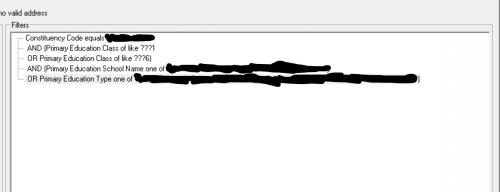 4
4 -
@JoAnn Strommen If you have a spreadsheet with the classes you want - you can copy those classes and paste them into a one of query like you would do with constituent ID. Class Year works the same way. Let Excel do the work and then you don't have to key them separately.
Hope this helps.2 -
@JoAnn Strommen I'm so curious to know the reason behind this. How is the requestor going to use this infomation???
0 -
@Karen Diener Good question. I don't know.
One of 3 very different criteria listed on request form for a mailing solicitation to go in August. Seems very odd to me. Now that I've figured out a fairly painless way to pull odd years I haven't asked. As I tend to question a lot of their things I'm really trying to only question when I makes a difference to the actual data I pull. LOL
1 -
@Elizabeth Johnson and @JoAnn Strommen This is what I would likely do and even if you don't have them in Excel there is a trick I like to use for this. If you type the first 3 odd class years (ex. 1951, 1953, 1955) in their own cell (oldest to newest), select those three fields, then in the bottom right corner of the bottom most cell once your cursor turns to a + symbol, click and hold and pull that list down and it will fill them in as odd numbers since that is the pattern you gave Excel to follow. Then all you have to do is pull down until you get to 2023 or 2025.
2 -
@Dan Snyder If I were to go the excel route that's what I was thinking of - like that fill the series/pattern.
I'm going with @Sara Barnaby suggestion - was 5 quick criteria. Thanks for that - don't know that I've used ‘like’ in that way. Great idea.
1 -
@Elizabeth Johnson and @JoAnn Strommen This is what I would likely do and even if you don't have them in Excel there is a trick I like to use for this. If you type the first 3 odd class years (ex. 1951, 1953, 1955) in their own cell (oldest to newest), select those three fields, then in the bottom right corner of the bottom most cell once your cursor turns to a + symbol, click and hold and pull that list down and it will fill them in as odd numbers since that is the pattern you gave Excel to follow. Then all you have to do is pull down until you get to 2023 or 2025.
This is what I do. I have an excel workbook saved for class reunion year intervals like this.
0


















Categories
- All Categories
- 6 Blackbaud Community Help
- 211 bbcon®
- 1.4K Blackbaud Altru®
- 403 Blackbaud Award Management™ and Blackbaud Stewardship Management™
- 1.2K Blackbaud CRM™ and Blackbaud Internet Solutions™
- 15 donorCentrics®
- 360 Blackbaud eTapestry®
- 2.6K Blackbaud Financial Edge NXT®
- 658 Blackbaud Grantmaking™
- 579 Blackbaud Education Management Solutions for Higher Education
- 3.2K Blackbaud Education Management Solutions for K-12 Schools
- 943 Blackbaud Luminate Online® and Blackbaud TeamRaiser®
- 84 JustGiving® from Blackbaud®
- 6.7K Blackbaud Raiser's Edge NXT®
- 3.8K SKY Developer
- 250 ResearchPoint™
- 120 Blackbaud Tuition Management™
- 165 Organizational Best Practices
- 241 Member Lounge (Just for Fun)
- 36 Blackbaud Community Challenges
- 37 PowerUp Challenges
- 3 (Open) PowerUp Challenge: Grid View Batch
- 3 (Closed) PowerUp Challenge: Chat for Blackbaud AI
- 3 (Closed) PowerUp Challenge: Data Health
- 3 (Closed) Raiser's Edge NXT PowerUp Challenge: Product Update Briefing
- 3 (Closed) Raiser's Edge NXT PowerUp Challenge: Standard Reports+
- 3 (Closed) Raiser's Edge NXT PowerUp Challenge: Email Marketing
- 3 (Closed) Raiser's Edge NXT PowerUp Challenge: Gift Management
- 4 (Closed) Raiser's Edge NXT PowerUp Challenge: Event Management
- 3 (Closed) Raiser's Edge NXT PowerUp Challenge: Home Page
- 4 (Closed) Raiser's Edge NXT PowerUp Challenge: Standard Reports
- 4 (Closed) Raiser's Edge NXT PowerUp Challenge: Query
- 798 Community News
- 3K Jobs Board
- 56 Blackbaud SKY® Reporting Announcements
- 47 Blackbaud CRM Higher Ed Product Advisory Group (HE PAG)
- 19 Blackbaud CRM Product Advisory Group (BBCRM PAG)