Copy Query JSON





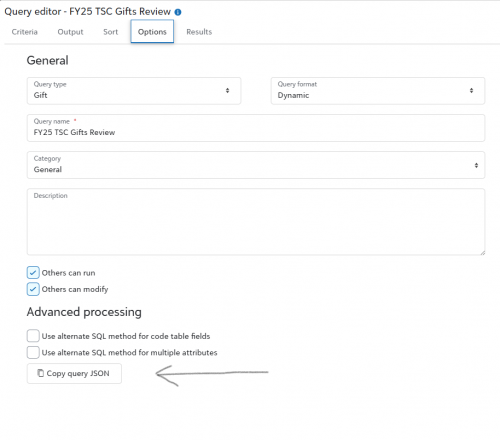
In Web View > Query > Options, there is an option to “Copy Query JSON”. What format is the code in this feature in? I have a flow that creates an ad hoc query, and I assumed this button might provide the JSON of a query I created in that format, but it doesn't seem to be the case. Can anyone provide some clarity as to how one is supposed to utilize this code?
Comments
-
@Ryan Carr
You are correct, the code is in JSON format, specifically for use in Adhoc query. However, you cannot directly use it “only”.https://developer.sky.blackbaud.com/api#api=query&operation=StartQueryExecutionJob
The “body” of the request needs to look like this:
{
“query”: {},
}
The JSON copy from webview query goes INSIDE the red {}.
and you may (and should) specify other parameters (for example):
{
“query”: {},
“formatting_mode”: “Export”,
“output_format”: “JSON”
}
2 -
@Alex Wong @Ryan Carr Funny that. I just added a idea to the idea bank about this very concept:
However, I don't see the copy query JSON that you are describing. Where is that located? I can see the cog on the query screen but that only has one option to see the short or long code in queries. Is there somewhere else where this would appear?
0 -
1
-
@Ryan Carr I'd be interested in knowing more about your use case for a flow that starts an ad hoc query job (which I know is supported by the connector). Could you elaborate on that? Are you taking the query JSON from web view as-is, or are you modifying the JSON with different output fields or criteria?
0 -
@Ben Lambert
I use ad hoc query almost exclusively. Main reason is to not rely on a saved query in RE (in case someone ignore all the warning in query name and description that say don't modify don't delete use in automation, yes, while the query can be saved using option that does not allow change, any RE admin have right to all queries, and can accidently delete).I wrote a post a while ago before the “Copy JSON” button was available: https://community.blackbaud.com/forums/viewtopic/491/66976
while you don't need to do the same anymore, it mentioned all the properties that can be deleted (i.e. “type”, “category_id”, “others_can_execute”, etc) as it is meaningless to an ad hoc query.
There is also one type of automation that you can only use Adhoc query, which is one where you want dynamic-ness in the query criteri/filter/sort. For example, in the event page, being able to run query against this specific event to display this event's information. You will need to get the context_id for the event and dynamically generate the JSON that filter on event system record id = the event page you are on.
1









Categories
- All Categories
- 6 Blackbaud Community Help
- 211 bbcon®
- 1.4K Blackbaud Altru®
- 403 Blackbaud Award Management™ and Blackbaud Stewardship Management™
- 1.2K Blackbaud CRM™ and Blackbaud Internet Solutions™
- 15 donorCentrics®
- 360 Blackbaud eTapestry®
- 2.6K Blackbaud Financial Edge NXT®
- 658 Blackbaud Grantmaking™
- 579 Blackbaud Education Management Solutions for Higher Education
- 3.2K Blackbaud Education Management Solutions for K-12 Schools
- 943 Blackbaud Luminate Online® and Blackbaud TeamRaiser®
- 84 JustGiving® from Blackbaud®
- 6.7K Blackbaud Raiser's Edge NXT®
- 3.8K SKY Developer
- 250 ResearchPoint™
- 120 Blackbaud Tuition Management™
- 165 Organizational Best Practices
- 241 Member Lounge (Just for Fun)
- 36 Blackbaud Community Challenges
- 37 PowerUp Challenges
- 3 (Open) PowerUp Challenge: Grid View Batch
- 3 (Closed) PowerUp Challenge: Chat for Blackbaud AI
- 3 (Closed) PowerUp Challenge: Data Health
- 3 (Closed) Raiser's Edge NXT PowerUp Challenge: Product Update Briefing
- 3 (Closed) Raiser's Edge NXT PowerUp Challenge: Standard Reports+
- 3 (Closed) Raiser's Edge NXT PowerUp Challenge: Email Marketing
- 3 (Closed) Raiser's Edge NXT PowerUp Challenge: Gift Management
- 4 (Closed) Raiser's Edge NXT PowerUp Challenge: Event Management
- 3 (Closed) Raiser's Edge NXT PowerUp Challenge: Home Page
- 4 (Closed) Raiser's Edge NXT PowerUp Challenge: Standard Reports
- 4 (Closed) Raiser's Edge NXT PowerUp Challenge: Query
- 798 Community News
- 3K Jobs Board
- 56 Blackbaud SKY® Reporting Announcements
- 47 Blackbaud CRM Higher Ed Product Advisory Group (HE PAG)
- 19 Blackbaud CRM Product Advisory Group (BBCRM PAG)