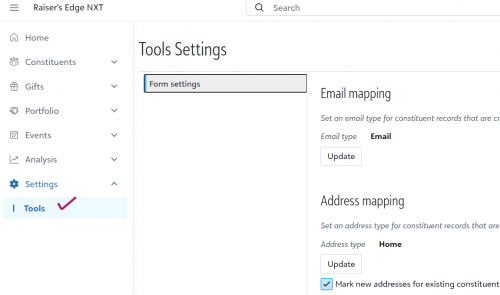
How to remove access to Settings > Tools > Form Settings?





Since the new sidebar came out, we noticed that all of our NXT users have access to the settings → tools section and can change form settings. Does anyone know how to remove their access to this?
I've tried reaching out to support and fiddling with roles in NXT and security groups in database view until my face was blue, but I'm still totally stuck!
Comments
-
@Pepper Hayes It's in the security area under role management. There's a whole section for the tools subsection. Have you looked at the user accounts and see what roles the users have for tools? It might be that the users were grandfathered into the wrong role for tools.
0 -
@Dariel Dixon
That's what support said too, but my users don't have any roles assigned in tools or settings. And, even if I wanted to toggle the roles, there is no option anywhere for form settings in the role management area. It's quite a pickle!0 -
@Pepper Hayes Have you looked in the Blackbaud apps section under settings? It's at the bottom of the roles section, but it might be minimized. There is a section for user forms. I would check those settings there.
0 -
@Dariel Dixon Thank you - I'll check that! And if it doesn't work, I can revisit my support ticket. I was sort of hoping someone else had faced this and figured it out!
0 -
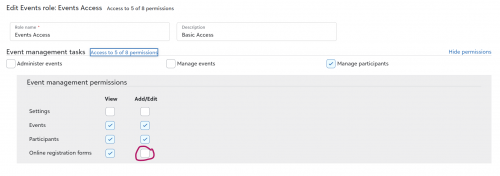
I resolved the issue! It turns out that this is related to the permissions in the roles for event management. You need to uncheck the box permitting people to edit registration forms and that will take away their access to the form settings. Hopefully this helps someone else!
 3
3





Categories
- All Categories
- 6 Blackbaud Community Help
- 211 bbcon®
- 1.4K Blackbaud Altru®
- 402 Blackbaud Award Management™ and Blackbaud Stewardship Management™
- 1.1K Blackbaud CRM™ and Blackbaud Internet Solutions™
- 15 donorCentrics®
- 360 Blackbaud eTapestry®
- 2.6K Blackbaud Financial Edge NXT®
- 657 Blackbaud Grantmaking™
- 578 Blackbaud Education Management Solutions for Higher Education
- 3.2K Blackbaud Education Management Solutions for K-12 Schools
- 943 Blackbaud Luminate Online® and Blackbaud TeamRaiser®
- 84 JustGiving® from Blackbaud®
- 6.7K Blackbaud Raiser's Edge NXT®
- 3.8K SKY Developer
- 250 ResearchPoint™
- 120 Blackbaud Tuition Management™
- 165 Organizational Best Practices
- 240 Member Lounge (Just for Fun)
- 34 Blackbaud Community Challenges
- 37 PowerUp Challenges
- 3 (Open) PowerUp Challenge: Grid View Batch
- 3 (Closed) PowerUp Challenge: Chat for Blackbaud AI
- 3 (Closed) PowerUp Challenge: Data Health
- 3 (Closed) Raiser's Edge NXT PowerUp Challenge: Product Update Briefing
- 3 (Closed) Raiser's Edge NXT PowerUp Challenge: Standard Reports+
- 3 (Closed) Raiser's Edge NXT PowerUp Challenge: Email Marketing
- 3 (Closed) Raiser's Edge NXT PowerUp Challenge: Gift Management
- 4 (Closed) Raiser's Edge NXT PowerUp Challenge: Event Management
- 3 (Closed) Raiser's Edge NXT PowerUp Challenge: Home Page
- 4 (Closed) Raiser's Edge NXT PowerUp Challenge: Standard Reports
- 4 (Closed) Raiser's Edge NXT PowerUp Challenge: Query
- 798 Community News
- 3K Jobs Board
- 54 Blackbaud SKY® Reporting Announcements
- 47 Blackbaud CRM Higher Ed Product Advisory Group (HE PAG)
- 19 Blackbaud CRM Product Advisory Group (BBCRM PAG)