Pull primary phone and email into a query/list/export at the same time





New user here! Coming from a VERY different system and struggling. How are you all pulling together primary contact information for quick and easy use. Case: We are doing end of year calling and want to pull a list of Class of 1990 grads who haven't donated this year. Easy enough to pull that query but then to add in their primary email and phone number that becomes multiple rows per constituent. Go to Export, not finding a way to pull in just their primary email and just their primary phone. Go to Lists the Constituent Summary is helpful yet there you can't add in maiden name. Going a little crazy trying to figure out how to operate in NXT without a million work arounds, which may be the life I will now lead. Thanks for any feedback!
Comments
-
@Amy Bridges Understand the craziness.
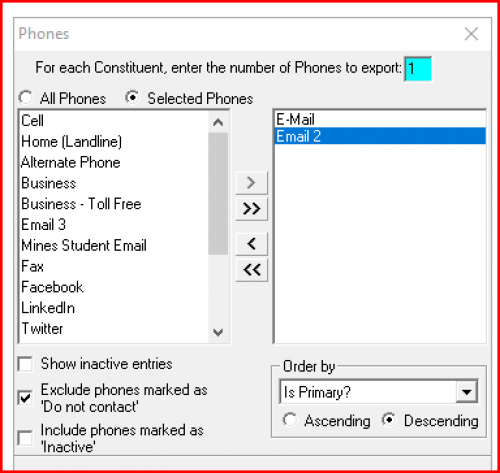
Take the query to export and for the export criteria this has worked for me. (db screenshot - could be done in webview)
Pull in any phone types where primary might be, export only 1 but order by Is Primary - Descending.
 0
0 -
Do the same for phone.
0 -
@JoAnn Strommen this worked but only for one type at a time meaning it results in two exports - is that what you would expect or am I doing something wrong? It's pretty shocking to me that you can't access this functionality in one place. We are coming out of Slate, and the functionality between the two systems is just very different. I will be leaning on this community and really appreciate your response and help!
0 -
@Amy Bridges You can do it in one query.
You just have to grab Phones > Phone number output field and drag it to output window a second time. It should open again in window like I snipped and you set the filters there for phone type.
0 -
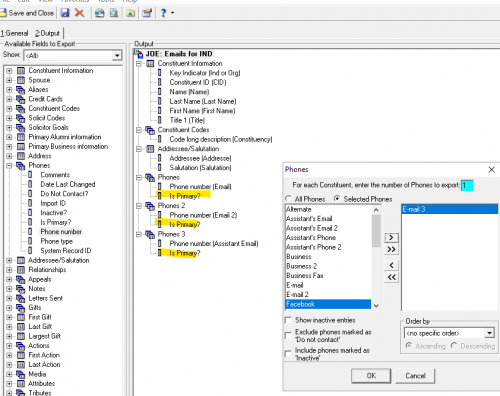
@Amy Bridges I would also say to just add Is Primary? in the export and that way you can sort everything by Primary. Like JoAnn said, I would separate out each different phone type that way you have each one in its own column, since phone types are one to many fields. As in my case below I would have Email together, Email 2 together, Assistant Email together and when I pull over Email 3, those will be together.
 1
1 -
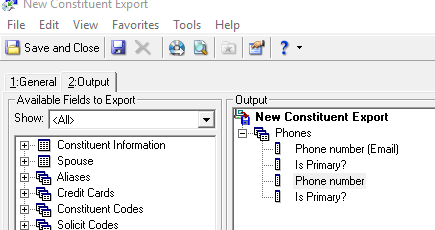
Hi @Joe Moretti, how do you get the Output to allow Phones 2 and Phones 3? When I double click on Phones then Phone Number it won't allow me to specify like it does the first time. The header looks different. What step am I missing?
 0
0 -
@Annie Daum You have to pull it up to the top of the window until the icon changes. Usually at the very top where the the name of the export is in bold.
1















Categories
- All Categories
- 6 Blackbaud Community Help
- 211 bbcon®
- 1.4K Blackbaud Altru®
- 403 Blackbaud Award Management™ and Blackbaud Stewardship Management™
- 1.1K Blackbaud CRM™ and Blackbaud Internet Solutions™
- 15 donorCentrics®
- 360 Blackbaud eTapestry®
- 2.6K Blackbaud Financial Edge NXT®
- 657 Blackbaud Grantmaking™
- 578 Blackbaud Education Management Solutions for Higher Education
- 3.2K Blackbaud Education Management Solutions for K-12 Schools
- 943 Blackbaud Luminate Online® and Blackbaud TeamRaiser®
- 84 JustGiving® from Blackbaud®
- 6.7K Blackbaud Raiser's Edge NXT®
- 3.8K SKY Developer
- 250 ResearchPoint™
- 120 Blackbaud Tuition Management™
- 165 Organizational Best Practices
- 240 Member Lounge (Just for Fun)
- 34 Blackbaud Community Challenges
- 37 PowerUp Challenges
- 3 (Open) PowerUp Challenge: Grid View Batch
- 3 (Closed) PowerUp Challenge: Chat for Blackbaud AI
- 3 (Closed) PowerUp Challenge: Data Health
- 3 (Closed) Raiser's Edge NXT PowerUp Challenge: Product Update Briefing
- 3 (Closed) Raiser's Edge NXT PowerUp Challenge: Standard Reports+
- 3 (Closed) Raiser's Edge NXT PowerUp Challenge: Email Marketing
- 3 (Closed) Raiser's Edge NXT PowerUp Challenge: Gift Management
- 4 (Closed) Raiser's Edge NXT PowerUp Challenge: Event Management
- 3 (Closed) Raiser's Edge NXT PowerUp Challenge: Home Page
- 4 (Closed) Raiser's Edge NXT PowerUp Challenge: Standard Reports
- 4 (Closed) Raiser's Edge NXT PowerUp Challenge: Query
- 798 Community News
- 3K Jobs Board
- 54 Blackbaud SKY® Reporting Announcements
- 47 Blackbaud CRM Higher Ed Product Advisory Group (HE PAG)
- 19 Blackbaud CRM Product Advisory Group (BBCRM PAG)