Changing Routing and Account Number



In Database view, under Online Express, in the Events forms, we have one account that is linked that we need to change the routing and account number to. Currently, if we choose this account as a payment method under “Blackbaud merchant account”, the funds will be deposited into the wrong account. How can we edit this account with the correct routing and account number?
Comments
-
@Madison Bacon
Do you have RE NXT or RE?If you search for this in KB, the answer is generated, maybe work, maybe doesn't, so try it out
To change the bank routing number and account in The Raiser's Edge, follow these steps: 1. Go to Config > Financial Institutions and locate your bank. If it is not present, click "New Financial Institution" to create a new record. 2. Open the financial institution record and enter or update the address and contact information. 3. In the upper right, mark "Sponsoring Bank." 4. Enter the Account Name and Account Number. Leave the User Number field blank unless your financial institution provides one. 5. Under Electronic Transfer Information, enter the new Transit/Routing number for the account. 6. Ensure that the Immediate Destination is set to "Use Transit/Routing no." 7. Click "Save and Close" to save your changes. If the routing number on the Constituent record does not match the one in Config > Financial Institutions, update the routing number accordingly. If the bank on the Constituent's Relationship tab is different, add a new bank record.
0 -
@Alex Wong We tried doing this and it does not work
0 -
@Madison Bacon
RE NXT or RE?0 -
@Alex Wong this is Online Express, which only operates in RE database view.
@Madison Bacon, to be clear, are you talking about the donor's routing/account info, or the routing/account info that you are receiving funds into? Also, do you use Blackbaud Merchant Services (BBMS) for your forms?
If you use BBMS, you can create new accounts and change the account/routing information through your BBMS admin control panel, under “disbursements”.
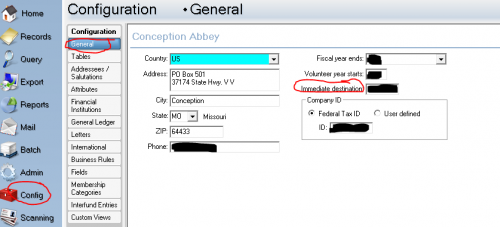
You can also check the settings under your RE Config menu under Merchant Accounts.
If you do not use BBMS for your ACH deposits, but process them manually in-house, you can follow the instructions in this KB article to change your account info in RE. However, I believe you can only set one account for RE to receive funds.
0 -
@Faith Murray the routing/ account info that we are receiving funds into. Someone years ago added in the wrong account information and we just need to change it.
0 -
@Alex Wong RE database view, inside of online express
0 -
@Madison Bacon
Okay, that helps. So, if you use BBMS as your processor, you can change it under your BBMS settings (NOT under OLX - it simply links into your BBMS account), as below: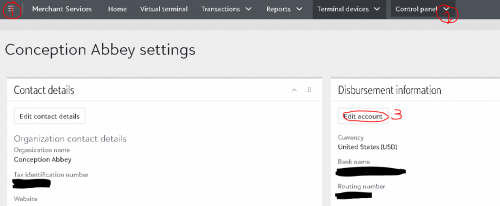
And if you don't use BBMS, you can change the info under RE Config. Change the routing number where it says “Immediate destination” (below), and then change the account number which is stored on a bank record under Financial Institutions, per the KB article I referenced in my last post.
 0
0 -
@Faith Murray
I am aware that Madison meant Online Express, which is db view only. My question on RE NXT or RE has to do with BBMS setting update, which for RE NXT, you can make the change in “webview”. What I am not certain about is if you do not have access to RE NXT, would Madison still have access to change BBMS setting in “webview”.0 -
@Alex Wong
Yes, if they use BBMS at all then they have a BB online login to access the BBMS admin page, even if they are currently self hosted with their RE subscription. At least, that's the way it was for us before we moved to NXT. In some organizations, if RE is self hosted, the BBMS account may be managed by the finance office, rather than Development. She can check by going to her RE Config tab, under Merchant Accounts to see if they are subscribed to BBMS for processing.0







Categories
- All Categories
- 6 Blackbaud Community Help
- 211 bbcon®
- 1.4K Blackbaud Altru®
- 403 Blackbaud Award Management™ and Blackbaud Stewardship Management™
- 1.2K Blackbaud CRM™ and Blackbaud Internet Solutions™
- 15 donorCentrics®
- 360 Blackbaud eTapestry®
- 2.6K Blackbaud Financial Edge NXT®
- 658 Blackbaud Grantmaking™
- 579 Blackbaud Education Management Solutions for Higher Education
- 3.2K Blackbaud Education Management Solutions for K-12 Schools
- 943 Blackbaud Luminate Online® and Blackbaud TeamRaiser®
- 84 JustGiving® from Blackbaud®
- 6.7K Blackbaud Raiser's Edge NXT®
- 3.8K SKY Developer
- 250 ResearchPoint™
- 120 Blackbaud Tuition Management™
- 165 Organizational Best Practices
- 241 Member Lounge (Just for Fun)
- 36 Blackbaud Community Challenges
- 37 PowerUp Challenges
- 3 (Open) PowerUp Challenge: Grid View Batch
- 3 (Closed) PowerUp Challenge: Chat for Blackbaud AI
- 3 (Closed) PowerUp Challenge: Data Health
- 3 (Closed) Raiser's Edge NXT PowerUp Challenge: Product Update Briefing
- 3 (Closed) Raiser's Edge NXT PowerUp Challenge: Standard Reports+
- 3 (Closed) Raiser's Edge NXT PowerUp Challenge: Email Marketing
- 3 (Closed) Raiser's Edge NXT PowerUp Challenge: Gift Management
- 4 (Closed) Raiser's Edge NXT PowerUp Challenge: Event Management
- 3 (Closed) Raiser's Edge NXT PowerUp Challenge: Home Page
- 4 (Closed) Raiser's Edge NXT PowerUp Challenge: Standard Reports
- 4 (Closed) Raiser's Edge NXT PowerUp Challenge: Query
- 798 Community News
- 3K Jobs Board
- 56 Blackbaud SKY® Reporting Announcements
- 47 Blackbaud CRM Higher Ed Product Advisory Group (HE PAG)
- 19 Blackbaud CRM Product Advisory Group (BBCRM PAG)