Processing payments confirming check printing step missing





Has anyone else noticed that the “Did the checks print correctly?” question no longer appears after checks are “printed” (really, once the PDF is downloaded) causing the checks to automatically be added to the register without a chance to confirm?
Comments
-
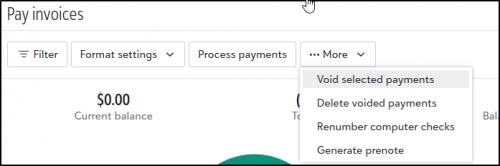
@Mary McMillan yes, I noticed that too. If I need to void or correct something I go to the “More” section under “Pay Invoices”
 0
0 -
@Mary McMillan Hello. There is a new workflow on payment processing - Earlier After processing, the Payment Process Status window would appear to verify if the payment was printed successfully. You had the option to reprint, void, or delete the payments if something went wrong. However, now in new workflow after clicking "Generate," the Generate Payments window closes, and the payments are processed asynchronously in the background. If the payments need to be voided or deleted, that will be done from the Bank Register or payment record itself.
0 -
@Mary McMillan
yes, I've been experiencing that as well0 -
@Mary McMillan
We have had this process switched by Blackbaud on us for almost a month now and our processing now takes soooo much longer when we have to do corrections to our check runs without that confirmation question.Blackbaud … we HATE that new process! It makes all of our processors very nervous to miss the notification that checks are ready to print and then to not have the confirmation question just makes the whole process a nerve racking experience now. Put it back!!!!!
2 -
After generating a check payment, often times there is no download. There needs to be an improvement to this process.
0


Categories
- All Categories
- 6 Blackbaud Community Help
- 213 bbcon®
- 1.4K Blackbaud Altru®
- 403 Blackbaud Award Management™ and Blackbaud Stewardship Management™
- 1.1K Blackbaud CRM™ and Blackbaud Internet Solutions™
- 15 donorCentrics®
- 360 Blackbaud eTapestry®
- 2.6K Blackbaud Financial Edge NXT®
- 656 Blackbaud Grantmaking™
- 576 Blackbaud Education Management Solutions for Higher Education
- 3.2K Blackbaud Education Management Solutions for K-12 Schools
- 939 Blackbaud Luminate Online® and Blackbaud TeamRaiser®
- 84 JustGiving® from Blackbaud®
- 6.6K Blackbaud Raiser's Edge NXT®
- 3.7K SKY Developer
- 248 ResearchPoint™
- 119 Blackbaud Tuition Management™
- 165 Organizational Best Practices
- 241 Member Lounge (Just for Fun)
- 34 Blackbaud Community Challenges
- 34 PowerUp Challenges
- 3 (Open) PowerUp Challenge: Chat for Blackbaud AI
- 3 (Closed) PowerUp Challenge: Data Health
- 3 (Closed) Raiser's Edge NXT PowerUp Challenge: Product Update Briefing
- 3 (Closed) Raiser's Edge NXT PowerUp Challenge: Standard Reports+
- 3 (Closed) Raiser's Edge NXT PowerUp Challenge: Email Marketing
- 3 (Closed) Raiser's Edge NXT PowerUp Challenge: Gift Management
- 4 (Closed) Raiser's Edge NXT PowerUp Challenge: Event Management
- 3 (Closed) Raiser's Edge NXT PowerUp Challenge: Home Page
- 4 (Closed) Raiser's Edge NXT PowerUp Challenge: Standard Reports
- 4 (Closed) Raiser's Edge NXT PowerUp Challenge: Query
- 793 Community News
- 2.9K Jobs Board
- 54 Blackbaud SKY® Reporting Announcements
- 47 Blackbaud CRM Higher Ed Product Advisory Group (HE PAG)
- 19 Blackbaud CRM Product Advisory Group (BBCRM PAG)