Power Automate actions using Blackbaud API connector



Help please! New-ish Data analyst who's very new to using Power Automate!
I work for an organisation that uses Raiser's Edge database and Raiser's Edge NXT to store data about all our individual supporters who we call constituents.
? What I’m Trying to Achieve
I want to automate a process that identifies constituents in Raiser's Edge NXT involved in our “Memory Tree” initiative and takes action based on their engagement and contact status.
? Flow Logic and Required Actions
- Manually trigger the flow (Instant cloud flow).
- Retrieve multiple constituents who either:
- Have a constituent code = “Memory Tree”, or
- Have a custom field with the value “Memory Tree”
❗ I need to know how to do this using the connector — there is no “List constituents” action, and “Search for a constituent” only returns one result. I need to retrieve multiple matching constituents so I can loop through them.
- For each matching constituent, I need to:
- Retrieve their actions using the connector.
- Check if any action:
- Has type = “Mailing - FR”
- AND the subject starts with “Memory Tree”
- If such an action exists, I then need to:
- Check if the constituent has:
- A valid email address, or
- A consent status such as “Opted In”
- Check if the constituent has:
- If either condition is true, I want to:
- Send an email (e.g., to notify a team member, log the case, or trigger a follow-up)
What I’m Trying to Achieve I want to automate a process that identifies constituents involved in our “Memory Tree” initiative and takes action based on their engagement and contact status. ? Flow Logic and Required Actions Manually trigger the flow (Instant cloud flow). Retrieve multiple constituents who either: Have a constituent code = “Memory Tree”, or Have a custom field with the value “Memory Tree” ❗ I need to know how to do this using the connector — there is no “List constituents” action, and “Search for a constituent” only returns one result. I need to retrieve multiple matching constituents so I can loop through them. For each matching constituent, I need to: Retrieve their actions using the connector. Check if any action: Has type = “Mailing - FR” AND the subject starts with “Memory Tree” If such an action exists, I then need to: Check if the constituent has: A valid email address, or A consent status such as “Opted In” If either condition is true, I want to: Send an email (e.g., to notify a team member, log the case, or trigger a follow-up)
I can't seem to find any of the actions I need to use.
Please can you tell me the actions in Power automate - Blackbaud connector that will achieve this?
Comments
-
@Robert Benjamin-Laing
You can do this via Query API easily without this many steps, as most of your steps are just more “filtering down” of the list.- manual trigger flow
- execute adhoc query or a saved constituent query using output option of JSON such that:
- Criteria (pay attention to parathesises):
- ( Constituent Code = “Memory Tree”
- OR Constituent Custom Field certain specific category's value = “Memory Tree” )
- AND Constituent Action Type = “Mailing - FR"
- AND Constituent Action Subject begins with “Memory Tree”
- ( Constituent has valid email address
- OR Consent status is “Opted In”
- Output
- Constituent System record id
- Criteria (pay attention to parathesises):
- Do While (status not error out not completed yet)
- wait 30 seconds
- check executed query status with Job ID from the execute action
- HTTP action to download the query result
- Compose (union expression to remove duplicate constituent system record id)
- For each unique constituent system record id
- get constituent api (this will give you the primary email address)
- send email
You “CAN” technically avoid the “get constituent api” action inside the for each unique constituent system record id loop, if you know how RE Query works and how it produce duplicates (one to many relationship: constituent code, constituent custom field, action, email, consent). IF your email is not unique to each constituent, you can also avoid the use of the last For each unique cosntituent system record id, instead send ONE email that has all the constituent in it.
NOTE:
- I don't use Consent, so you will have to figure out how Consent status can be queried to “Opted In”
- I'm not sure if your logic is correct “A valid email address or consent status such as opted in”. I imagine it should be “A valid email address AND consent status is opted in”?
- there are a few Query API template in the template showcase that can help you with how to use Query API (adhoc query or saved query)
1 -
@Alex Wong Thanks very much, have a good week!
0 -
@Alex Wong
Hi Alex ,Thankyou very much your help!
I'm trying to implement what you advised. I'm having some issues calling the API. According to the documentation SKY APIs requires an access token - which youll receive upon authorization of applications you make in Blackbaud. I'm having trouble accessing it specifically. I made my application have made my way through part of the authorization process - but thats where im stuck. I followed the instructions where you paste in the following code with your actual details:
?client_id=E140BF29-A528-4048-91A9-83BCB01B7FE2
&response_type=code
&redirect_uri=https://www.example.com/oauth2/callback
&code_challenge=J6Wil5tjWf7vz3zdr9ZiW7t2Jk0TCEJ7v4NK_xdWA9c
&code_challenge_method=S256
&state=fdf80155
Upon going to this address I authorize my access, the next step is the step where you're meant to get your access token. This is the step im not successful at. I keep on getting the error:
"The OAuth authorization scheme is required. Please add authentication scheme and try again."
I've also tried using postman to get the access token -that also didnt work. I got an error message regarding CORS not found or something like that.
Tried looking up possible solutions but not found anything.Help would be greatly appreciated please!
Thanks
0 -
@Robert BenjaminLaing
What “tool” are you planning to use to issue API calls to get data?0 -
0
-
@Robert BenjaminLaing
if you are using power automate, don't use HTTP action to call API.Use the Blackbaud connectors that already handles authorization token. Search for “Blackbaud” and you will see a bunch of connector by Blackbaud to use
0 -
@Alex Wong
What steps should I add next to actually get the results of my query(the results I would get if I ran the query in Raiser's Edge myself)? 0
0 -
@Robert BenjaminLaing
executing the report job is going to take time, your flow will not work as you are checking job status the moment you submit it.- submit job
- while job not done
- wait 30 seconds
- check job status
- condition if job completed successfully
- if yes, the last job status action will have the link to download the report, use the HTTP action to download it
0 -
This is what I've done , can you confirm it's correct please? My flow ran for 1 hour but it the condition parameter returned a false reading - i.e status did not start with ‘Complete’. This is my flow below:

Could you also confirm if these action are configured correctly please:
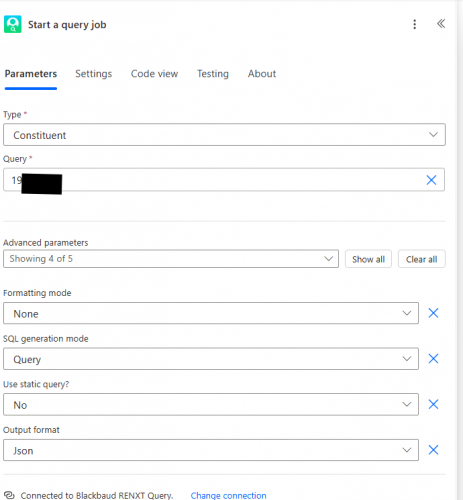

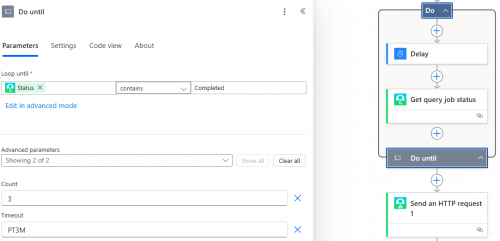
got the following error :
 0
0 -
@Robert BenjaminLaing
I responded to your question in your other post here:0






Categories
- All Categories
- 6 Blackbaud Community Help
- 211 bbcon®
- 1.4K Blackbaud Altru®
- 402 Blackbaud Award Management™ and Blackbaud Stewardship Management™
- 1.1K Blackbaud CRM™ and Blackbaud Internet Solutions™
- 15 donorCentrics®
- 360 Blackbaud eTapestry®
- 2.6K Blackbaud Financial Edge NXT®
- 657 Blackbaud Grantmaking™
- 578 Blackbaud Education Management Solutions for Higher Education
- 3.2K Blackbaud Education Management Solutions for K-12 Schools
- 942 Blackbaud Luminate Online® and Blackbaud TeamRaiser®
- 84 JustGiving® from Blackbaud®
- 6.7K Blackbaud Raiser's Edge NXT®
- 3.8K SKY Developer
- 250 ResearchPoint™
- 120 Blackbaud Tuition Management™
- 165 Organizational Best Practices
- 240 Member Lounge (Just for Fun)
- 34 Blackbaud Community Challenges
- 37 PowerUp Challenges
- 3 (Open) PowerUp Challenge: Grid View Batch
- 3 (Closed) PowerUp Challenge: Chat for Blackbaud AI
- 3 (Closed) PowerUp Challenge: Data Health
- 3 (Closed) Raiser's Edge NXT PowerUp Challenge: Product Update Briefing
- 3 (Closed) Raiser's Edge NXT PowerUp Challenge: Standard Reports+
- 3 (Closed) Raiser's Edge NXT PowerUp Challenge: Email Marketing
- 3 (Closed) Raiser's Edge NXT PowerUp Challenge: Gift Management
- 4 (Closed) Raiser's Edge NXT PowerUp Challenge: Event Management
- 3 (Closed) Raiser's Edge NXT PowerUp Challenge: Home Page
- 4 (Closed) Raiser's Edge NXT PowerUp Challenge: Standard Reports
- 4 (Closed) Raiser's Edge NXT PowerUp Challenge: Query
- 797 Community News
- 3K Jobs Board
- 54 Blackbaud SKY® Reporting Announcements
- 47 Blackbaud CRM Higher Ed Product Advisory Group (HE PAG)
- 19 Blackbaud CRM Product Advisory Group (BBCRM PAG)