Negative Numbers in Income Statement





Does anyone know how to get expenses to show as negative numbers in a section of an income statement report? I'd like to create an “Other Income (Expense)” section to our reports, but the natural account balances always show as positive numbers, i.e. revenue account credit balances and expense account debit balances all show as positive numbers. I need expense account debit balances to show as negative numbers, but just in this section of this report.
8/6/2025 Update: The reply from BB support is that this is functioning as expected! 😡
"I’ve received a response from our engineering team, and they’ve confirmedthat the behavior you described—where debit balances show as positive despite the “Show debit balance as negative” setting—is working as expected within thecurrent system design."
I now created an Idea that this functionality be added. Please vote for this idea.
8/11/2025 Update: Per BB support the "Show debit balance as negative" setting apparently only impacts the total for that header/section of the chart organizer, not the account detail. There currently is no way to mix revenue and expense accounts in detail in one section of an income statement report.
Please do vote for the above linked Idea to request that Blackbaud enable the ability to generate a standard income statment.
Comments
-
@Dan HoutReilly, you can do this in a couple of ways. One is more cascading, which is to mark the account code as ‘contra’ in configuration.
One that is more specific to the report you're running would be made on the Chart Organizer. You'd select to edit the Chart Organizer and for the Header section above the accounts you want to edit, you'd select ‘Negative’ instead of ‘positive’ on the right for ‘Show debit balance as’ (see screenshot).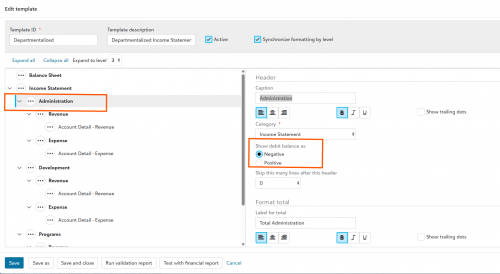 0
0 -
@Nikki Baldwin Hi Nikki. Marking the accounts as a contra accounts is not an option in this instance as other reports will need to show this account as a possitive balance. I do have the "Show debit balance as" indicated as 'negative' for all of the headers in this chart of accounts, but none of the expense accounts show as negative.
1 -
@Dan HoutReilly I have this same issue. It doesn't seem to matter which bullet I check, the expenses do not change from positive to negative.
0 -
@Dan HoutReilly, something I should've mentioned earlier, I would recommend you save this chart template as a separate one so you can continue to utilize the original on your reports wherein you don't want the expenses to show as negative.
With that disclaimer out of the way, depending on the report, if you're using IS/IS accounts, we can change the headers to income statement and tell it to treat debits as negative/positive based on your needs. In addition, I spoke to a colleague about your response and he advised that as he was working on this same task with a client directly last month, (and it was negative and they wanted the inverse positive) they were able to get this to work. However. they had to make any main header show that way, so that meant checking all headers in the chart organizer--all of them that control that section. For that client that was literally 30/40 headers for one section of VCO.
So I would encourage you to review all of the headers available in the chart organizer and if that still does not work (same to you, @JoAnne) please contact support because that absolutely should solve that issue for you and if it doesn't, they will need to address it.
0 -
@Nikki Baldwin I created a new VCO to test this with one header and it still was not working. I have opened a ticket.
1 -
@Dan HoutReilly, sorry it's giving you so much trouble and hope support can resolve for you quickly!
0 -
@Nikki Baldwin
I have had success flipping the sign within custom management reports by using the following: {Actual} * ( 0-1 ) Not sure if this will help, but thought I would share.1 -
@Dan HoutReilly - I've faced this situation too. The default account ranges FE forces us to use are designed with the underlying assumption that an account always has a normal account balance that corresponds to its account range (revenues = CR, expenses = DR). I too tried checking the “show debit balance as” and it did not work. Changing the account to a contra worked for me as a bandaid. I've not been able to find any other way of getting the account to appear correctly in a detailed income statement.
0 -
@Mary Solorzano I used the contra account setting in another instance that made sense for us: investment fees in an “investment income, net” section and we never show investment fees in another report or section where we need it to be positive. My support case is continuing.
0 -
Most recent update on my case/ticket: “this has been forwarded to our programming team where it will be investigated. Once the investigation process is complete and we are able to fully understand the issue, the next step is to develop a fix. After the fix has been developed, it will go through a testing process to ensure that it corrects the issue without negatively impacting any other areas of the software. Due to the complexity of this process, our programmers are not able to provide an official timeframe on when this will be resolved.”
1 -
The reply from BB support is that this is functioning as expected! 😡
"I’ve received a response from our engineering team, and they’ve confirmedthat the behavior you described—where debit balances show as positive despite the “Show debit balance as negative” setting—is working as expected within thecurrent system design."
I now created an Idea that this functionality be added. Please vote for this idea. https://financialedge.ideas.aha.io/ideas/FENXT-I-3491
0












Categories
- All Categories
- 6 Blackbaud Community Help
- 211 bbcon®
- 1.4K Blackbaud Altru®
- 403 Blackbaud Award Management™ and Blackbaud Stewardship Management™
- 1.2K Blackbaud CRM™ and Blackbaud Internet Solutions™
- 15 donorCentrics®
- 360 Blackbaud eTapestry®
- 2.6K Blackbaud Financial Edge NXT®
- 659 Blackbaud Grantmaking™
- 579 Blackbaud Education Management Solutions for Higher Education
- 3.2K Blackbaud Education Management Solutions for K-12 Schools
- 943 Blackbaud Luminate Online® and Blackbaud TeamRaiser®
- 84 JustGiving® from Blackbaud®
- 6.7K Blackbaud Raiser's Edge NXT®
- 3.8K SKY Developer
- 250 ResearchPoint™
- 120 Blackbaud Tuition Management™
- 165 Organizational Best Practices
- 241 Member Lounge (Just for Fun)
- 36 Blackbaud Community Challenges
- 37 PowerUp Challenges
- 3 (Open) PowerUp Challenge: Grid View Batch
- 3 (Closed) PowerUp Challenge: Chat for Blackbaud AI
- 3 (Closed) PowerUp Challenge: Data Health
- 3 (Closed) Raiser's Edge NXT PowerUp Challenge: Product Update Briefing
- 3 (Closed) Raiser's Edge NXT PowerUp Challenge: Standard Reports+
- 3 (Closed) Raiser's Edge NXT PowerUp Challenge: Email Marketing
- 3 (Closed) Raiser's Edge NXT PowerUp Challenge: Gift Management
- 4 (Closed) Raiser's Edge NXT PowerUp Challenge: Event Management
- 3 (Closed) Raiser's Edge NXT PowerUp Challenge: Home Page
- 4 (Closed) Raiser's Edge NXT PowerUp Challenge: Standard Reports
- 4 (Closed) Raiser's Edge NXT PowerUp Challenge: Query
- 798 Community News
- 3K Jobs Board
- 56 Blackbaud SKY® Reporting Announcements
- 47 Blackbaud CRM Higher Ed Product Advisory Group (HE PAG)
- 19 Blackbaud CRM Product Advisory Group (BBCRM PAG)