Using Data Imports to Assign Random Schedule Meeting Time Cycles?





Hi all,
We follow a random schedule; core academic classes meet 4 times a week during random but unchanging time slots, e.g. English 09 meets Monday 3rd period, Tuesday 5th, Thursday 1st, and Friday 2nd every week. We outsource our schedule creation and the person who does that seems to think that I should be able to use a data import to fully schedule classes, including designating the section meeting time cycles. Our scheduler's theory was "that the block will be identified as random and the meeting times as an exception_meeting string like |3|5|0|1|2| where the pipes separate the days.” I tried this last year, along with some variations, to no avail.
I've been told by Blackbaud that this isn't possible but am holding out hope that someone's been able to crack this and can share their wisdom. Seems like the capability should be there for the system to handle this.
Thanks!
Comments
-
@Katherine Bailey I've considered trying this before but didn't have enough sections to make it worth, so I just built a test section in 2024-25 to see what would happen. It was successful. I did the “Schedule > Academic Section-Insert with exceptions” import and I used 2024-25 so I could re-use an existing “By Section” schedule set rather than create a new one.
Here's what I used for the import file:
section_identifier school_year_label term_name level_description course_code block exception_meeting schedule_set TEST 2024 - 2025 Year Birchwood School ART 8 Random |2,4|3|7||1| Grades 5-8 And here was the result:
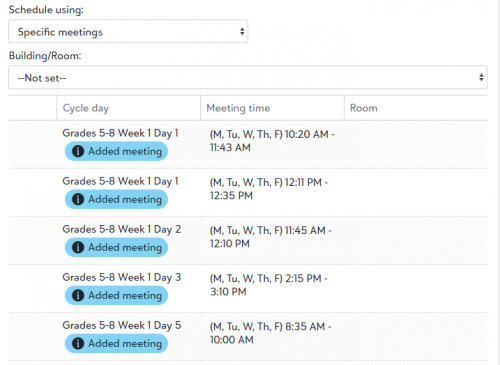
I think the only notable difference from your post is what you do when a block doesn't meet on a day. Instead of putting a 0 there, just skip that one and put two pipes || together.
Give it another shot and hopefully it will work out!
Dave
1 -
@David Gillespie Ah-ha! I bet it was that 0 on the days classes don't meet that was tripping me and the system up. This is a huge development for us, thank you SO much for giving it a whirl! I don't think I've ever been--or ever will be--so excited to do a data import to try it myself!
0 -
@David Gillespie This is amazing! We, too, have been trying to find a way to import meeting times for our academic center tutors. We set up 80 individual sections for each tutor-tutee for both the fall and winter/spring semesters, and we've been manually selecting the week/day and the meeting times for each section. Unlike Katherine's example, however, each tutor meets with a student on different days of the week AND at different times. Would this import be possible given that a tutor-tutee might meet on a Monday from 8:30-9:10 and Wednesday from 1:30-2:00 and then the following week on Tuesday from 10:15-11:50 and Thursday from 9:15-10:25? We are on a ribbon schedule, so blocks A-G repeat, resulting in every day and week being different. Students have tutoring sessions scheduled during their free block, which is why there are constant day/time changes of those meetings.
0 -
@Michelle Blayney Yes, I think you can use it for any layout where the meetings are predictable. You just have to match it to a Schedule Set and then specify the meeting times each day with |s between them - however many there are. You enter the meeting time numbers that are on the schedule set, like this:

So if I were on a 7-day rotation and it met four times at different slots, I could put: |2||5|6||8||.
Might be worth giving it a shot for your sections. Oh, and there are both “insert” and “update” methods, so you could go back and update this way, too, I think … maybe …
0 -
@Michelle Blayney It's been a while since I've spent a lot of time with the data imports so my memory is fuzzy, but I think/wonder if it would just be a difference of whether you use the Insert/Update/Delete option for the Academic Sections? Don't quote me, but I believe Insert will overwrite existing Academic Section data and and remove any that aren't included in the import file, Update will only update the sections included in the import file and leave whatever else is in the system, and Delete would, obviously, delete the sections included in the file. So perhaps you could do the appropriate data import(s) on a weekly basis to wipe the previous week's tutoring sessions and input the new ones? Still much better than manually updating them!
Edit to add that I didn't see David's reply to you--I second his idea to do the 7-day rotation, it seems like it should work if that's how your schedule set is configured. I hope it works for you, this is feels like a game changer to me!
0






Categories
- All Categories
- 6 Blackbaud Community Help
- 211 bbcon®
- 1.4K Blackbaud Altru®
- 403 Blackbaud Award Management™ and Blackbaud Stewardship Management™
- 1.2K Blackbaud CRM™ and Blackbaud Internet Solutions™
- 15 donorCentrics®
- 360 Blackbaud eTapestry®
- 2.6K Blackbaud Financial Edge NXT®
- 659 Blackbaud Grantmaking™
- 579 Blackbaud Education Management Solutions for Higher Education
- 3.2K Blackbaud Education Management Solutions for K-12 Schools
- 943 Blackbaud Luminate Online® and Blackbaud TeamRaiser®
- 84 JustGiving® from Blackbaud®
- 6.7K Blackbaud Raiser's Edge NXT®
- 3.8K SKY Developer
- 250 ResearchPoint™
- 120 Blackbaud Tuition Management™
- 165 Organizational Best Practices
- 241 Member Lounge (Just for Fun)
- 36 Blackbaud Community Challenges
- 37 PowerUp Challenges
- 3 (Open) PowerUp Challenge: Grid View Batch
- 3 (Closed) PowerUp Challenge: Chat for Blackbaud AI
- 3 (Closed) PowerUp Challenge: Data Health
- 3 (Closed) Raiser's Edge NXT PowerUp Challenge: Product Update Briefing
- 3 (Closed) Raiser's Edge NXT PowerUp Challenge: Standard Reports+
- 3 (Closed) Raiser's Edge NXT PowerUp Challenge: Email Marketing
- 3 (Closed) Raiser's Edge NXT PowerUp Challenge: Gift Management
- 4 (Closed) Raiser's Edge NXT PowerUp Challenge: Event Management
- 3 (Closed) Raiser's Edge NXT PowerUp Challenge: Home Page
- 4 (Closed) Raiser's Edge NXT PowerUp Challenge: Standard Reports
- 4 (Closed) Raiser's Edge NXT PowerUp Challenge: Query
- 798 Community News
- 3K Jobs Board
- 56 Blackbaud SKY® Reporting Announcements
- 47 Blackbaud CRM Higher Ed Product Advisory Group (HE PAG)
- 19 Blackbaud CRM Product Advisory Group (BBCRM PAG)