Can't accept invitation to Community Group





Hello,
I am trying to set up a Community Group for our Board as a invitation-only type group.
I have a test email I tried to invite myself to--the email popped up:
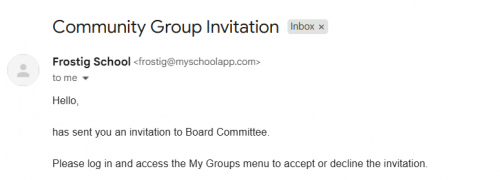
However, when logging into this test account on Blackbaud, I don't see any option to accept the invitation. I've tried clicking through settings, other links on the page but I can' t seem to find where that invite is.
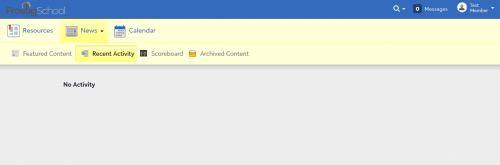
Any help is appreciated!
Comments
-
@Nathan Ong It's been a while since I used a group with invitations, so I tried it out and eventually found a place where I could get the invitation. Try Resources > Group Finder > View all. The invite appeared on the right side for me. I also tinkered around with the Group access rights, hoping that that would bring back the “Groups” menu but apparently that only appears if I'm already in a group … maybe. But give that a try.
0 -
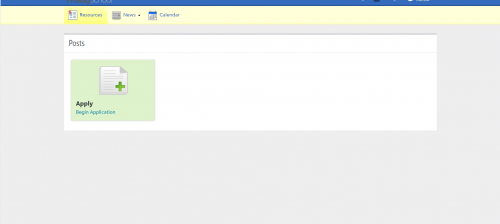
@David Gillespie Thanks David for the response--I couldn't find it under Resources as this is what shows up below. I'll play around some Group Access settings…I was able to find it if I invited myself to an open group as you mentioned, just not an invite-only one.
Weirdly, if on my own account I copy and paste the URL of the group page into the test account browser, it pulls it up the group pages and I can accept from there. There is just is no way to access it via the dashboard or panel despite the email saying I've been invited, which is odd and leads me to think it's some coding/backend related thing.
I might just end up having to make the group open, though since this is a community group for our board/trustees, a closed group would have been ideal.
Appreciate your help!
 0
0 -
@Nathan Ong Do you have the group finder enabled on the Resource Board for the role type that that account belongs to? Its not enabled on our site for “Friend” by default, but I think that's what would be needed if you were doing a Trustee vs. a Parent/Student/Teacher.
0 -
@Nathan Ong By the way - I think you can change the type of the group after it's been created. So you can make it as “Listed With Permission” at first, load everyone into the roster (no invitations needed, they automatically add) and then change it to Unlisted Invite-Only afterwards.
0


Categories
- All Categories
- 6 Blackbaud Community Help
- 211 bbcon®
- 1.4K Blackbaud Altru®
- 403 Blackbaud Award Management™ and Blackbaud Stewardship Management™
- 1.2K Blackbaud CRM™ and Blackbaud Internet Solutions™
- 15 donorCentrics®
- 360 Blackbaud eTapestry®
- 2.6K Blackbaud Financial Edge NXT®
- 659 Blackbaud Grantmaking™
- 579 Blackbaud Education Management Solutions for Higher Education
- 3.2K Blackbaud Education Management Solutions for K-12 Schools
- 943 Blackbaud Luminate Online® and Blackbaud TeamRaiser®
- 84 JustGiving® from Blackbaud®
- 6.7K Blackbaud Raiser's Edge NXT®
- 3.8K SKY Developer
- 250 ResearchPoint™
- 120 Blackbaud Tuition Management™
- 165 Organizational Best Practices
- 241 Member Lounge (Just for Fun)
- 36 Blackbaud Community Challenges
- 37 PowerUp Challenges
- 3 (Open) PowerUp Challenge: Grid View Batch
- 3 (Closed) PowerUp Challenge: Chat for Blackbaud AI
- 3 (Closed) PowerUp Challenge: Data Health
- 3 (Closed) Raiser's Edge NXT PowerUp Challenge: Product Update Briefing
- 3 (Closed) Raiser's Edge NXT PowerUp Challenge: Standard Reports+
- 3 (Closed) Raiser's Edge NXT PowerUp Challenge: Email Marketing
- 3 (Closed) Raiser's Edge NXT PowerUp Challenge: Gift Management
- 4 (Closed) Raiser's Edge NXT PowerUp Challenge: Event Management
- 3 (Closed) Raiser's Edge NXT PowerUp Challenge: Home Page
- 4 (Closed) Raiser's Edge NXT PowerUp Challenge: Standard Reports
- 4 (Closed) Raiser's Edge NXT PowerUp Challenge: Query
- 798 Community News
- 3K Jobs Board
- 56 Blackbaud SKY® Reporting Announcements
- 47 Blackbaud CRM Higher Ed Product Advisory Group (HE PAG)
- 19 Blackbaud CRM Product Advisory Group (BBCRM PAG)